WP Table Manager
Análisis antivirus
Powered by ClamAV
✅ Verificado limpio
El archivo de este producto ha pasado nuestros filtros de seguridad.
¿Quieres ejecutar un análisis fresco con ClamAV ahora mismo? Tarda unos segundos y verás versión del scanner, base de datos de firmas y resultado en tiempo real.
Esto puede tardar entre 5 y 30 segundos.
Archivo limpio Amenaza detectada
No se detectaron amenazas en este archivo.
- Archivo
- Tamaño
- Analizado
- ClamAV
- Base de datos de firmas
⚡ Powered by ClamAV
No se pudo completar el análisis
Reportar producto
Si has detectado un problema (archivo dañado, malware, contenido inadecuado, etc.) infórmanos y lo revisaremos cuanto antes.
Inicia sesión para reportar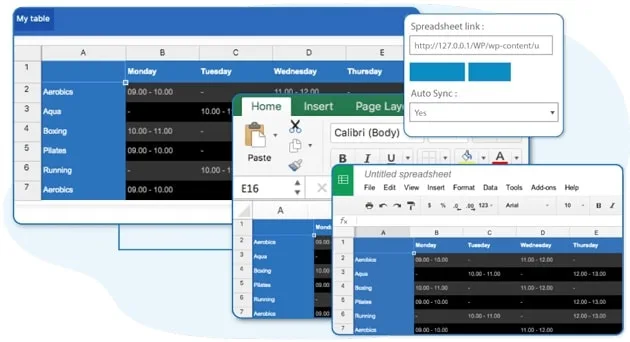
Acerca de WP Table Manager
Administrador de tablas de WP
WP Table Manager es the only WordPress table plugin that offers a complete spreadsheet interface for managing tables. Create a table, select a theme, and start editing tables right away. With WP Table Manager, you'll enjoy a set of powerful table editing tools, such as: HTML cell editing, table copying, calculation, Excel and Google Sheets syncing. As an end-user, editing a table is as simple as clicking on a cell and editing data with or without a visual text editor. WP Table Manager has a new design and tables editor! WP Table Manager has been completely rebuilt with customized responsive modes, optimized Excel and Google Sheets syncing, and many more. Let's build amazing tables! Save time on Table Edition Tables are not easy to manipulate in HTML and WordPress doesn't offer a native tool for it. How does table editing in a spreadsheet sound? All you need to do is click on a cell, edit the data, and you're done! It saves automatically. You save time and not even a user error can break your table's layout. WP Table Manager is amazing. Themes and colors for tables WP Table Manager comes with 6 themes. Themes have been created from the plugin, so everything is editable. For example, add the scheduling theme, replace the hours with your data and you're done. With WP Table Manager, you can even create your own from scratch because tables can be copied with a click. You can also create your own set of alternate 2-line colors and apply it to a selected range of table cells. Excel WordPress plugin: sync with Excel and Google Sheets files An Excel import and export tool is available for each table. Save a lot of time, import your spreadsheet file, create your layout, and publish it. What can I import/export? You can import all data + some Excel styles or just data and preserve your table's style. Supported styles for Import/Export are cell background color, font color, font size, borders, links (HTML format). Google Sheets import/export and sync plugin Yes, you read that right. Select any Google Sheet from Google Drive and you'll enable automatic data sync. You can import all data + some Google Sheets styles or just data and keep your table's style. A Google Sheets import and export tool is also available for each table. Save a lot of time, import your Google Sheets file, create your layout, and publish it. An export button can be used for customers from the interface.WP Table Manager Features
- All additional features included -- Unlimited tables, lines, rows
- Advanced for mobile
- Optimized for large tables
- Cell and column freezing
- Multi-cell editing
- Sort data by default
- HTML cell tooltip
Historial de versiones
-
v
4.2.3 Actual 4 jun. 2026
-
v
4.2.2 14 ene. 2026
Reseñas de clientes
Inicia sesión para dejar tu reseña. Solo pueden reseñar quienes tienen el producto.
Aún no hay reseñas de este producto.
Preguntas frecuentes
-
La GPL (General Public License) es la licencia con la que WordPress y la mayoría de plugins/themes premium se distribuyen. Te da derecho a usar, modificar y redistribuir el software en cuantos proyectos quieras, sin restricciones de dominios.
-
Sí. Con membresía recibes actualizaciones automáticas via nuestro plugin GPLClub Updater (instalado en tu WP, detecta nuevas versiones y las aplica). Con compra individual, tienes acceso a un año de actualizaciones manuales desde tu cuenta.
-
Depende del plan. Mensual: 3 dominios. Semestral: 7. Anual y Lifetime: 15. Compra individual: 1 dominio.
-
GPLClub ofrece soporte propio en español para instalación, configuración y compatibilidad. Para soporte directo del autor original (con feature requests, bugs específicos del producto), se requiere licencia comprada al autor.