Accordion Upcoming Events for Calendarize it!
Antivirus scan
Powered by ClamAV
✅ Verified clean
This product file has passed our security filters.
Want to run a fresh ClamAV scan right now? Takes a few seconds and shows scanner version, signature DB and live result.
This can take 5 to 30 seconds.
Clean file Threat detected
No threats detected in this file.
- File
- Size
- Scanned
- ClamAV
- Signature database
⚡ Powered by ClamAV
Scan could not be completed
Report product
If you detected an issue (broken file, malware, inappropriate content, etc.) let us know and we'll review it ASAP.
Sign in to reportNewer version out, or a problem?
About Accordion Upcoming Events for Calendarize it!
Websites with an events calendar that want upcoming events in a compact block
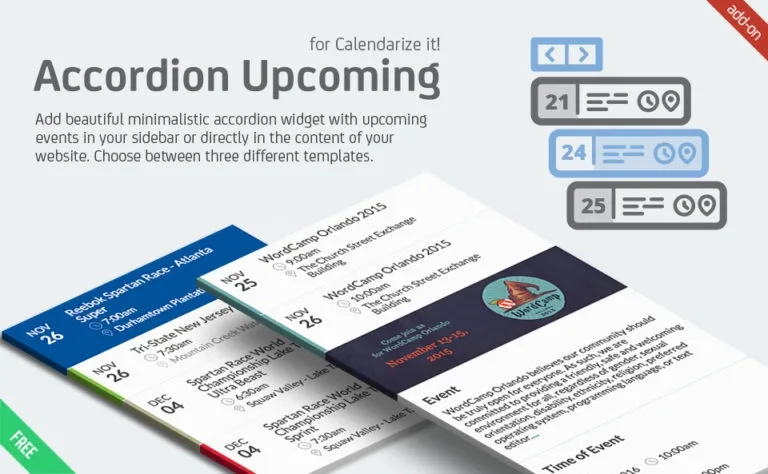
A long list of events takes up a lot of room in the sidebar. Accordion Upcoming Events shows upcoming events in collapsible blocks with a minimalist look.
It is an add-on for Calendarize it!, so you need that plugin installed and active. The taxonomy filter dropdowns also require the Taxonomy Filter add-on.
Three new templates alongside the nine in the Calendarize it! widget
The Calendarize it! upcoming events widget already has nine templates, and this add-on adds three: a minimalist accordion, one with images that expand, and one with tilted dates.
The templates are inserted with a shortcode, directly into your site's content or into the sidebar, and each placement can use different attributes.
Navigation arrows in each accordion
The nav attribute sets where the arrows appear: above the accordion, below it, in both places, or hidden. Even when hidden, the filter dropdown stays visible if you have added one.
Filters by calendar, organizer or venue, and events near the visitor
With the Taxonomy Filter add-on, the header attribute adds dropdowns for the Calendarize it! taxonomies (calendar, organizer and venue) and for any custom taxonomy you have created.
Geolocation shows only the events within a set distance of the visitor.
Frequently asked questions about Accordion Upcoming Events
Do I need Taxonomy Filter for the dropdowns?
Yes. The dropdowns come from the Taxonomy Filter add-on, which has to be installed alongside the header attribute.
Can I show only the events from one calendar?
Yes. The taxonomy and terms attributes choose the calendar, and events from other calendars stay out of the block.
Can I remove the link on the title?
Yes. The auw_title_type attribute decides whether each event title links to its details page.
Can I change the date format?
Yes. The date_format and time_format attributes set how the date and time are written in each block.
Topics
Version history
-
v
1.3.1.84750 Current 12 May 2024
Customer reviews
Sign in to leave a review. Only people who have the product can review it.
No reviews for this product yet.
Frequently asked questions
-
GPL (General Public License) is the license under which WordPress and most premium plugins/themes are distributed. It grants you the right to use, modify and redistribute the software in as many projects as you want, with no domain restrictions.
-
Yes. With membership you get automatic updates via our GPLClub Updater plugin (installed on your WP, detects new versions and applies them). With individual purchase, you get one year of manual updates from your account.
-
Depends on the plan. Monthly: 3 domains. Semi-annual: 7. Annual and Lifetime: 15. Individual purchase: 1 domain.
-
GPLClub offers its own support for installation, configuration and compatibility. For direct support from the original author (feature requests, product-specific bugs), a license purchased from the author is required.