ACPT
Antivirus scan
Powered by ClamAV
✅ Verified clean
This product file has passed our security filters.
Want to run a fresh ClamAV scan right now? Takes a few seconds and shows scanner version, signature DB and live result.
This can take 5 to 30 seconds.
Clean file Threat detected
No threats detected in this file.
- File
- Size
- Scanned
- ClamAV
- Signature database
⚡ Powered by ClamAV
Scan could not be completed
Report product
If you detected an issue (broken file, malware, inappropriate content, etc.) let us know and we'll review it ASAP.
Sign in to report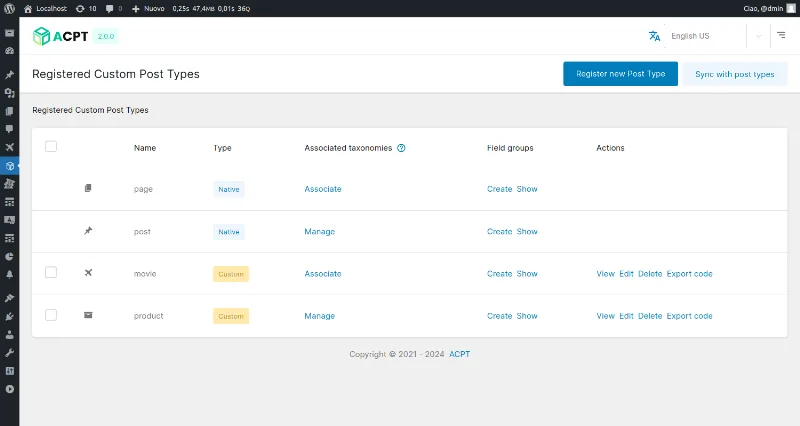
About ACPT
When your content doesn't fit into posts and pages
A movie catalog, a directory of professionals or a property portfolio end up stuffed into regular posts, with data pasted into the text, fields that every editor fills in their own way and templates that are impossible to maintain. ACPT lets you model that content from the dashboard, without writing PHP: you define which content types exist, what data each one carries and how they relate to each other.
What you can build with ACPT without touching code
- Post types and taxonomies: you register unlimited types with a visual wizard (slug, labels, icon, REST API visibility) and link them to hierarchical or flat taxonomies.
- Meta fields: more than 60 types, from text and images to repeaters, maps, galleries, relationships and flexible content, with validation and conditional logic.
- Relationships: bidirectional, one-to-many and taxonomy-to-post links, managed from the field manager itself.
- Custom database tables (CCT): you define the structure from the interface, without SQL, and each table generates its own REST endpoint. They work alongside a post type or as a small standalone CRM.
- Option pages: admin panels for site-wide settings, with data available through REST or PHP functions.
- Frontend forms: a drag-and-drop builder so visitors can submit content, displayed with a shortcode.
- Dynamic blocks: Gutenberg blocks based on TWIG templates, with meta fields mapped to block attributes.
What to know before committing to it
Dynamic blocks use TWIG: if you've never seen it, there is a small learning curve. And custom tables and complex relationships require you to think through the data model before creating it: the interface is visual, but the design is still your job. ACPT stores and organizes data; how it looks on the site depends on your page builder, blocks, shortcodes or PHP functions.
Frequently asked questions about ACPT
Is it an alternative to ACF?
It covers the same ground (post types, fields, relationships, option pages) and adds custom tables, frontend forms and TWIG blocks in the same plugin. If you already have large projects built with ACF, migrating means rebuilding the structure, so consider it for new projects.
Does it work with Elementor, Bricks or Divi?
Yes. It integrates with Elementor, Bricks, Oxygen, Breakdance, Divi and Gutenberg, as well as WooCommerce, WPML and WPGraphQL, among others. Check in the demo that the specific field you need can be linked in your builder.
Is it suitable for a headless site?
It offers a REST API, WPGraphQL support, more than 100 PHP functions and import and export in JSON, YAML and XML, so it fits those projects well.
Can I add fields to WooCommerce products?
Yes: it allows custom fields on products, orders and product types.
Custom tables don't replace all of postmeta
Custom tables are useful when performance matters, but you don't need to use them every time. For a portfolio or a blog with three extra fields, ordinary meta fields are enough. Keep tables for data that grows, such as inventories or CRM-style records.
Structure first, template afterwards
When you activate the plugin, its own menu appears in the dashboard. The order that works best is: create the post type, the taxonomies and the field groups, load a couple of test entries and only then design how they are displayed with your builder, a block or a shortcode. If you rename a field once templates already exist, you'll have to review them, so settle the names first.
Version history
-
v
2.1.9 Current 31 Oct 2026
-
v
2.1.8 30 Oct 2026
-
v
2.1.7 24 Oct 2026
-
v
2.1.6 17 Oct 2026
-
v
2.1.4 9 Oct 2026
-
v
2.1.3 7 Oct 2026
-
v
2.1.0 23 Sep 2026
-
v
2.0.67 21 Aug 2026
-
v
2.0.61 5 May 2026
Customer reviews
Sign in to leave a review. Only people who have the product can review it.
No reviews for this product yet.
Frequently asked questions
-
GPL (General Public License) is the license under which WordPress and most premium plugins/themes are distributed. It grants you the right to use, modify and redistribute the software in as many projects as you want, with no domain restrictions.
-
Yes. With membership you get automatic updates via our GPLClub Updater plugin (installed on your WP, detects new versions and applies them). With individual purchase, you get one year of manual updates from your account.
-
Depends on the plan. Monthly: 3 domains. Semi-annual: 7. Annual and Lifetime: 15. Individual purchase: 1 domain.
-
GPLClub offers its own support for installation, configuration and compatibility. For direct support from the original author (feature requests, product-specific bugs), a license purchased from the author is required.