Admin Menu Editor Pro Plugin
Antivirus scan
Powered by ClamAV
✅ Verified clean
This product file has passed our security filters.
Want to run a fresh ClamAV scan right now? Takes a few seconds and shows scanner version, signature DB and live result.
This can take 5 to 30 seconds.
Clean file Threat detected
No threats detected in this file.
- File
- Size
- Scanned
- ClamAV
- Signature database
⚡ Powered by ClamAV
Scan could not be completed
Report product
If you detected an issue (broken file, malware, inappropriate content, etc.) let us know and we'll review it ASAP.
Sign in to report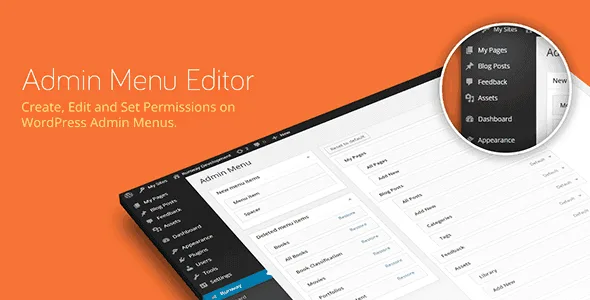
About Admin Menu Editor Pro Plugin
A client with full access will eventually click what they shouldn't
You hand over a finished site and within a week the client has opened Settings, updated a plugin without a backup, or lost an afternoon among menus they don't understand. It's rarely carelessness: it's curiosity in front of a panel full of options that aren't theirs.
Admin Menu Editor Pro works on exactly that panel. Instead of explaining to the client what not to touch, you remove from the menu what they don't need and leave what they use every day. It's especially useful if you build sites for third parties or membership sites where each user should only see their own part.
Admin Menu Editor Pro decides who sees each menu
You pick a role, uncheck the items you want to hide and check the ones you want to show. The same works for individual users, so you can hide a menu from everyone except yourself, or give access to an admin page without changing anyone's role.
- Reorder with drag and drop: move the most-used items to the top, shift items from one submenu to another or to the main menu, and create a direct link to "Add New Post" or to a plugin screen.
- Tame messy plugins: if one puts its page where it doesn't belong, move it to Settings.
- Hide and rename: rename items and add separators between submenus.
- Plugins and accounts: you can hide specific entries on the Plugins page from certain roles or users, and protect important accounts so they can't be edited or deleted.
Tutorials and external services that look like part of WordPress
This is what gets the most use on client projects. You can add your own links to the menu, create an item that shows the content of a post or page inside the admin, or leave non-clickable items that work as section titles in long menus.
The "Open in: Frame" option displays the linked page in a borderless frame, ideal for a help video or an external tool. A new-window option exists too. Check in the demo that the service you want to embed allows being shown inside a frame, because that depends on the destination site.
Visually, you can change the background, text, icon and highlight colors, for the whole menu or per item, and choose from over 600 Dashicons and FontAwesome icons or upload your own as PNG or GIF, also for submenus. If you repeat the same setup across several sites, you export the menu to a file and import it on another one.
Is a menu editor enough, or do you need something broader?
Admin Menu Editor Pro controls what shows up in the menu and who sees it. It is not a role builder from scratch or a complete security tool. Before considering a site closed, log in with a test account of the affected role and check what happens if it tries to open a hidden screen.
Custom branding (logo, login page, color scheme, hiding the WordPress version and core update notices) and Admin Bar editing are handled by two optional add-ons: Branding and Toolbar Editor. They are not part of the basic menu editor, so confirm they come with your copy if you need them.
Can I hide menus from a single user?
Yes. Permissions can be adjusted by role and also for individual users.
Can I reuse the setup on another site?
Yes, you export the menu configuration to a file and import it on another site.
Does it change the WordPress top bar?
Not on its own. To edit the toolbar you need the Toolbar Editor add-on.
Can I change the WordPress logo and the login page?
Yes, with the Branding add-on, which also lets you change the admin color scheme.
Version history
-
v
2.37.1 Current 7 Oct 2026
-
v
2.37 30 Sep 2026
-
v
2.36 15 Sep 2026
-
v
2.34 20 Aug 2026
-
v
2.32 24 Feb 2026
Customer reviews
Sign in to leave a review. Only people who have the product can review it.
No reviews for this product yet.
Frequently asked questions
-
GPL (General Public License) is the license under which WordPress and most premium plugins/themes are distributed. It grants you the right to use, modify and redistribute the software in as many projects as you want, with no domain restrictions.
-
Yes. With membership you get automatic updates via our GPLClub Updater plugin (installed on your WP, detects new versions and applies them). With individual purchase, you get one year of manual updates from your account.
-
Depends on the plan. Monthly: 3 domains. Semi-annual: 7. Annual and Lifetime: 15. Individual purchase: 1 domain.
-
GPLClub offers its own support for installation, configuration and compatibility. For direct support from the original author (feature requests, product-specific bugs), a license purchased from the author is required.