Advanced Form Integration Professional
Antivirus scan
Powered by ClamAV
✅ Verified clean
This product file has passed our security filters.
Want to run a fresh ClamAV scan right now? Takes a few seconds and shows scanner version, signature DB and live result.
This can take 5 to 30 seconds.
Clean file Threat detected
No threats detected in this file.
- File
- Size
- Scanned
- ClamAV
- Signature database
⚡ Powered by ClamAV
Scan could not be completed
Report product
If you detected an issue (broken file, malware, inappropriate content, etc.) let us know and we'll review it ASAP.
Sign in to reportNewer version out, or a problem?
About Advanced Form Integration Professional
Stores and sites whose forms end up in a spreadsheet, a CRM or an email tool
When every WooCommerce order or contact form lands in an inbox and someone copies it by hand into a spreadsheet or a CRM, the work falls behind and the data ends up half recorded. Advanced Form Integration is made for WordPress sites that want each submission to reach its destination on its own. You need one of the supported form plugins installed, such as Contact Form 7, WPForms, Gravity Forms, Forminator, Ninja Forms or Elementor Forms, because that is where the submissions are generated.
In the free version, integrations work with basic field support. To unlock the advanced features you have to move to the paid version. If what you need are complex multi-step automations across SaaS applications, tools like Zapier or Make are built for that case.
Your data is processed on your own WordPress and only travels to the apps you set up
The difference from many cloud tools is where the information goes. Data is processed on your own site and is only sent to the third-party platforms you configure. Since it runs from your WordPress site, there is no submission limit and no charge per task.
WooCommerce orders, sign-ups and form entries in one system
Besides forms, the integration can take WooCommerce orders and new user sign-ups and send them to your email tool, your CRM or a Slack or Teams channel. WooCommerce, LMS and booking triggers come built in, so there is no need to set up a webhook for each case. A typical example is sending new subscribers to Mailchimp or Brevo, or alerting Slack about a new order.
Linked fields, conditions and a log that lets you resend with one click
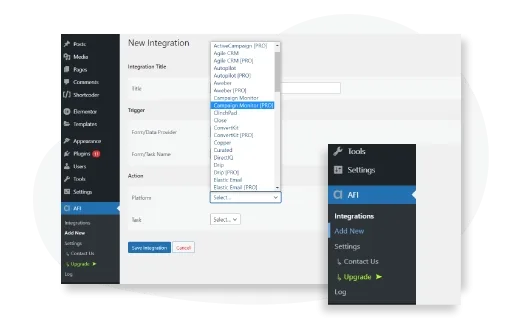
When you set up each automation, you match the form fields to the destination app's fields using dropdown menus, without writing code. Among the setup steps there are also conditions. When something fails, the activity log shows the error in detail and you can resend the submission with one click, instead of rebuilding the automation. Error alerts notify you as soon as a problem occurs.
More than 500 connected apps, from Google Sheets to Salesforce
The integrations cover spreadsheets, CRMs, email marketing and messaging. Among the available integrations are:
- Google Sheets, to send each submission to a spreadsheet.
- Mailchimp, Brevo, AWeber and ActiveCampaign, for subscriber lists.
- HubSpot, Salesforce, Pipedrive and Zoho CRM, for sales follow-up.
- Slack, for instant alerts to the team.
- Klaviyo and Webhooks.
Frequently asked questions about Advanced Form Integration
Do I need to know how to code?
No. Everything is set up from a panel with dropdown menus, so there is no need to write code.
Which form plugins work?
Most of the common WordPress form plugins, including Contact Form 7, WPForms, Gravity Forms, Forminator, Ninja Forms and Elementor Forms. Support for new form builders keeps being added.
Can I test it before paying?
Yes. The free version lets you test integrations with basic field support. Advanced features are in the paid version.
What happens if an integration fails?
The error log details what failed and lets you resend the submission.
What happens to my data?
It stays on your site. Information is processed locally on WordPress and is only sent to the platforms you configure. The product does not store or access that data on its servers.
Is there a refund if I am not convinced?
There is a 30-day money-back guarantee on the paid versions: if you are not satisfied, you can ask for a full refund within that period.
Topics
Version history
-
v
1.92.1 Current 8 Jan 2025
Customer reviews
Sign in to leave a review. Only people who have the product can review it.
No reviews for this product yet.
Frequently asked questions
-
GPL (General Public License) is the license under which WordPress and most premium plugins/themes are distributed. It grants you the right to use, modify and redistribute the software in as many projects as you want, with no domain restrictions.
-
Yes. With membership you get automatic updates via our GPLClub Updater plugin (installed on your WP, detects new versions and applies them). With individual purchase, you get one year of manual updates from your account.
-
Depends on the plan. Monthly: 3 domains. Semi-annual: 7. Annual and Lifetime: 15. Individual purchase: 1 domain.
-
GPLClub offers its own support for installation, configuration and compatibility. For direct support from the original author (feature requests, product-specific bugs), a license purchased from the author is required.