Animations Addons PRO for Elementor
Antivirus scan
Powered by ClamAV
✅ Verified clean
This product file has passed our security filters.
Want to run a fresh ClamAV scan right now? Takes a few seconds and shows scanner version, signature DB and live result.
This can take 5 to 30 seconds.
Clean file Threat detected
No threats detected in this file.
- File
- Size
- Scanned
- ClamAV
- Signature database
⚡ Powered by ClamAV
Scan could not be completed
Report product
If you detected an issue (broken file, malware, inappropriate content, etc.) let us know and we'll review it ASAP.
Sign in to report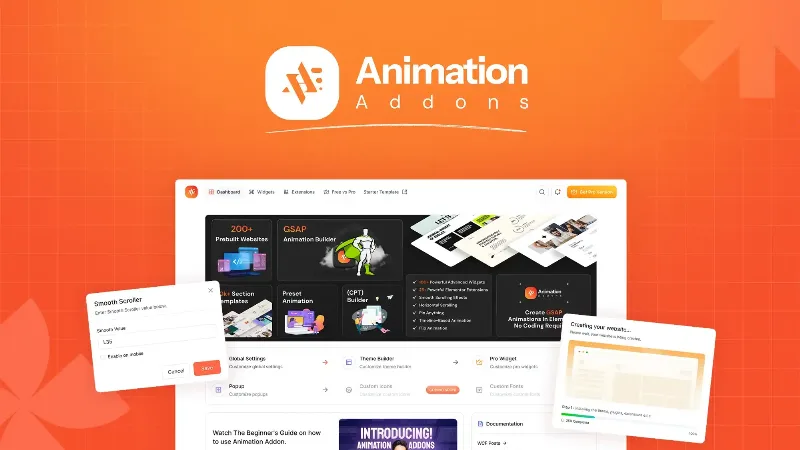
About Animations Addons PRO for Elementor
A site built with Elementor often has the same problem: the structure is right, but it looks like a thousand others. Headlines appear all at once, images just sit there and the scroll has no rhythm.
An animated portfolio page, step by step with Animations Addons PRO
Imagine you are building the website of an interior design studio. Here is how the plugin fits at each step:
- You start from a template. There are full site kits and section templates so you don't start from scratch. You swap texts and images and you have the base.
- You animate the headline. With Split Text the title appears letter by letter, word by word or line by line, with a staggered delay between each piece. You choose the trigger (for example, page load).
- You reveal the photos. Image Reveal makes each image come in with a wipe, a scale or a mask as it appears on screen. You decide direction and easing.
- You show projects sideways. With Horizontal Scroll the visitor scrolls down the page and the content moves sideways. It suits portfolios, products or timelines.
- You pin sections. Sticky and Pin hold a section still while the rest moves on, and you release it where you want. Stacking Cards stacks cards as you scroll.
- You add weight to the whole. Smooth Scrolling smooths the scroll across the entire site, and Parallax moves backgrounds and layers at different speeds.
- You add details. Custom cursor, 3D tilt on hover and SVG logos and icons drawn stroke by stroke.
Each effect is set up from the Elementor panel, with trigger, easing and stagger adjustable per device. An effect's script loads only on the pages that use it, so you don't load animations you don't need.
Elementor 4 and the atomic editor: where the difference lies
The plugin is built on Elementor 4's atomic editor. Its widgets are atomic elements, not old widgets run inside the new editor with their own style panel. That means typography, spacing and color are defined in Elementor's Style tab, and you can apply your global classes and variables to any widget. If you change a variable, everything that uses it follows.
Atomic elements, native Elementor elements and classic Elementor 3 widgets live together on the same page. The plugin also includes a classic library (more than 100 widgets and 25 extensions) for sites still on Elementor 3, which keep working.
How much you need to pay for and what it does not do
You don't need Elementor Pro to use the animations. What you should know:
- It is an Elementor add-on: without Elementor installed it does nothing.
- Many atomic widgets are free, but others (nav menu, off canvas, nested sliders, stack cards, draw SVG) belong to the Pro version.
- Elementor 4's animations (Interactions) cover simple fades and slides. This plugin adds GSAP on top, it doesn't replace them.
- Too much motion tires people out. A portfolio can take horizontal scroll, pin and parallax together; a services site with forms is better with two well-chosen effects.
Frequently asked questions
Do I need to know how to code GSAP?
No. Each effect is turned on and adjusted from the Elementor panel, with no code.
Does it work with Elementor 3?
Yes, through its classic library of widgets and extensions. Sites on Elementor 3 keep working.
Do I need Elementor Pro?
No. It works with free Elementor and with Pro.
Can I set a different animation on mobile?
Yes, trigger, easing and stagger are adjusted per device.
Who Animations Addons PRO makes sense for
If your project is a simple informational site, you will probably not need half of the effects. Try the demo on mobile before deciding.
Version history
-
v
4.4.0 Current 30 Sep 2026
-
v
2.6.6 16 Jun 2026
-
v
2.6.3 4 Apr 2026
Customer reviews
Sign in to leave a review. Only people who have the product can review it.
No reviews for this product yet.
Frequently asked questions
-
GPL (General Public License) is the license under which WordPress and most premium plugins/themes are distributed. It grants you the right to use, modify and redistribute the software in as many projects as you want, with no domain restrictions.
-
Yes. With membership you get automatic updates via our GPLClub Updater plugin (installed on your WP, detects new versions and applies them). With individual purchase, you get one year of manual updates from your account.
-
Depends on the plan. Monthly: 3 domains. Semi-annual: 7. Annual and Lifetime: 15. Individual purchase: 1 domain.
-
GPLClub offers its own support for installation, configuration and compatibility. For direct support from the original author (feature requests, product-specific bugs), a license purchased from the author is required.