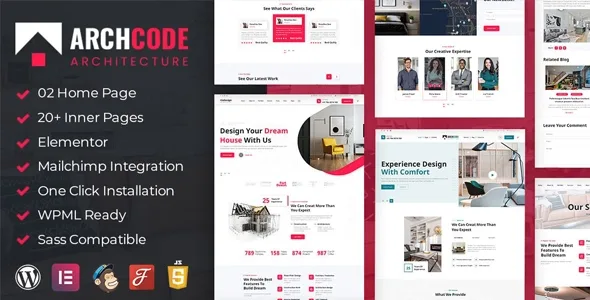
Archcode – Architect Design WordPress Theme
Antivirus scan
Powered by ClamAV
✅ Verified clean
This product file has passed our security filters.
Want to run a fresh ClamAV scan right now? Takes a few seconds and shows scanner version, signature DB and live result.
This can take 5 to 30 seconds.
Clean file Threat detected
No threats detected in this file.
- File
- Size
- Scanned
- ClamAV
- Signature database
⚡ Powered by ClamAV
Scan could not be completed
Report product
If you detected an issue (broken file, malware, inappropriate content, etc.) let us know and we'll review it ASAP.
Sign in to reportNewer version out, or a problem?
About Archcode – Architect Design WordPress Theme
Architecture firms and architects who want the work to be seen before the text
An architecture studio often has excellent projects and a website that does not do them justice: photos that load slowly on phones, menus that hide the work, and generic templates that look like they belong to another sector. Archcode is designed for architecture studios, architects and design professionals.
If your project belongs to another sector, think it through: the theme is oriented to architecture.
To build pages with its own elements you need Elementor installed and active, since it is the page builder the theme relies on.
Photos and projects that look right on any screen
Clients look at projects on phones, tablets or large monitors, and the theme is designed to adapt to each one. It has been tested on real devices and looks sharp on retina screens too.
It includes two different home pages, so you can choose the one that best fits how you want to present your studio.
Archcode comes with demo content so you do not start with an empty website
The theme includes demo content and a one-click installer that imports the sample pages.
Once imported, the demo pages are configured automatically, so the starting point is a complete site rather than a set of loose pieces.
Archcode: typography, animations and custom pages from the theme panel
The Redux-based options panel lets you choose typefaces from the Google Fonts library, which offers more than 600 font families. For an architecture studio's headings that freedom matters: a more serious or more contemporary font changes the feel of the whole site.
There are CSS3 animations to bring sections to life, custom page templates, unlimited sidebars and a full-screen background slider. The theme's own elements depend on having Elementor active.
A multilingual site for international projects
If your studio works with clients in other countries, the theme is compatible with WPML to translate pages and layouts into any language. To use it you need to install that plugin, since it handles the translations. The theme is also prepared for translation with .pot files.
Shop and contact features with WooCommerce and Contact Form 7
The theme is compatible with WooCommerce, in case you need to sell something from the website, and it accepts Contact Form 7 forms so clients can write to you directly from the site.
Frequently asked questions about Archcode
Do I need Elementor to use Archcode?
Yes. The pages and the theme's own elements are built with Elementor, so it must be installed and active.
Can it run a site in several languages?
Yes, with WPML, the plugin that manages the translations.
Does it adapt well to phones and tablets?
Yes. It is responsive and has been tested on real devices.
Does it come with content to start?
Yes, it includes demo content that is imported with a one-click installer.
Can I change the typography?
Yes, from the theme options panel, with access to the Google Fonts library.
Topics
Version history
-
v
1.1 Current 18 Jun 2024
Customer reviews
Sign in to leave a review. Only people who have the product can review it.
No reviews for this product yet.
Frequently asked questions
-
GPL (General Public License) is the license under which WordPress and most premium plugins/themes are distributed. It grants you the right to use, modify and redistribute the software in as many projects as you want, with no domain restrictions.
-
Yes. With membership you get automatic updates via our GPLClub Updater plugin (installed on your WP, detects new versions and applies them). With individual purchase, you get one year of manual updates from your account.
-
Depends on the plan. Monthly: 3 domains. Semi-annual: 7. Annual and Lifetime: 15. Individual purchase: 1 domain.
-
GPLClub offers its own support for installation, configuration and compatibility. For direct support from the original author (feature requests, product-specific bugs), a license purchased from the author is required.