Bellows Pro - Accordion Menu
Antivirus scan
Powered by ClamAV
✅ Verified clean
This product file has passed our security filters.
Want to run a fresh ClamAV scan right now? Takes a few seconds and shows scanner version, signature DB and live result.
This can take 5 to 30 seconds.
Clean file Threat detected
No threats detected in this file.
- File
- Size
- Scanned
- ClamAV
- Signature database
⚡ Powered by ClamAV
Scan could not be completed
Report product
If you detected an issue (broken file, malware, inappropriate content, etc.) let us know and we'll review it ASAP.
Sign in to report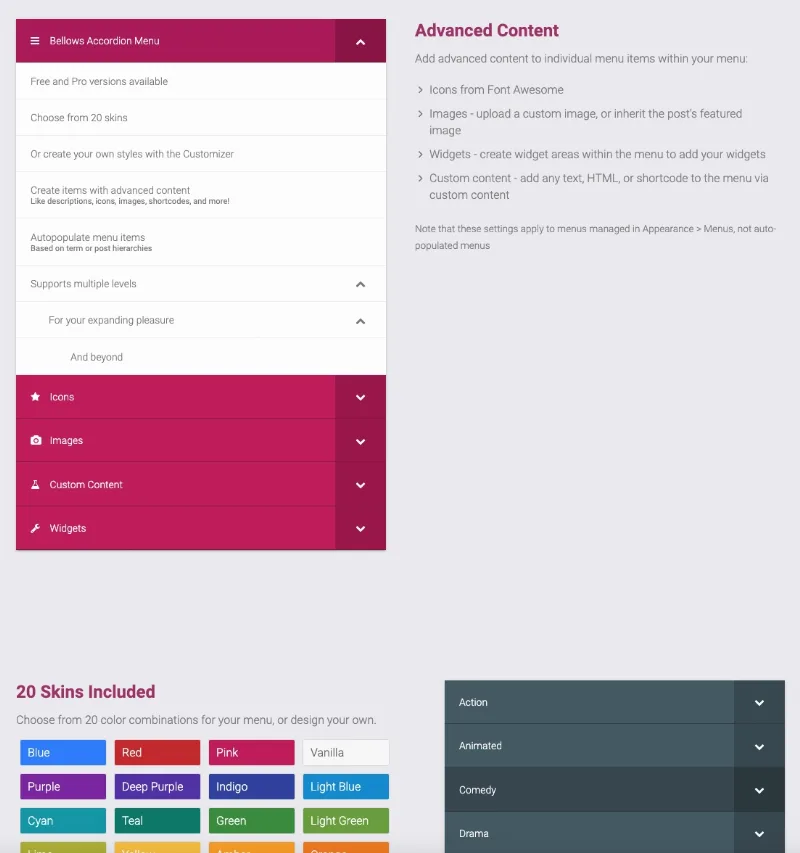
About Bellows Pro - Accordion Menu
When the sidebar menu turns into an endless list
A store with hundreds of products, a directory organized by country or a help center with many sections all share the same problem: the hierarchy exists, but the visitor can't see it. Either everything is shown at once and they get lost, or it is hidden so well that nobody reaches the content. An accordion menu solves this because it lets people open only the branch they care about and drill down level by level.
Bellows Pro is an accordion plugin for WordPress built for content with a deep hierarchy. You can place the menu in your layout with a widget, a shortcode or a PHP snippet, and it adapts to the width of the container where you put it.
Two ways to fill the menu: by hand or from your own structure
Bellows is built on the WordPress menu system, so you manage it from Appearance > Menus with the usual tools. That is the route for controlling every item in detail.
The other route is auto-population: the menu fills itself from post hierarchies or taxonomies, and it also works with custom post types and custom taxonomies. The interesting part is that it can inherit the hierarchy of the current page or taxonomy, so a single menu changes its contents depending on where the visitor is. On a large site, that avoids maintaining dozens of different menus.
To prepare and test these queries there is a menu generator in the admin area:
- You fine-tune the auto-population queries and save them for reuse.
- You see a preview that refreshes on its own.
- You get the shortcode or PHP code based on your settings.
More than text: icons, images, widgets and custom content
In menus created by hand, each item can carry more than a link:
- Icons: over 600 from Font Awesome.
- Images: you upload your own or inherit the post's featured image.
- Widgets: widget areas inside the menu to drop in, for example, a map or a feed from another plugin (those widgets come from the corresponding plugin).
- Custom content: text, HTML or shortcodes, useful for a subtle call to action.
You can also change colors, font size and padding of individual items. If a submenu is very long, the "Show More" feature cuts the list at the point you choose and lets users expand the rest.
Choosing Bellows Pro: limits and common questions
Before deciding, be clear about one important limit: icons, images, widgets, custom content and per-item settings only apply to menus managed in Appearance > Menus. They are not available in auto-populated menus. If you need a dynamic menu with icons on every item, you will have to pick one of the two routes.
Can I change the look?
Yes. It comes with 20 color skins, and the WordPress Customizer lets you preview settings and create your own styles: icons, text and background colors, padding, fonts and more.
Can several submenus be open at once?
Yes, you can choose whether a single submenu or several are displayed at the same time.
Does it support multiple levels?
Yes, it supports multiple levels of depth.
Can I have different configurations on the same site?
Yes, you can create several configurations and adjust each accordion menu separately.
Is it a main header menu?
It is designed as an accordion for expanding hierarchies, typical of sidebars and content navigation areas. Check in the demo whether its behavior fits what you want in your design.
Version history
-
v
1.4.3 Current 16 May 2024
Customer reviews
Sign in to leave a review. Only people who have the product can review it.
No reviews for this product yet.
Frequently asked questions
-
GPL (General Public License) is the license under which WordPress and most premium plugins/themes are distributed. It grants you the right to use, modify and redistribute the software in as many projects as you want, with no domain restrictions.
-
Yes. With membership you get automatic updates via our GPLClub Updater plugin (installed on your WP, detects new versions and applies them). With individual purchase, you get one year of manual updates from your account.
-
Depends on the plan. Monthly: 3 domains. Semi-annual: 7. Annual and Lifetime: 15. Individual purchase: 1 domain.
-
GPLClub offers its own support for installation, configuration and compatibility. For direct support from the original author (feature requests, product-specific bugs), a license purchased from the author is required.