Bulk Category Editor for WooCommerce
Antivirus scan
Powered by ClamAV
✅ Verified clean
This product file has passed our security filters.
Want to run a fresh ClamAV scan right now? Takes a few seconds and shows scanner version, signature DB and live result.
This can take 5 to 30 seconds.
Clean file Threat detected
No threats detected in this file.
- File
- Size
- Scanned
- ClamAV
- Signature database
⚡ Powered by ClamAV
Scan could not be completed
Report product
If you detected an issue (broken file, malware, inappropriate content, etc.) let us know and we'll review it ASAP.
Sign in to report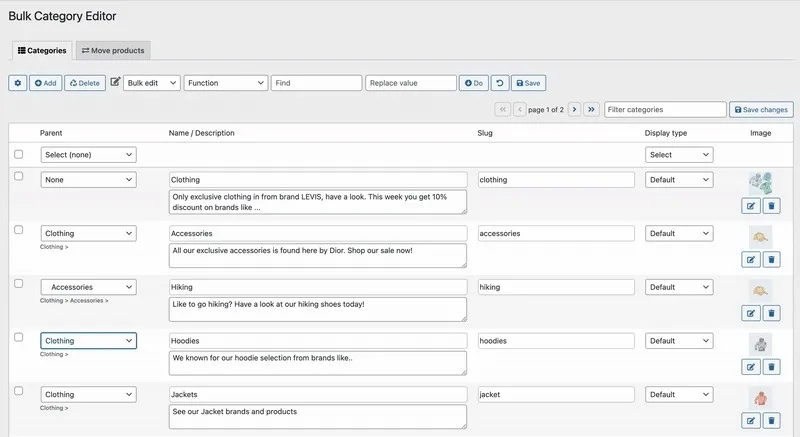
About Bulk Category Editor for WooCommerce
When the catalog grows, categories fall into disorder on their own
At first a store has ten categories and everything fits in your head. A year later there are duplicate subcategories, uncategorised products, empty categories still showing in the menu and a tree so deep nobody knows where to put new items. Fixing all that one by one from the standard WooCommerce categories screen is slow and error-prone.
Bulk Category Editor for WooCommerce brings that work into a table-style interface, built for stores with large structures or that reorganize often.
Edit the category tree right in the table
From a single table you change names, descriptions, slugs, images and hierarchy without opening each category. Subcategories are color-coded, you can show or hide descriptions, and you see each category's ID, product count and link at a glance.
- Parent category: each row has a filter to find and assign the parent, and you can remove it one at a time or in bulk.
- Drag and drop ordering: you reorder categories visually, with no manual position editing.
- Bulk creation: you can add several categories at once from a comma-separated list, setting parent and image as you create them.
Move products and keep an eye on catalog health
The Move Products tab lets you recategorize without going product by product. You select products from one or several categories, see their image, SKU, stock and price, then add, replace or remove categories for all of them at once.
Category Insights also flags typical problems: empty categories, uncategorised products, categories missing an image or description, and paths that are too deep. From each alert you jump straight to what needs fixing, before it affects store navigation.
Product filters for the shop
It also includes a filters tab where you build category and attribute filters, customize labels, colors, layout and visibility, exclude categories and copy a shortcode to place wherever you like (themes, widgets or page builders such as Elementor). They can be shown as a toggleable menu or always visible.
Import and export between stores
You can export categories to CSV, as a backup or to edit them elsewhere, and import them into another store. It makes sense for agencies, multi-store setups and migrations where the structure must be identical.
Is Bulk Category Editor worth it if your store is small?
If you have few categories and rarely touch them, the native WooCommerce screen is enough. This plugin pays off when you reorganize often, work with hundreds of categories or recategorize many products at once.
One thing to keep in mind: some user reviews mention that dragging categories and moving products to another category did not feel smooth, while another calls it a must for stores with thousands of products. Try it in the demo with a tree similar to yours before deciding.
Do I need to know how to code?
No. Being comfortable with WooCommerce is enough; filters are built without code and placed with a shortcode.
Can I change the categories of many products at once?
Yes: in the Move Products tab you can add, replace or remove categories for several products in a single operation.
Can I bring the same structure to another store?
Yes, by exporting categories to CSV and importing them into the other installation.
Does it work with Elementor?
Filters are inserted with a shortcode and are compatible with themes, widgets and page builders such as Elementor.
Does it replace an advanced filtering plugin?
It covers category and attribute filters with layout and visibility options. If you need other filter types, check in the demo that it fits what you are looking for.
Topics
Version history
-
v
2.6.12 Current 5 Sep 2026
-
v
2.6.8 22 Jul 2026
-
v
2.6.1 24 Feb 2026
Customer reviews
Sign in to leave a review. Only people who have the product can review it.
No reviews for this product yet.
Frequently asked questions
-
GPL (General Public License) is the license under which WordPress and most premium plugins/themes are distributed. It grants you the right to use, modify and redistribute the software in as many projects as you want, with no domain restrictions.
-
Yes. With membership you get automatic updates via our GPLClub Updater plugin (installed on your WP, detects new versions and applies them). With individual purchase, you get one year of manual updates from your account.
-
Depends on the plan. Monthly: 3 domains. Semi-annual: 7. Annual and Lifetime: 15. Individual purchase: 1 domain.
-
GPLClub offers its own support for installation, configuration and compatibility. For direct support from the original author (feature requests, product-specific bugs), a license purchased from the author is required.