Click to mail - Fancy Mailto UI chat bubbles plugin
Antivirus scan
Powered by ClamAV
✅ Verified clean
This product file has passed our security filters.
Want to run a fresh ClamAV scan right now? Takes a few seconds and shows scanner version, signature DB and live result.
This can take 5 to 30 seconds.
Clean file Threat detected
No threats detected in this file.
- File
- Size
- Scanned
- ClamAV
- Signature database
⚡ Powered by ClamAV
Scan could not be completed
Report product
If you detected an issue (broken file, malware, inappropriate content, etc.) let us know and we'll review it ASAP.
Sign in to report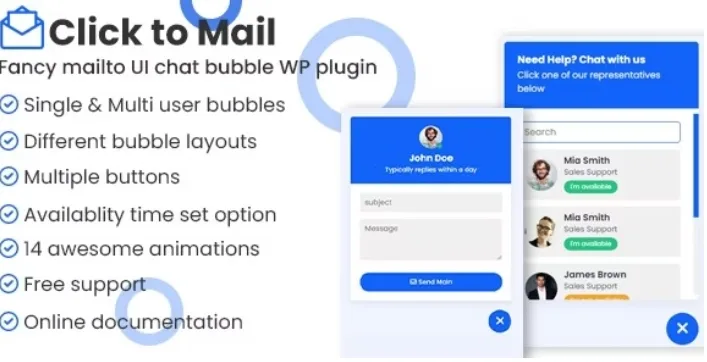
About Click to mail - Fancy Mailto UI chat bubbles plugin
Someone with just one question doesn't want to fill in a form
A visitor looks at your services, is left with a small question and runs into a six-field form or an email address hidden in the footer. Most often they close the tab. Many small businesses lose enquiries not for lack of interest, but because of how much effort it takes to ask.
Click to mail adds a floating bubble, or buttons placed around the page, that lead straight to email. It is not a real-time chat: the conversation continues by email, which fits if you reply calmly and prefer to keep everything in writing.
From the bubble to your inbox: how a visitor experiences it
Think of a small consultancy where two people handle enquiries. This is the journey, with what the plugin solves at each step:
- Choosing who to talk to: with a single agent, the bubble points to one address. With multiple agents (unlimited), the visitor chooses who to write to. Each agent can have their own email, subject, Cc, Bcc and message text.
- Arriving with the message prepared: you can set the subject and body, so the email reaches you with context instead of an empty message.
- Knowing whether you are available: you define hours for the single agent, for multiple agents and for the buttons. If you set your timezone, the schedule is calculated with yours; if not, it uses the visitor's computer time. Outside those hours, the bubble shows as offline.
- Showing it only where it makes sense: you can display it only on desktop, only on tablet or only on mobile. For standalone buttons there are Gutenberg blocks.
Mind the limit: the offline notice informs, but it does not reply for you. If you promise a fast answer, the hours you configure must be real. And since everything ends up in email, don't expect a conversation inbox inside WordPress.
Frequently asked questions about Click to mail
Can I add several team members?
Yes. The multiple agents option has no limit and the visitor chooses who to write to.
Can I hide it on mobile?
Yes. You can show it only on desktop, only on tablet or only on mobile.
What happens if I'm not online?
Based on the hours you have defined, the bubble shows as offline. Check in the demo how that state looks before deciding.
Do I need to know how to code?
No. There is documentation designed so you can manage it without coding experience. If you want to tweak it in depth, the main file only contains JS, CSS and HTML.
Bubble, grid or list: the look adapts to your website
There are several layouts (bubble to one side, header on the left or centred, grid, list), a dark mode, your own colours and animations for the floating bubble. You can also change the label of all the buttons, useful if your website is not in English. To choose well, see in the demo how each design looks with your palette before committing to one.
Topics
Version history
-
v
1.0 Current 13 May 2024
Customer reviews
Sign in to leave a review. Only people who have the product can review it.
No reviews for this product yet.
Frequently asked questions
-
GPL (General Public License) is the license under which WordPress and most premium plugins/themes are distributed. It grants you the right to use, modify and redistribute the software in as many projects as you want, with no domain restrictions.
-
Yes. With membership you get automatic updates via our GPLClub Updater plugin (installed on your WP, detects new versions and applies them). With individual purchase, you get one year of manual updates from your account.
-
Depends on the plan. Monthly: 3 domains. Semi-annual: 7. Annual and Lifetime: 15. Individual purchase: 1 domain.
-
GPLClub offers its own support for installation, configuration and compatibility. For direct support from the original author (feature requests, product-specific bugs), a license purchased from the author is required.