Coffeet – Cafe & Coffee Shop WordPress Theme
Antivirus scan
Powered by ClamAV
✅ Verified clean
This product file has passed our security filters.
Want to run a fresh ClamAV scan right now? Takes a few seconds and shows scanner version, signature DB and live result.
This can take 5 to 30 seconds.
Clean file Threat detected
No threats detected in this file.
- File
- Size
- Scanned
- ClamAV
- Signature database
⚡ Powered by ClamAV
Scan could not be completed
Report product
If you detected an issue (broken file, malware, inappropriate content, etc.) let us know and we'll review it ASAP.
Sign in to report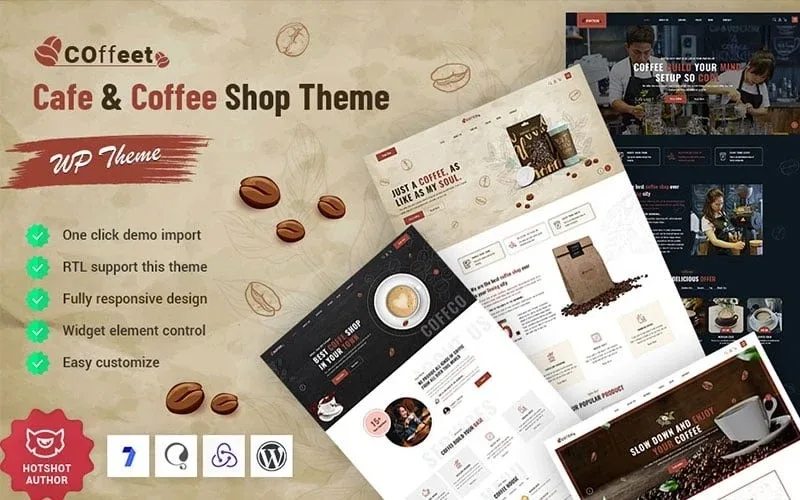
About Coffeet – Cafe & Coffee Shop WordPress Theme
Coffeet: coffee is sold twice, at the counter and in the bag
A coffee shop often has its menu in a PDF, its opening hours out of date in three places and its beans for sale only through direct messages. Each thing lives somewhere else and the website tells none of it well. Coffeet is a theme for cafes and coffee shops that brings the venue, the menu, the store and the blog together on one site.
Someone who finds a coffee shop on their phone first looks for opening hours and location, and only then notices how nice the place looks. That is why it matters that the hours (in the demo, Monday to Saturday with Sunday closed) and the contact details sit in clearly visible blocks.
Three different cafes, three ways to set up Coffeet
The demo comes with three home pages (Home, Home 02 and Home 03), a landing page and a video home page, so you don't start from a single layout.
Neighborhood cafe with a physical venue
You will want the video home page or the landing page, the team page with barista and pastry chef, the opening hours and the table booking block. The tabbed menu (chocolate, coffee, sandwiches, sweets and tea) replaces the usual PDF.
Roaster selling beans
Your focus is the store: products with sale prices, star ratings, quick view and wishlist, plus the cart and my account pages. The demo shows Arabica origins as an example product.
Cafe with a bakery or pastry counter
The demo store's categories include bakery, bread, desserts and coffee, and the menu has its own sweets tab. It helps you split your products between the counter and online sales.
Booking, menu and team: what Coffeet puts in front of the customer
Besides the home pages, the demo includes the pages a coffee shop usually needs:
- Table booking: a form with number of people, time and date, and a request button.
- Menu with prices: each line has a name, ingredients and a price, grouped in tabs.
- Team, testimonials and FAQ: dedicated pages to introduce the people behind the counter and answer questions.
- Blog: variants with the sidebar on the left or right, in one or two columns.
Questions before opening your coffee shop with Coffeet
Can I sell coffee online with it? The demo includes a store, cart, my account, wishlist, quick view, sale prices and ratings. Check which plugin runs the store before you decide.
Can I use it for a pastry shop? Yes, the demo already works with bakery, bread and dessert categories, and the menu has a sweets tab.
Does it have a blog? Yes, with four variants: sidebar on the left or the right, and in one or two columns.
Can I change the menu without coding? The menu appears as a home page block with a name, ingredients and a price on each line. Check in the demo how it is edited before committing.
Booking and the store need you to check what sits behind them
Coffeet is a theme: it provides the design. Check in the demo whether the booking form sends the request to your email or is only a design, and don't assume it confirms tables automatically. The same goes for the cart: find out which plugin runs it.
The home page talks about ordering food and about delivery or pick up, but those are text blocks; before promising it to your customers, decide how you will handle it. The demo's texts, prices and figures are filler: replace them with your own.
Topics
Version history
-
v
1.0.0 Current 13 Jun 2024
Customer reviews
Sign in to leave a review. Only people who have the product can review it.
No reviews for this product yet.
Frequently asked questions
-
GPL (General Public License) is the license under which WordPress and most premium plugins/themes are distributed. It grants you the right to use, modify and redistribute the software in as many projects as you want, with no domain restrictions.
-
Yes. With membership you get automatic updates via our GPLClub Updater plugin (installed on your WP, detects new versions and applies them). With individual purchase, you get one year of manual updates from your account.
-
Depends on the plan. Monthly: 3 domains. Semi-annual: 7. Annual and Lifetime: 15. Individual purchase: 1 domain.
-
GPLClub offers its own support for installation, configuration and compatibility. For direct support from the original author (feature requests, product-specific bugs), a license purchased from the author is required.