Content Locker - Pro
Antivirus scan
Powered by ClamAV
✅ Verified clean
This product file has passed our security filters.
Want to run a fresh ClamAV scan right now? Takes a few seconds and shows scanner version, signature DB and live result.
This can take 5 to 30 seconds.
Clean file Threat detected
No threats detected in this file.
- File
- Size
- Scanned
- ClamAV
- Signature database
⚡ Powered by ClamAV
Scan could not be completed
Report product
If you detected an issue (broken file, malware, inappropriate content, etc.) let us know and we'll review it ASAP.
Sign in to report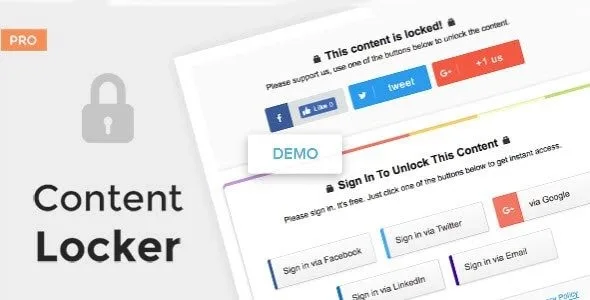
About Content Locker - Pro
Your lock charges a price, so pick the currency first
You spent weeks on a long guide, people make use of it and leave without a trace. You decide to ask for something in return, and the useful question comes before you install anything: what will you ask for?
A share and an email are two different payments. The share is posted once on the payer's profile and brings you closer to their contacts. The email goes onto your list and lets you write to them again. Content Locker Pro, by MyThemeShop, hides part of a post until the visitor pays in one of those two currencies, so every locker you create is also a decision about what serves you best on that piece of writing.
It is worth being clear about the currency it does not accept: its features include no payment gateway and no membership levels. Payment is social, never money.
Two lockers for two goals
- Share to unlock. The visitor gives a Facebook Like or posts a tweet, and can then keep reading.
- Sign in to unlock. The Sign-in Locker collects the visitor's email and name from their social account, and also lets them type those in by hand.
If your site lives on new visits, the first one targets that goal. If you live on what you sell by email, the second one feeds your list. You can create several lockers and compare their results, so the choice does not have to be final.
Where the emails you collect end up
- In your own WordPress: subscribers are managed from the installation.
- In MailChimp or MailerLite: both services are integrated.
- In a CSV file: if you use Aweber or GetResponse, you export the emails and import them there.
Its features include no newsletter sending. It collects the data and leaves it on your list: writing to those people remains the job of your email service.
Who sees each locker and how it performs
A poorly planned locker can cost you readers, which is why these controls matter:
- Hide it from logged-in users, so that people who already have an account get in with no extra steps.
- Disable it on phones, where sharing or signing up can be more awkward.
- Optional close icon: if you show it, the visitor can close the locker, and the request stops being mandatory.
- Terms and policies shown alongside the locker.
- Button language, which you can choose.
- Ajax loading and lazy loading for the content.
Measurement includes per-locker analytics and Google Analytics integration, so you can compare the performance of one against another.
Your first locker, from install to real test
It works with any theme and is optimized for mobile. A cautious way to begin:
- Activate the plugin and choose a single locker type for a single post.
- If you collect emails, connect MailChimp or MailerLite and add your terms.
- Keep visible the part of the text that convinces the reader to continue.
- Test the unlock with real accounts on each network and from a phone.
- Review the analytics before extending it to more posts.
The real-accounts step matters because the buttons depend on the social networks, which change their services on their own terms.
If your plan calls for open sign-ups or paid access
When you want subscribers without hiding anything, WP Subscribe Pro, from the same maker, asks for the email with a popup, exit intent and a box in posts.
If content should be paid for with money, Restrict Content Pro limits access by membership level and lets you sell those levels on your site.
Deciding what each locker hides and from whom
Can I hide only part of a post?
Yes. That is the idea of the plugin: part of the content stays hidden until the visitor shares or signs in.
Can I keep the locker from showing to my subscribers?
You can hide it from people who are logged in. That covers logged-in users, not someone who subscribed by email without having an account.
Should I use the share locker or the sign-in locker?
It depends on your goal. If you want new visits, the share one. If you want a list of your own, the sign-in one. Per-locker analytics help you compare both on your site.
Topics
Version history
-
v
1.0.16 Current 28 May 2024
Customer reviews
Sign in to leave a review. Only people who have the product can review it.
No reviews for this product yet.
Frequently asked questions
-
GPL (General Public License) is the license under which WordPress and most premium plugins/themes are distributed. It grants you the right to use, modify and redistribute the software in as many projects as you want, with no domain restrictions.
-
Yes. With membership you get automatic updates via our GPLClub Updater plugin (installed on your WP, detects new versions and applies them). With individual purchase, you get one year of manual updates from your account.
-
Depends on the plan. Monthly: 3 domains. Semi-annual: 7. Annual and Lifetime: 15. Individual purchase: 1 domain.
-
GPLClub offers its own support for installation, configuration and compatibility. For direct support from the original author (feature requests, product-specific bugs), a license purchased from the author is required.