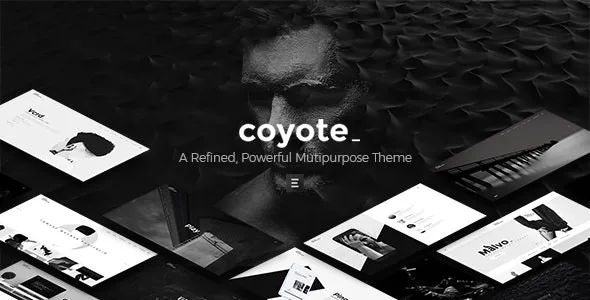
Coyote – Multipurpose WordPress Theme
Antivirus scan
Powered by ClamAV
✅ Verified clean
This product file has passed our security filters.
Want to run a fresh ClamAV scan right now? Takes a few seconds and shows scanner version, signature DB and live result.
This can take 5 to 30 seconds.
Clean file Threat detected
No threats detected in this file.
- File
- Size
- Scanned
- ClamAV
- Signature database
⚡ Powered by ClamAV
Scan could not be completed
Report product
If you detected an issue (broken file, malware, inappropriate content, etc.) let us know and we'll review it ASAP.
Sign in to reportNewer version out, or a problem?
About Coyote – Multipurpose WordPress Theme
A freelance portfolio that does not look like everyone else's
A freelance portfolio rarely loses clients for lack of work. It loses them when every project sits in the same grid of thumbnails, with no hierarchy and no room to explain what you solved in each case. Coyote is a multipurpose theme built so content can be shown in different ways, whether it is a personal portfolio, the presentation of a product app or the work you have done as a freelancer.
How Coyote starts: from the demo importer to your first homepage
You begin by importing a demo in one click, which sets up the site on one of its 18 homepages. The typography settings are highly customizable and can be defined separately for the responsive version, with more than 800 Google Fonts available.
Inner pages come ready too: there are blog and gallery templates, and for whatever does not fit a template you have a large collection of custom shortcodes.
Common questions before choosing Coyote
Do I need to install WPBakery or Slider Revolution separately?
No. WPBakery Page Builder and Slider Revolution are included with the theme.
Can it run a website in several languages?
Yes. It is compatible with WPML and ready for translation.
Can I build a shop with this theme?
It is compatible with WooCommerce and includes a dropdown cart widget and shop elements. To sell, you need WooCommerce installed.
Can I customize it without touching the original theme code?
Yes. It includes a child theme.
How each project is presented in Coyote
This is the core of the theme. The project listing supports five formats, and each individual project has its own single layout. That lets you give an illustration a full-screen view and a photo series a gallery, without the whole portfolio looking the same.
- Listings: standard, masonry, Pinterest, gallery and justified gallery.
- Single project: slider, gallery, masonry, split screen, full screen or custom layout.
When a visitor opens a project, images and videos display in a lightbox, and you can show related projects at the end. If you prefer to highlight several works at once, there is a portfolio slider shortcode.
The header and homepage, the first thing your client sees
The header comes in four types: standard, centered, vertical and full screen, with several behaviors and a side area with its own styles. You can set one logo for mobile, another for light and dark versions and another for the sticky header. The mobile menu also has styles separate from the desktop one.
On top of that, the Edge Slider supports images and video, with zoom animations, parallax and several transition types. Sections can carry image or video backgrounds, and the mega menu is customizable.
Services, team and clients on the same pages
When a visitor is deciding whether to hire you, they usually want to know three things: how much it costs, who does the work and what other clients say. Coyote has a shortcode for each: pricing tables, team, testimonials and client logos, plus a process shortcode.
If you also sell products, the theme is compatible with WooCommerce and with Contact Form 7 for your contact forms. The shop needs WooCommerce installed to work.
The demo images are not for publishing as they are
The photos and illustrations in the demos are for display only. If you want them on your site, you will need to buy them yourself from a stock image website or replace them with your own. It is worth deciding before you publish, because swapping every image in a finished portfolio takes more work than it seems.
Topics
Version history
-
v
1.5 Current 17 Jun 2024
Customer reviews
Sign in to leave a review. Only people who have the product can review it.
No reviews for this product yet.
Frequently asked questions
-
GPL (General Public License) is the license under which WordPress and most premium plugins/themes are distributed. It grants you the right to use, modify and redistribute the software in as many projects as you want, with no domain restrictions.
-
Yes. With membership you get automatic updates via our GPLClub Updater plugin (installed on your WP, detects new versions and applies them). With individual purchase, you get one year of manual updates from your account.
-
Depends on the plan. Monthly: 3 domains. Semi-annual: 7. Annual and Lifetime: 15. Individual purchase: 1 domain.
-
GPLClub offers its own support for installation, configuration and compatibility. For direct support from the original author (feature requests, product-specific bugs), a license purchased from the author is required.