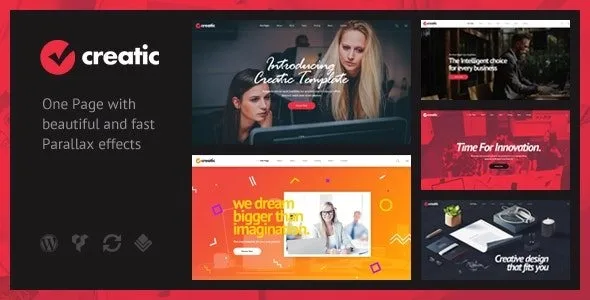
Creatic – One Page Parallax WordPress
Antivirus scan
Powered by ClamAV
✅ Verified clean
This product file has passed our security filters.
Want to run a fresh ClamAV scan right now? Takes a few seconds and shows scanner version, signature DB and live result.
This can take 5 to 30 seconds.
Clean file Threat detected
No threats detected in this file.
- File
- Size
- Scanned
- ClamAV
- Signature database
⚡ Powered by ClamAV
Scan could not be completed
Report product
If you detected an issue (broken file, malware, inappropriate content, etc.) let us know and we'll review it ASAP.
Sign in to reportNewer version out, or a problem?
About Creatic – One Page Parallax WordPress
Why a long page needs a theme like Creatic
A one page website has a problem that multi-page sites do not: the whole business has to fit in a single scroll. Someone arriving from a phone or a social media link wants to know in a few taps what you do, with which work and how to contact you, and if they do not find it on the first screen they usually leave. Creatic is built for that long, creative page, with parallax effects and a menu that takes the visitor from one block to the next.
From the homepage to the last section with Creatic
Imagine a web studio that wants to move from a scattered presentation to a page that tells who they are. The first step is choosing one of the ready-made homepages. The header is changed with one click and customized live, so you see each change on the page itself while you make it.
Then comes the content. With the visual builder, each section is assembled with rows and columns: you can adjust the background, margins, column height and effects of each block, and edit the texts directly on the page. There are more than 40 content blocks to insert, from buttons and galleries to testimonials, team members or counters.
For the movement, CSS3 animations and parallax are GPU accelerated, and the one page menu takes the visitor from each section to the next with smooth scrolling. The design adapts to different screen sizes.
Frequently asked questions before choosing Creatic
Which plugins does Creatic include or support?
The theme includes WPBakery Visual Composer and Revolution Slider, and it is compatible with LayerSlider, Contact Form 7, WPML, Mailchimp, W3 Total Cache and iLightbox, among others.
Can it be used for a website in several languages?
Yes. The theme is ready to be translated with WPML and includes a multilingual megamenu.
What if my language is written right to left?
Creatic is compatible with RTL.
Can I change colors and fonts without touching code?
Yes. Colors and typography are customized live, you can assign an accent color to each page, and more than 600 Google Fonts are available. If you prefer code, it also includes HTML and CSS editors.
Portfolio, blog and shop on the same page
Work can be shown with portfolio styles and individual pages for each project, in grids of 2 to 5 columns, as a carousel or in masonry layout. Besides the portfolio, the page can include:
- Blog blocks with different layout types.
- Team, testimonials, clients and price lists.
- Galleries, infographics with interactive hotspots and multiscroll sliders.
- A Mailchimp signup form.
There are also shop blocks, such as products, tabbed shop and trending products.
Colors, typography and sidebars in Creatic
Each page can have its own accent color, and the theme includes predefined title styles. There is a light and a dark color style to choose from, and you can place sidebars on the left, on the right or in dual layout, as many as you need.
A child theme to customize Creatic
Creatic supports child themes. It comes with predefined headers that change with one click and are customized live, and columns support hover effects and sticky columns on scroll.
Topics
Version history
-
v
1 Current 19 Jun 2024
Customer reviews
Sign in to leave a review. Only people who have the product can review it.
No reviews for this product yet.
Frequently asked questions
-
GPL (General Public License) is the license under which WordPress and most premium plugins/themes are distributed. It grants you the right to use, modify and redistribute the software in as many projects as you want, with no domain restrictions.
-
Yes. With membership you get automatic updates via our GPLClub Updater plugin (installed on your WP, detects new versions and applies them). With individual purchase, you get one year of manual updates from your account.
-
Depends on the plan. Monthly: 3 domains. Semi-annual: 7. Annual and Lifetime: 15. Individual purchase: 1 domain.
-
GPLClub offers its own support for installation, configuration and compatibility. For direct support from the original author (feature requests, product-specific bugs), a license purchased from the author is required.