CSSIgniter Lefkada
Antivirus scan
Powered by ClamAV
✅ Verified clean
This product file has passed our security filters.
Want to run a fresh ClamAV scan right now? Takes a few seconds and shows scanner version, signature DB and live result.
This can take 5 to 30 seconds.
Clean file Threat detected
No threats detected in this file.
- File
- Size
- Scanned
- ClamAV
- Signature database
⚡ Powered by ClamAV
Scan could not be completed
Report product
If you detected an issue (broken file, malware, inappropriate content, etc.) let us know and we'll review it ASAP.
Sign in to report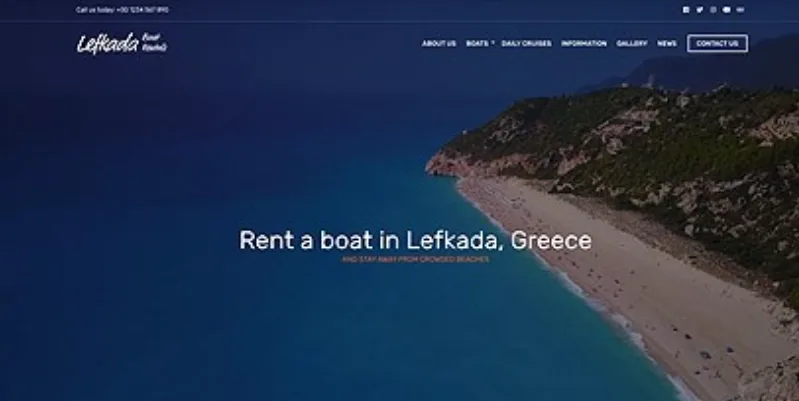
About CSSIgniter Lefkada
A business website that stays consistent when someone else edits it
In a small business, the website is rarely maintained by a designer. The owner, an employee or an acquaintance touches it, and over time every page ends up with a different header, a different blue and a different font. Visitors can't explain why, but they sense disorder and come away with the idea of a neglected business. CSSIgniter Lefkada is a theme designed for small businesses that want a clean, professional website.
This is the walkthrough of a typical setup, with what the theme solves at each step and where not to expect too much.
What to know about Lefkada before choosing it: hosting, editor and plugins
Do I need Elementor?
No. You can work with the WordPress block editor, with the GutenBee blocks that come with the theme, or with Elementor. You can also use another page builder such as Beaver Builder or Divi, although it's optional.
What do I need besides the theme?
A domain, a hosting account and WordPress installed. The theme includes none of that.
Will it work with the plugin I use?
Popular plugins from reliable developers usually work without problems, but it's impossible to test them all. If your business depends on a specific one (bookings, forms, CRM), try it on a test installation before going live.
Is it only for online stores?
No. It's designed as a business website. The shop is an optional add-on, as you'll see in the last step.
Step one: import the demo and empty it of someone else's content
Lefkada comes with one-click demo import: it replicates the sample site with its example content. It helps you see the finished structure and start trimming instead of starting from a blank page.
But the demo knows nothing about your business. The texts and images are examples, and you have to replace all of them before publishing. Importing it is not the same as having the website done.
Step two: set the brand in the Customizer
From the Customizer, with a real-time preview, you adjust:
- Header: color scheme, layout, typography and logo.
- Footer: colors, layout, fonts, and the links or information you want to show.
- Colors: a global scheme for the whole site, or fine adjustments in specific areas such as the top bar, the header or the footer.
- Typography: the font pair is chosen from dozens of Google Fonts, and the properties of key sections can be fine-tuned.
Step three: pages with blocks or Elementor, and sections designed only once
To build pages you can use WordPress blocks and the GutenBee collection, or Elementor with drag and drop. The most useful feature for a small business is Global Sections: you design a section (a contact block, a call to action) with the block editor or with Elementor and reuse it on as many pages as you like, without rebuilding it each time.
Two limits: if you choose Elementor, it's installed separately, and it's worth checking in the demo whether any element you like requires its paid version. And although the theme is designed to load fast, heavy images or too many plugins will still slow the site down.
Step four, only if you sell: the shop with WooCommerce
Lefkada is compatible with WooCommerce, so you can sell products, manage inventory and offer a checkout process. You need to install the WooCommerce plugin separately. The shop is an add-on to a business website, not its core: if selling is the center of your business, check in the demo how the catalog and the product page look before deciding.
Topics
Version history
-
v
1.1.4 Current 14 Jun 2024
Customer reviews
Sign in to leave a review. Only people who have the product can review it.
No reviews for this product yet.
Frequently asked questions
-
GPL (General Public License) is the license under which WordPress and most premium plugins/themes are distributed. It grants you the right to use, modify and redistribute the software in as many projects as you want, with no domain restrictions.
-
Yes. With membership you get automatic updates via our GPLClub Updater plugin (installed on your WP, detects new versions and applies them). With individual purchase, you get one year of manual updates from your account.
-
Depends on the plan. Monthly: 3 domains. Semi-annual: 7. Annual and Lifetime: 15. Individual purchase: 1 domain.
-
GPLClub offers its own support for installation, configuration and compatibility. For direct support from the original author (feature requests, product-specific bugs), a license purchased from the author is required.