Dashboard Switcher
Antivirus scan
Powered by ClamAV
✅ Verified clean
This product file has passed our security filters.
Want to run a fresh ClamAV scan right now? Takes a few seconds and shows scanner version, signature DB and live result.
This can take 5 to 30 seconds.
Clean file Threat detected
No threats detected in this file.
- File
- Size
- Scanned
- ClamAV
- Signature database
⚡ Powered by ClamAV
Scan could not be completed
Report product
If you detected an issue (broken file, malware, inappropriate content, etc.) let us know and we'll review it ASAP.
Sign in to report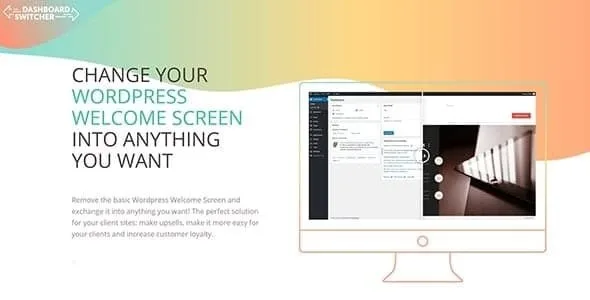
About Dashboard Switcher
Clients call you because they cannot find what they need
You hand over a finished website, the client logs into the WordPress dashboard and finds news widgets and a generic welcome screen that says nothing about their business or about you. A week later they write to you about something you already explained. Dashboard Switcher replaces that first screen with your own content.
The idea behind it: the dashboard is the one part of a website your client sees every time they work on it, and almost nobody takes advantage of it. Whoever builds websites for others gets a space of their own there, in front of the client, right when they need help.
What Dashboard Switcher does with the WordPress dashboard
It works on a simple logic: you create the content with the page builder or theme you already use and implement it inside the plugin. No coding needed.
- Custom welcome screen: fully replaces the WordPress welcome screen with the content you want (video tutorials, instructions, a contact form).
- Custom elements: if you do not want to replace the whole screen, you add one or more elements of your own alongside what is already there.
- Your own admin pages: you can add up to 30 new pages to the dashboard and load any content you want into them, with a menu icon picker.
- Synchronization: the content is loaded through an iFrame, so you edit once and the change reaches your clients' websites.
- Multisite: you can push your custom pages to all subsites in the network.
- Extra control: user role management, multisite restriction and security options for iframes.
One limit to keep in mind: the content lives on a central site and is displayed through an iFrame. So you need that source website built and reachable, and the plugin installed on every website where you want to show it. It is not a dashboard editor by itself: it does not ship content templates, you build them with your page builder.
Three uses that make sense in a dashboard
Support and onboarding
Instructions, FAQs and a contact form or buttons in the backend reduce repeated questions. The client has the answer right where they are working.
A showcase for your services
The dashboard can display your maintenance services, add-ons or news. It is a direct channel to someone who already knows you, so use it in moderation: if it looks like constant advertising, the client stops looking at it.
One piece of content for many websites
If you manage several websites, you maintain a single welcome page instead of editing each dashboard separately.
Frequently asked questions
Do I need to know how to code?
No. You build the content with the page builder or theme you already use and connect it from the plugin.
Can I use it on my clients' websites?
Yes, it is designed for that: freelancers, agencies and developers who deliver websites to third parties. It also works on your own site.
Does it work on multisite?
Yes. You can push your pages to all subsites in the network and limit it with the multisite options.
Can I show different things depending on the user?
The plugin includes user role management. Check in the demo how far it goes for the case you have in mind.
Build the content first, then connect each website
Before installing, be clear about what you want the client to see: a welcome message, a couple of elements or several help pages. Build that content on your source website with your page builder and check how it looks inside an iframe, because theme menus or headers can get in the way in a small frame. Then implement the screen, elements or pages in the plugin, and repeat the connection on each client website. Test with a single site before rolling it out to the rest.
Version history
-
v
1.3.4 Current 28 May 2024
Customer reviews
Sign in to leave a review. Only people who have the product can review it.
No reviews for this product yet.
Frequently asked questions
-
GPL (General Public License) is the license under which WordPress and most premium plugins/themes are distributed. It grants you the right to use, modify and redistribute the software in as many projects as you want, with no domain restrictions.
-
Yes. With membership you get automatic updates via our GPLClub Updater plugin (installed on your WP, detects new versions and applies them). With individual purchase, you get one year of manual updates from your account.
-
Depends on the plan. Monthly: 3 domains. Semi-annual: 7. Annual and Lifetime: 15. Individual purchase: 1 domain.
-
GPLClub offers its own support for installation, configuration and compatibility. For direct support from the original author (feature requests, product-specific bugs), a license purchased from the author is required.