Directorist dRealEstate – Real Estate WordPress Theme for Business Directory
Antivirus scan
Powered by ClamAV
✅ Verified clean
This product file has passed our security filters.
Want to run a fresh ClamAV scan right now? Takes a few seconds and shows scanner version, signature DB and live result.
This can take 5 to 30 seconds.
Clean file Threat detected
No threats detected in this file.
- File
- Size
- Scanned
- ClamAV
- Signature database
⚡ Powered by ClamAV
Scan could not be completed
Report product
If you detected an issue (broken file, malware, inappropriate content, etc.) let us know and we'll review it ASAP.
Sign in to report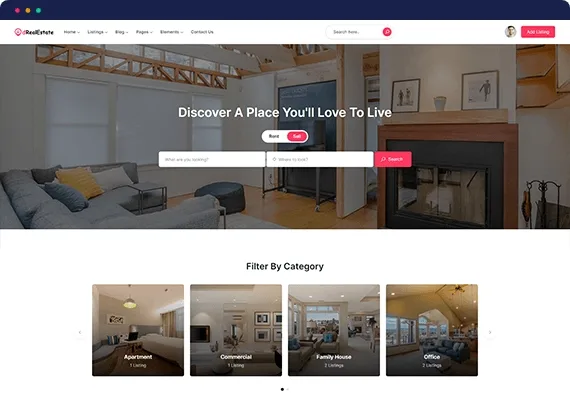
About Directorist dRealEstate – Real Estate WordPress Theme for Business Directory
A real estate portal with no listings attracts nobody
Building a property portal usually gets stuck on the same thing: the site looks great, but the visitor arrives, filters by bedrooms and finds nothing, and the agent or owner who should be posting sees no reason to do it.
The hard part of this business is not design, it is getting supply and demand at the same time. The theme takes care of the visible part; you have to bring in the listings, and whoever posts wants to see that someone is looking.
A search with the filters buyers and renters actually use
The home page opens with a rent or sell selector and an address search. The extra filters show the usual housing criteria:
- Property type and category.
- Minimum and maximum price, and distance.
- Bedrooms, bathrooms and garages.
- Area and year built.
- Features such as air conditioning, swimming pool, built-in wardrobes, school, supermarket or nearby transport.
There is a button to clear all filters. The home page cards are split into properties for sale and for rent, with featured and popular badges, star ratings and a monthly price on rentals.
Map, categories and locations to browse the directory
Directorist dRealEstate comes with two different home pages and the pages a directory needs to work:
- Listings in grid or list view, and a detail page for each property.
- Map views in two or three columns.
- Categories and locations in grid or list view.
- Author profile, a page to add listings and a user dashboard.
- Blog with or without a sidebar, contact page, about page and a 404 page.
To build the home pages it includes its own elements: search, listings, category and location carousels, reviews, info boxes, calls to action, counters, testimonials and brand logos.
Pop-up sign-up and content only for logged-in users
Login and registration open in a pop-up, with the option to sign in with Facebook and checkboxes to accept the privacy policy and the terms. The demo also shows a notice for content visible only after logging in and a request-a-tour button. It is useful if you want to capture registered users, but check in the demo where those requests go before promising them to an agent.
The demo categories and texts have to be redone
What you see in the demo is a sample showcase, not a portal ready to open. Split the work like this:
- Already solved: search with filters, cards, map, category and location pages, listing submission and sign-up.
- Up to you: the sample categories mix homes with bowling alleys, cemeteries, buffets or farms, so keep only the types in your market.
- Up to you: the testimonials and the Latin filler text get replaced with real opinions and copy.
- Up to you: the properties, photos, featured cities and contact details are samples.
- To check: the demo uses dollars, square feet and kilometers; if you work in euros and square meters, verify that you can change it.
Frequently asked questions about Directorist dRealEstate
Is it suitable for a single agency?
It can be used that way, but if you will only publish your own portfolio, part of the listing submission and author profile structure will be surplus.
Does it separate rent and sale?
Yes. The home page has a rent or sell selector and shows the listings in different blocks, with the monthly price on rentals.
Does it have a map view?
Yes, with two layouts: map in two columns and in three columns.
What elements does it include to build the home pages?
It includes its own elements (search, carousels, reviews, testimonials and others) to build them. Check in the demo which ones each home page uses to decide which is closest to what you want.
Topics
Version history
-
v
1.10 Current 13 Jun 2024
Customer reviews
Sign in to leave a review. Only people who have the product can review it.
No reviews for this product yet.
Frequently asked questions
-
GPL (General Public License) is the license under which WordPress and most premium plugins/themes are distributed. It grants you the right to use, modify and redistribute the software in as many projects as you want, with no domain restrictions.
-
Yes. With membership you get automatic updates via our GPLClub Updater plugin (installed on your WP, detects new versions and applies them). With individual purchase, you get one year of manual updates from your account.
-
Depends on the plan. Monthly: 3 domains. Semi-annual: 7. Annual and Lifetime: 15. Individual purchase: 1 domain.
-
GPLClub offers its own support for installation, configuration and compatibility. For direct support from the original author (feature requests, product-specific bugs), a license purchased from the author is required.