Discount Rules and Dynamic Pricing for WooCommerce
Antivirus scan
Powered by ClamAV
✅ Verified clean
This product file has passed our security filters.
Want to run a fresh ClamAV scan right now? Takes a few seconds and shows scanner version, signature DB and live result.
This can take 5 to 30 seconds.
Clean file Threat detected
No threats detected in this file.
- File
- Size
- Scanned
- ClamAV
- Signature database
⚡ Powered by ClamAV
Scan could not be completed
Report product
If you detected an issue (broken file, malware, inappropriate content, etc.) let us know and we'll review it ASAP.
Sign in to report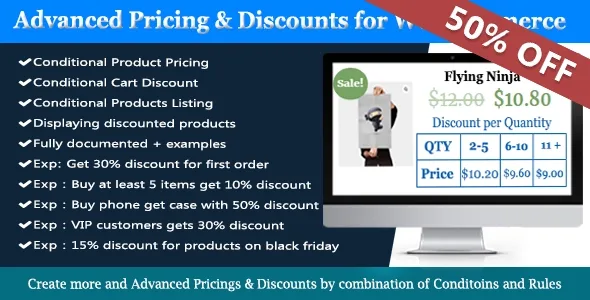
About Discount Rules and Dynamic Pricing for WooCommerce
Discounting everything to sell something is the most expensive way to run an offer
Running an offer in WooCommerce often ends up as sitewide sales, prices changed by hand and forgotten later, or discounts that also reach people who were going to buy anyway. Discount Rules and Dynamic Pricing for WooCommerce starts from the opposite idea: rules with conditions, so the discount only applies when the purchase deserves it.
Discounts are applied to the cart automatically, without the customer typing a code. You can apply them to specific products, variations, categories or the whole catalog.
Six ways to cut a price with Discount Rules and Dynamic Pricing
- Simple pricing: lower or set a price with conditions, for example 10% off a cap if the subtotal exceeds a certain amount.
- Bulk: the price drops with the quantity bought, also on variable products and their variations.
- Tiered: each following unit gets a bigger discount.
- Product group: a fixed price for a set, such as any 4 t-shirts for a set amount.
- BOGO: buy 3 and get 1 free, or buy product A and get product B at a discount.
- Cart: a discount on the whole purchase, for example by payment method or shipping state.
You can also show a price table on the product page (with several position options), show customers their already discounted price as Your Price, and add a countdown to give the offer a deadline. When offers are available, the plugin notifies shoppers in the cart and at checkout, and a shortcode lets you list discounted products.
Conditions that look at the customer, not just the product
This is what sets it apart from a general sale. Conditions can be combined with each other:
- Customer: role, whether they are logged in, money spent, number of orders, date and amount of the last order, reviews written.
- Cart: products, categories, attributes and tags, total weight, quantities, subtotal with or without tax, and applied coupons.
- Purchase history: which products or categories they bought before, in what quantity and for what amount.
- Checkout: payment method, country, state, postcode, shipping zone and shipping method.
- Dates: a specific day, periods, time slots and days of the week.
With that you can build cases such as 30% off the first order, prices for VIP customers or 15% off selected products on Black Friday.
Conditional shipping and fees in the same plugin
The same conditions let you create dynamic shipping methods: a paid shipping option when the weight passes a threshold, or free shipping when the cart total reaches a set amount. You can also add checkout fees, for example for heavy products, international orders, payment methods or postcodes.
The automatic BOGO gift comes with conditions
Adding the free product to the cart automatically works with two restrictions: the free product cannot already be in the cart, and the rule must contain a single simple product or a single variation. Before setting up your store, it helps to be clear about who does what:
- Covered: discounts by product, category and cart, with conditions.
- Covered: price table, live price, countdown and notices in the cart and at checkout.
- Covered: conditional shipping and fees.
- Up to you: work out the minimum margin of each rule before activating it.
- Up to you: make a test purchase to see how several rules work together.
- Up to you: promote the offer outside the store (banners, email, social media) with other tools.
If there are products you never want to discount, you can exclude them from all pricing rules.
Frequently asked questions before installing it
Can I give a discount only to registered customers?
Yes. There are conditions by user role and by whether the customer is logged in, and they can be combined with purchase history.
Does it work with variable products?
Yes, bulk prices can be applied to variable products and their variations.
Is it useful for offers with an expiry date?
Yes: you can limit a rule to dates, times or days of the week, and add a visible countdown.
Do I need to know how to code?
No. It is designed to work out of the box for beginners, with advanced options for those who need more complex rules.
Topics
Version history
-
v
9.12.3 Current 31 Oct 2026
-
v
9.12.2 29 Oct 2026
-
v
9.12.1 26 Oct 2026
-
v
9.12.0 21 Oct 2026
-
v
9.11.0 7 Sep 2026
-
v
9.10.3 7 Sep 2026
-
v
9.7.1 12 Jun 2026
-
v
8.18.1 8 Jan 2025
Customer reviews
Sign in to leave a review. Only people who have the product can review it.
No reviews for this product yet.
Frequently asked questions
-
GPL (General Public License) is the license under which WordPress and most premium plugins/themes are distributed. It grants you the right to use, modify and redistribute the software in as many projects as you want, with no domain restrictions.
-
Yes. With membership you get automatic updates via our GPLClub Updater plugin (installed on your WP, detects new versions and applies them). With individual purchase, you get one year of manual updates from your account.
-
Depends on the plan. Monthly: 3 domains. Semi-annual: 7. Annual and Lifetime: 15. Individual purchase: 1 domain.
-
GPLClub offers its own support for installation, configuration and compatibility. For direct support from the original author (feature requests, product-specific bugs), a license purchased from the author is required.