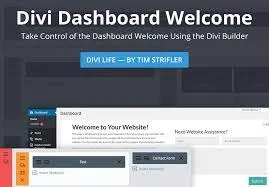
Divi Dashboard Welcome
Antivirus scan
Powered by ClamAV
✅ Verified clean
This product file has passed our security filters.
Want to run a fresh ClamAV scan right now? Takes a few seconds and shows scanner version, signature DB and live result.
This can take 5 to 30 seconds.
Clean file Threat detected
No threats detected in this file.
- File
- Size
- Scanned
- ClamAV
- Signature database
⚡ Powered by ClamAV
Scan could not be completed
Report product
If you detected an issue (broken file, malware, inappropriate content, etc.) let us know and we'll review it ASAP.
Sign in to reportNewer version out, or a problem?
About Divi Dashboard Welcome
When you hand over the site and the client logs in for the first time
Handing over a WordPress site often ends the same way: the client logs into the admin, sees the generic home screen, and calls you to ask where everything is. That first screen is the one most people overlook.
Divi Dashboard Welcome replaces that default home with a dashboard branded to you or your client. There you can place training videos and a contact form for requesting help.
Building the dashboard with Divi Builder, including forms and videos
Each dashboard is built with Divi Builder. You need Divi installed to create the dashboards, because the plugin relies on its builder. You can include:
- A contact form so the client can ask for help easily.
- Videos and tutorials that walk them through their new site.
You can start from one of the included templates, then change styles, text, and content afterwards.
Frequently asked questions about Divi Dashboard Welcome
Can it help guide clients through their new site?
Yes, you can add videos that walk them through their new site and a contact form for requesting help.
Can I show a different dashboard to each type of user?
Yes. You can show the same dashboard to all users or a different one for each role, including the default WordPress roles, the roles created by shop or membership plugins, and the custom roles you define yourself.
Can I use the same dashboard across several sites?
Yes. You can create a global dashboard for all your client sites and update it remotely, all at once.
Can I change the dashboard height or remove the close button?
Yes. You control the height and decide whether the button to dismiss the dashboard appears or not.
Choosing who sees each dashboard by role
You can show the dashboard to all users of the site or assign a different one to each role. It includes the default WordPress roles, the roles created by shop or membership plugins, and the custom roles you create yourself.
Full screen or just the welcome block
The dashboard can replace the entire WordPress home screen, or be limited to the welcome screen content and leave the rest of the panel widgets in view. The second option keeps the other widgets in view and only changes the welcome content.
Starting from 26 included layouts and extending them
The plugin includes 26 dashboard layouts that you can import. All of them are built with Divi, so editing the style and content is very easy. Use them as they are if they fit the client's brand, or treat them as a base for a dashboard of your own.
Topics
Version history
-
v
1.2 Current 8 Jan 2025
Customer reviews
Sign in to leave a review. Only people who have the product can review it.
No reviews for this product yet.
Frequently asked questions
-
GPL (General Public License) is the license under which WordPress and most premium plugins/themes are distributed. It grants you the right to use, modify and redistribute the software in as many projects as you want, with no domain restrictions.
-
Yes. With membership you get automatic updates via our GPLClub Updater plugin (installed on your WP, detects new versions and applies them). With individual purchase, you get one year of manual updates from your account.
-
Depends on the plan. Monthly: 3 domains. Semi-annual: 7. Annual and Lifetime: 15. Individual purchase: 1 domain.
-
GPLClub offers its own support for installation, configuration and compatibility. For direct support from the original author (feature requests, product-specific bugs), a license purchased from the author is required.