Easy Query Pro
Antivirus scan
Powered by ClamAV
✅ Verified clean
This product file has passed our security filters.
Want to run a fresh ClamAV scan right now? Takes a few seconds and shows scanner version, signature DB and live result.
This can take 5 to 30 seconds.
Clean file Threat detected
No threats detected in this file.
- File
- Size
- Scanned
- ClamAV
- Signature database
⚡ Powered by ClamAV
Scan could not be completed
Report product
If you detected an issue (broken file, malware, inappropriate content, etc.) let us know and we'll review it ASAP.
Sign in to reportNewer version out, or a problem?
About Easy Query Pro
For those who build custom listings in their theme without writing the query by hand
Building custom listings in WordPress often ends with queries copied from a forum and adjusted blindly, with the risk that the result is not what you wanted. Easy Query Pro is aimed at those who need to show content on their site and prefer to build it from a visual panel, even if they later want to see the code it generates.
If you already write your own queries, the plugin works mainly as a shortcut to test parameters and get the snippet ready for your template. If you never touch code, it lets you get the listing without opening a theme file.
From the query panel to the shortcode or your template code
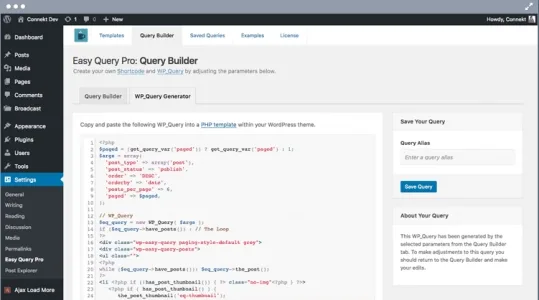
The Query Builder lets you adjust the query parameters visually. From what you configure, Easy Query Pro produces two outputs: an easy_query shortcode that you paste into any content area, widget or page template, and a WP_Query snippet that you can take directly into a theme file.
You can include several Easy Query instances on the same page, and enable pagination by adding paging="true" to the shortcode.
Templates that decide how each entry looks
Templates control what is displayed for each piece of content on the public side of the site. They are fully editable, with syntax highlighting, and you can create, modify and delete as many as you need. This way you can have a design for each content type in your theme, instead of one single design for everything.
Saved queries to reuse the same listing
A saved query can be viewed, modified and deleted with one click, and it works as a backup to manage and display the query via shortcode. You can create, view or modify custom WordPress queries with the click of a button.
Responsive layouts and examples with Owl Carousel and Slick Slider carousels
The design template library includes fully responsive layouts, ready to use on your site. The plugin's examples also show how to present results in a carousel with Owl Carousel or Slick Slider, and how several instances look on the same page.
Frequently asked questions about Easy Query Pro
Do I need to know how to program to use it?
Not to build the query, since the Query Builder constructs it with visual parameters. If you want the code, the plugin also gives you the WP_Query snippet to take into your template.
Where can I display a query?
The shortcode can be placed in any content area, in a widget or in a page template.
Can I have several listings on the same page?
Yes, you can include several Easy Query instances on a single page.
How do I turn on pagination?
By adding paging="true" to the shortcode.
Can I save a query to use it later?
Yes. Saved queries can be viewed, modified, deleted and displayed via shortcode.
Version history
-
v
2.3.1 Current 28 May 2024
Customer reviews
Sign in to leave a review. Only people who have the product can review it.
No reviews for this product yet.
Frequently asked questions
-
GPL (General Public License) is the license under which WordPress and most premium plugins/themes are distributed. It grants you the right to use, modify and redistribute the software in as many projects as you want, with no domain restrictions.
-
Yes. With membership you get automatic updates via our GPLClub Updater plugin (installed on your WP, detects new versions and applies them). With individual purchase, you get one year of manual updates from your account.
-
Depends on the plan. Monthly: 3 domains. Semi-annual: 7. Annual and Lifetime: 15. Individual purchase: 1 domain.
-
GPLClub offers its own support for installation, configuration and compatibility. For direct support from the original author (feature requests, product-specific bugs), a license purchased from the author is required.