Export Order Items Pro
Antivirus scan
Powered by ClamAV
✅ Verified clean
This product file has passed our security filters.
Want to run a fresh ClamAV scan right now? Takes a few seconds and shows scanner version, signature DB and live result.
This can take 5 to 30 seconds.
Clean file Threat detected
No threats detected in this file.
- File
- Size
- Scanned
- ClamAV
- Signature database
⚡ Powered by ClamAV
Scan could not be completed
Report product
If you detected an issue (broken file, malware, inappropriate content, etc.) let us know and we'll review it ASAP.
Sign in to reportNewer version out, or a problem?
About Export Order Items Pro
Closing the month with orders your accountant can actually read
Closing the month in a WooCommerce store usually ends the same way: someone downloads the orders, copies them into a spreadsheet and reshapes them into the columns the accountant asks for. Export Order Items Pro pulls those orders already filtered and with the fields in the order you need, so the report arrives ready for whoever is waiting for it.
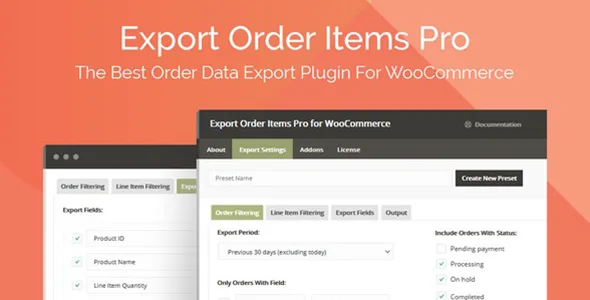
Choosing which fields appear in the report and in what order
The report builder works by drag and drop. You choose which fields to include, reorder them, change the title of each column and turn fields on or off with a toggle. You can also add custom fields from orders, order line items, variations and products, including those added by other WooCommerce extensions.
Filtering by date, status and product before exporting
The date selector offers common presets, such as the current month, or an exact start and end with date and time. Then you narrow by order status: pending payment, processing, completed, cancelled, on hold, refunded or failed. For product reports, you filter by category, tag or ID and decide whether free items, refunds and shipping data are included.
If you need finer conditions, conditional logic defines what to include based on the fields you pick, and you can generate reports by user role.
Reusable templates for the reports you repeat
Save the configuration as a preset and reuse it with one click. Presets can be edited or duplicated to start from a template when you need a different report, so each period closes with the same columns as the last.
Output formats and totals that people can read
Export to CSV, CSV-ASCII, XLS, XLSX, HTML or HTML Enhanced depending on what you plan to do with the file: send it as an attachment, publish it on your website or import it into your accounting software.
Reports can also be easy to read at a glance. You can show or hide the header row, leave an empty row after each group, add a totals column, choose how decimals look and sort by a field in ascending or descending order.
Downloading when needed or scheduling email delivery
There are two ways to use the tool, and it helps to know which one you need:
- Downloading a report by hand: create a new report or generate one from a preset and download it. Export Order Items Pro handles this on its own, with WooCommerce active.
- Scheduling automatic delivery: to have the report arrive by email on a fixed schedule, you add the Scheduled Email Reports for WooCommerce plugin, which integrates with the tool and is installed separately.
Frequently asked questions about Export Order Items Pro
Can I export to Excel or only to CSV?
You can export to XLS and XLSX, as well as CSV, CSV-ASCII, HTML and HTML Enhanced.
Can I export customers' billing and shipping details?
Yes. You include name, email, phone, billing address and shipping address, and choose how those fields are formatted.
Does it work with fields added by other plugins?
Yes. You can include order and product metadata and data from third-party WooCommerce extensions.
Can I automate recurring exports?
Yes, by combining the tool with Scheduled Email Reports for WooCommerce, which sends reports by email on the schedule you choose.
Topics
Version history
-
v
2.1.37 Current 22 Jan 2026
Customer reviews
Sign in to leave a review. Only people who have the product can review it.
No reviews for this product yet.
Frequently asked questions
-
GPL (General Public License) is the license under which WordPress and most premium plugins/themes are distributed. It grants you the right to use, modify and redistribute the software in as many projects as you want, with no domain restrictions.
-
Yes. With membership you get automatic updates via our GPLClub Updater plugin (installed on your WP, detects new versions and applies them). With individual purchase, you get one year of manual updates from your account.
-
Depends on the plan. Monthly: 3 domains. Semi-annual: 7. Annual and Lifetime: 15. Individual purchase: 1 domain.
-
GPLClub offers its own support for installation, configuration and compatibility. For direct support from the original author (feature requests, product-specific bugs), a license purchased from the author is required.