FAT Event – WordPress Event and Calendar Booking
Antivirus scan
Powered by ClamAV
✅ Verified clean
This product file has passed our security filters.
Want to run a fresh ClamAV scan right now? Takes a few seconds and shows scanner version, signature DB and live result.
This can take 5 to 30 seconds.
Clean file Threat detected
No threats detected in this file.
- File
- Size
- Scanned
- ClamAV
- Signature database
⚡ Powered by ClamAV
Scan could not be completed
Report product
If you detected an issue (broken file, malware, inappropriate content, etc.) let us know and we'll review it ASAP.
Sign in to reportNewer version out, or a problem?
About FAT Event – WordPress Event and Calendar Booking
How FAT Event organizes events with ticket categories
Publishing the date of an event is the easy part. What usually gets complicated is charging: different prices for each type of ticket, discounts for anyone who arrives with a code, and notices that reach people who already signed up in time. FAT Event covers that part inside WordPress, with a plugin to create and manage events on any website.
Ticket classification lets you define categories such as Economy, Premium or VIP, each with its own price. You can also set fees based on how many tickets one person buys, so the price changes when someone books one, two or three.
Coupons work as promotional codes: the buyer enters the code on the checkout page and gets the discount. Payments can be made with PayPal or Stripe, and each new booking can trigger an email notification to the administrator or the main organizer.
Email reminders alert people when an event is about to start. In addition, notifications can include a QR code with the booking details: full name, phone, email, event name and start and end dates.
Calendar and timetable views to show the schedule on your site
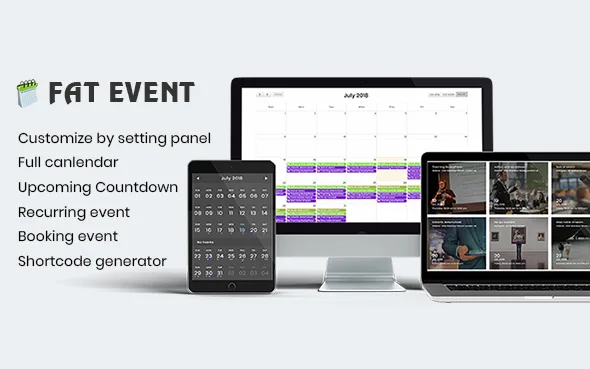
A clear schedule shows in how many people sign up, especially when there are several sessions on the same day. FAT Event includes a full calendar, a timetable view and a conference view, plus a countdown for upcoming events.
The seven event views are inserted with shortcode, and to build the code you have a shortcode builder. The views use five item styles, and image size, colors, font sizes and spacing are changed from the settings panel.
Events support image and video galleries, and they can be shown with an appearing animation effect. They can also be created from the public side of the site, without entering the admin panel.
When to choose FAT Event to sell tickets with your own fees
FAT Event fits if your site already runs on WordPress and you need to charge, not just show a schedule. It integrates with Google Maps to place the event venue, with PayPal and Stripe for payments, and with WPBakery Page Builder if you build your pages with it.
If you prefer bookings to go through the WooCommerce cart and checkout page, the integration needs WooCommerce installed and active. With it, the administrator configures bookings from those shop pages, and event variations also go through WooCommerce.
Frequently asked questions about FAT Event
Can I charge with Stripe and PayPal?
Yes. FAT Event includes integration with both gateways for bookings and payments.
What does the QR code in the confirmation include?
It goes in the notification email and includes the booking details, for example full name, phone, email, event name and start and end dates.
Can I sell tickets with different prices depending on the quantity?
Yes. You can create ticket categories such as Economy, Premium or VIP and set fees that change according to the number of tickets purchased.
Can it be translated?
Yes. It is ready for translation and includes the .mo file.
Version history
-
v
5.22 Current 24 Oct 2026
-
v
5.19 27 Jan 2026
Customer reviews
Sign in to leave a review. Only people who have the product can review it.
No reviews for this product yet.
Frequently asked questions
-
GPL (General Public License) is the license under which WordPress and most premium plugins/themes are distributed. It grants you the right to use, modify and redistribute the software in as many projects as you want, with no domain restrictions.
-
Yes. With membership you get automatic updates via our GPLClub Updater plugin (installed on your WP, detects new versions and applies them). With individual purchase, you get one year of manual updates from your account.
-
Depends on the plan. Monthly: 3 domains. Semi-annual: 7. Annual and Lifetime: 15. Individual purchase: 1 domain.
-
GPLClub offers its own support for installation, configuration and compatibility. For direct support from the original author (feature requests, product-specific bugs), a license purchased from the author is required.