Feedzy RSS Feeds WordPress Plugin
Antivirus scan
Powered by ClamAV
✅ Verified clean
This product file has passed our security filters.
Want to run a fresh ClamAV scan right now? Takes a few seconds and shows scanner version, signature DB and live result.
This can take 5 to 30 seconds.
Clean file Threat detected
No threats detected in this file.
- File
- Size
- Scanned
- ClamAV
- Signature database
⚡ Powered by ClamAV
Scan could not be completed
Report product
If you detected an issue (broken file, malware, inappropriate content, etc.) let us know and we'll review it ASAP.
Sign in to report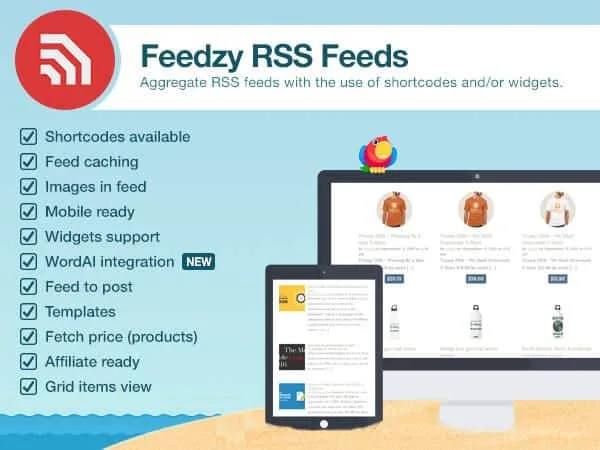
About Feedzy RSS Feeds WordPress Plugin
Showing content from other sites on your own often ends up as headlines copied by hand, links that go stale or custom code nobody wants to maintain. Feedzy solves that with RSS feeds: you choose the sources and the plugin brings in the latest they publish.
Feedzy RSS Feeds: a site that feeds itself from other sources
People who install an RSS aggregator are usually in one of these businesses: a news outlet or portal that needs headlines from several publications, a group of sites that wants to show the latest from the others on each one, or an affiliate site that lives on links. In all of them the same thing happens: a site whose content never refreshes loses visits, and refreshing it by hand doesn't scale. A feed turns that task into something automatic.
A real example of use: showing on a domain's homepage the latest posts from its subdomains, without programming anything.
What it does with feeds and what stays in the paid plans
The foundation is displaying feeds anywhere on the site: with Gutenberg, with Elementor, with shortcodes or with widgets. You can customize the layout, the style and which data is shown for each item.
- Feed to Post: instead of just displaying, it imports feed items as posts, pages or other content types. It allows filters by rules and keywords, custom schedules, automatic deletion and duplicate removal, plus exporting, uploading or cloning imports.
- Full text and images: a feed usually carries only a summary. Full-text import extracts the article from the source website.
- Tag actions: they chain improvements at import, such as replacing or trimming text, rewriting, translating or generating images with AI.
- Affiliate links: you can add your affiliate or referral IDs to feed URLs, and also import Amazon products through its advertising API.
Mind the limits: almost all of the above belongs to the Pro version. Full text, paraphrasing, Amazon and the AI integrations with OpenAI or OpenRouter require the Developer plan or higher, and built-in translation, WordAI and SpinnerChief the Agency plan. And a feed plugin depends on what the source publishes: if a site offers no RSS or only headlines, that is what you will get.
Questions from people about to install it
Can I use it to publish other people's content as if it were mine?
Technically it can import and rewrite content, but copying other people's articles without permission carries copyright and search ranking risks. Use it with your own sources, with permission, or by citing and linking to the original.
Can I use it with my page builder?
It works with Gutenberg, with Elementor, with shortcodes and with widgets.
Do I need the Pro version to start?
Not to display feeds. But if you plan to import full posts, filter in detail or monetize with affiliates, check first which plan includes each feature.
Does it slow down the site?
A user showing ten feeds per page says load time stays good. Even so, the more feeds you put on a single page, the more it is worth testing.
How to set up your first feed without filling the site with noise
Start with a single reliable source and a shortcode on a test page. Adjust how many items are shown and what is visible for each (title, excerpt, image) before replicating it on the homepage. If you move on to importing as posts, define filters from the start: an import without rules fills the site with repeated or irrelevant content, and cleaning it up later costs more than configuring it properly.
Topics
Version history
-
v
3.1.0 Current 22 Aug 2025
Customer reviews
Sign in to leave a review. Only people who have the product can review it.
No reviews for this product yet.
Frequently asked questions
-
GPL (General Public License) is the license under which WordPress and most premium plugins/themes are distributed. It grants you the right to use, modify and redistribute the software in as many projects as you want, with no domain restrictions.
-
Yes. With membership you get automatic updates via our GPLClub Updater plugin (installed on your WP, detects new versions and applies them). With individual purchase, you get one year of manual updates from your account.
-
Depends on the plan. Monthly: 3 domains. Semi-annual: 7. Annual and Lifetime: 15. Individual purchase: 1 domain.
-
GPLClub offers its own support for installation, configuration and compatibility. For direct support from the original author (feature requests, product-specific bugs), a license purchased from the author is required.