Fotomag – A Silky Minimalist Blogging Magazine WordPress Theme For Visual Storytelling
Antivirus scan
Powered by ClamAV
✅ Verified clean
This product file has passed our security filters.
Want to run a fresh ClamAV scan right now? Takes a few seconds and shows scanner version, signature DB and live result.
This can take 5 to 30 seconds.
Clean file Threat detected
No threats detected in this file.
- File
- Size
- Scanned
- ClamAV
- Signature database
⚡ Powered by ClamAV
Scan could not be completed
Report product
If you detected an issue (broken file, malware, inappropriate content, etc.) let us know and we'll review it ASAP.
Sign in to reportNewer version out, or a problem?
About Fotomag – A Silky Minimalist Blogging Magazine WordPress Theme For Visual Storytelling
A travel diary where the photo takes the lead
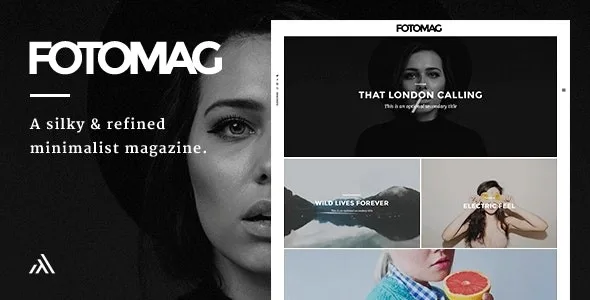
On a travel or recipe blog, photography is what keeps readers around: they come to look and read later. Fotomag is a minimalist design for visual blogs, with no distractions and a focus on the image, made for travel diaries, recipe collections or company blogs that tell stories with photos.
Imagine you publish an entry with a photo tour of your trip to the coast. When you create it you choose the Gallery format, and the series opens full screen, designed for touch on phones and for portrait photos. You can see how it looks in the gallery demo before you decide.
Videos and audio that open without leaving the post
If your post has a video, the Video format embeds YouTube, Vimeo, Kickstarter and Viddler. The video appears in a minimalist window when you press play. With YouTube, playback starts on its own when you press play and pauses if you close with the X or press the background. If you'd rather it not start on its own, the option to load the YouTube API for automatic playback can be turned on or off from the customizer.
The Audio format works the same way: any audio embed opens in the same window when you press play.
Frequently asked questions about Fotomag
How is the list of posts paginated?
You choose it from the customizer: numbered pages or infinite scroll with a load more button. With infinite scroll, the browser URL updates as you move through the homepage, a category or an archive.
Can I add my own CSS or JavaScript?
Custom CSS has its own box in the customizer. Custom JavaScript is no longer there: that option was removed, so the code goes in the child theme that comes with the theme.
What shows on posts without a featured image?
You can set a placeholder image that appears on those posts.
Does it work on high-density screens?
Yes. The theme is ready for Retina (HD) screens, and the logo has its own option for those displays.
Each post is set up piece by piece: category, likes, author and related
Once published, the reader sees these elements. Almost everything around a post can be turned on or off from the customizer, so you decide how much they see:
- The category above the title and a down arrow on the image.
- The like system, the reading progress bar and the publication date.
- The author box, whose profiles can show social icons, and the tags.
- The sharing block, the links to the previous and next post, the comments and the related posts.
Pages have their own settings for the progress bar, the sharing block and comments.
Left and right sticky menus and subscription in Fotomag
Fotomag has a slide-in menu on the right and another on the left, both sticky when you scroll. On the right one you can set a background image or color, adjust its opacity so it shows more or less, and change the letter color so it reads well on that background. The left one adds social icons, a search box in a modal window and a subscribe button with its own text, title, subtitle and background.
For the subscription form, MailChimp is the recommended service. The button and window texts are written from the customizer, and the window can also have its own background and opacity.
Typography and colors set so the photo doesn't compete
Titles and body text can use any Google Font, chosen from a list in the customizer, with size and line height set separately for desktop and mobile. You also choose the color of the text, headings, quotes, links with their hover state and widget links.
Code changes outside the customizer need a developer
Almost everything is controlled from the WordPress customizer, but if you want a feature the theme doesn't include or want to change its code, you will need a developer. The theme includes a ready-to-use child theme, where that code should go. Envato Studio is a good place to look for that person, since it is run by the same people who run ThemeForest.
Topics
Version history
-
v
2.0.5 Current 17 Jun 2024
Customer reviews
Sign in to leave a review. Only people who have the product can review it.
No reviews for this product yet.
Frequently asked questions
-
GPL (General Public License) is the license under which WordPress and most premium plugins/themes are distributed. It grants you the right to use, modify and redistribute the software in as many projects as you want, with no domain restrictions.
-
Yes. With membership you get automatic updates via our GPLClub Updater plugin (installed on your WP, detects new versions and applies them). With individual purchase, you get one year of manual updates from your account.
-
Depends on the plan. Monthly: 3 domains. Semi-annual: 7. Annual and Lifetime: 15. Individual purchase: 1 domain.
-
GPLClub offers its own support for installation, configuration and compatibility. For direct support from the original author (feature requests, product-specific bugs), a license purchased from the author is required.