Front End PM PRO
Antivirus scan
Powered by ClamAV
✅ Verified clean
This product file has passed our security filters.
Want to run a fresh ClamAV scan right now? Takes a few seconds and shows scanner version, signature DB and live result.
This can take 5 to 30 seconds.
Clean file Threat detected
No threats detected in this file.
- File
- Size
- Scanned
- ClamAV
- Signature database
⚡ Powered by ClamAV
Scan could not be completed
Report product
If you detected an issue (broken file, malware, inappropriate content, etc.) let us know and we'll review it ASAP.
Sign in to report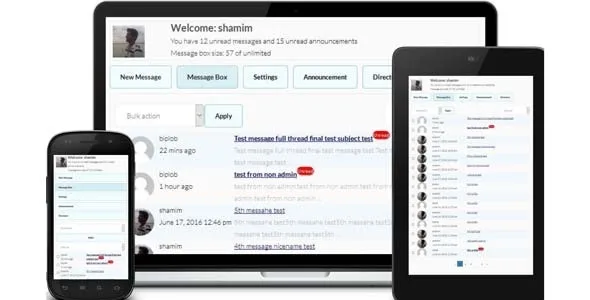
About Front End PM PRO
When your members talk outside your website
You run a community, a membership or a site with registered users and, sooner or later, someone asks to contact another member. Without a messaging system, they end up swapping emails or WhatsApp numbers, and the conversation (and the reason to come back to your site) slips away. Giving them access to the WordPress dashboard just so they can write to each other is not a good idea either.
Front End PM PRO solves that with a private message inbox that lives on a regular page of your site, not in the admin panel. It is placed with a shortcode, and your users never need to set foot in the dashboard.
Inbox, threads and attachments without leaving the page
Messages can be viewed as threads or as individual messages, and they support multiple attachments. You can also embed YouTube or WordPress TV videos inside the text. To make sure people notice what they receive:
- Notification sound and desktop notification in the browser.
- A user directory on the front end.
Role-based announcements and control over who talks to whom
Announcements can also be created from the front end.
Control is what keeps a community from turning into a spam mailbox between members:
- Whitelist and blacklist of users.
- Role-based permissions and blocking from one role to another.
- A mandatory waiting time between two sent messages.
- Each user can block other users.
If the administrator can read other people's private messages, tell your users about it in your privacy policy.
Groups, multiple recipients and email: what PRO adds
The PRO version adds extensions designed for larger communities: messages to multiple recipients, group messaging, read receipts, email templates with tags, a queue for sending announcement emails, and the ability to reply by email through email piping or POP3. If you only need two people to write to each other, most of this is overkill; if you manage teams, classes or interest groups, it starts to make sense.
It is not a forum or a chat: it is a private message inbox
Before installing it, be clear about what it covers and what you will have to solve on your own:
- Already solved: private messages between users, threads, attachments, directory, blocking and role-based permissions.
- You will cover it with another plugin: a public forum with topics open to everyone, or a live chat if you want instant conversation.
- You will cover it with another plugin or with WordPress: user registration and login, since the system works with existing users.
- You will do it by hand: creating the page with the shortcode and adding it to your menu.
- You will do it with CSS or a professional: a design very different from the default one, although message and button colors can be changed from the settings.
Frequently asked questions
Do my users have to enter the WordPress dashboard?
No. Everything works from a page on your site, which is exactly the idea behind the plugin.
Can I stop anyone from writing to anyone?
Yes. You can use role-based permissions, whitelists and blacklists, blocking from one role to another and a waiting time between messages. Users can also block anyone who bothers them.
Does it hold up with a lot of messages?
It stores messages in its own database table. Even so, on very active communities you should test it on your hosting before opening it to everyone.
Topics
Version history
-
v
11.2.2 Current 16 May 2024
Customer reviews
Sign in to leave a review. Only people who have the product can review it.
No reviews for this product yet.
Frequently asked questions
-
GPL (General Public License) is the license under which WordPress and most premium plugins/themes are distributed. It grants you the right to use, modify and redistribute the software in as many projects as you want, with no domain restrictions.
-
Yes. With membership you get automatic updates via our GPLClub Updater plugin (installed on your WP, detects new versions and applies them). With individual purchase, you get one year of manual updates from your account.
-
Depends on the plan. Monthly: 3 domains. Semi-annual: 7. Annual and Lifetime: 15. Individual purchase: 1 domain.
-
GPLClub offers its own support for installation, configuration and compatibility. For direct support from the original author (feature requests, product-specific bugs), a license purchased from the author is required.