FullEvents Event WordPress Plugin
Antivirus scan
Powered by ClamAV
✅ Verified clean
This product file has passed our security filters.
Want to run a fresh ClamAV scan right now? Takes a few seconds and shows scanner version, signature DB and live result.
This can take 5 to 30 seconds.
Clean file Threat detected
No threats detected in this file.
- File
- Size
- Scanned
- ClamAV
- Signature database
⚡ Powered by ClamAV
Scan could not be completed
Report product
If you detected an issue (broken file, malware, inappropriate content, etc.) let us know and we'll review it ASAP.
Sign in to report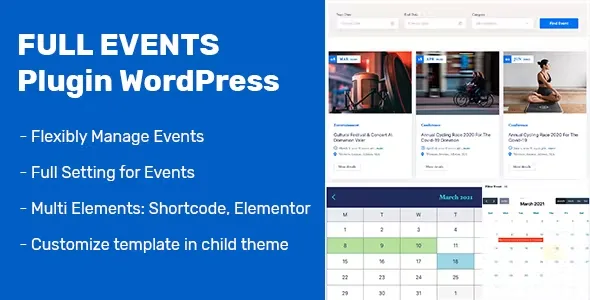
About FullEvents Event WordPress Plugin
An event expires, and your website has to know it
Publishing events on WordPress usually ends the same way: loose pages nobody updates, past dates still showing on the home page and a buy link hidden at the bottom of the text.
Event organizers have a problem other businesses don't: their product has an expiry date, and the audience decides late and in a hurry. What matters is that, at a glance, people can see when it is, where, how much it costs and how to get in. FullEvents is designed for that, and it also lets you hide past events so the schedule doesn't fill up with noise.
Every event with its own details, in a dedicated content type
The plugin adds a content type called Events, with categories and tags. For each event you fill in date, time, venue, price, organizer, phone, email, website, Google Maps location and an image gallery.
You can also mark events as featured, set a custom order and assign a different Elementor template to any single event. A conference and a small workshop don't have to share the same page.
Calendars, sliders and countdowns with Elementor
It includes 22 Elementor widgets and 20 shortcodes to show events as a calendar, slider, grid, countdown or single event page. They work with any standard WordPress theme.
- Calendars: a FullCalendar view and a simple monthly view, with a 12 or 24-hour format option and primary color control.
- AJAX search and filters: visitors filter, search and paginate without the page reloading.
- Countdown: a timer toward the event date to create urgency.
- Single event page: with related events, share buttons, tabs and navigation.
The calendar ships with more than 30 languages, there is a translation file (.pot), support for right-to-left languages and a layout that adapts to mobile, tablet and desktop.
Paid tickets need WooCommerce, which you install separately
FullEvents is not a payment gateway or a store by itself. Each event is set up to take bookings through WooCommerce or to send visitors to an external link. Here is how the work is split:
- Already solved: choosing per event whether to book with WooCommerce or with your own link, and showing the button on the event page.
- Already solved: the public schedule, filters, search and the pages for each event.
- Up to you: installing and setting up WooCommerce, with its payment methods, taxes and emails.
- Up to you: having Elementor installed, because the pages are designed with its widgets.
- Up to you: if you use an external ticketing service, having your account and event created there; the plugin only links to it.
- Up to you: writing the schedule, speakers and terms of each event.
If you need specific attendee management features, check in the demo whether they cover what you are looking for before deciding.
Which kind of organizer gets the most out of FullEvents
- Conferences and summits: schedule, speakers and ticket sales on the same website.
- Concerts and music venues: a visible countdown and buy button.
- Workshops and training: sessions with date, price and venue map.
- Webinars: events with an access link for those who sign up.
- Associations, churches and clubs: a public calendar of activities.
If all you want is a simple calendar inside a theme that doesn't use Elementor, this will be more than you need.
Frequently asked questions about FullEvents
Do I need Elementor Pro?
No, the free version of Elementor is enough.
Can I sell paid tickets?
Yes, through WooCommerce checkout. For free events you can link to an external booking page.
Does it work with my theme?
It is theme-independent and works with any standard WordPress theme.
Does it work for a multilingual site or with right-to-left writing?
Yes: it includes a translation file, a calendar in more than 30 languages and RTL compatibility. You write the text of each event in whatever language you need.
Topics
Version history
-
v
1.3.4 Current 24 Jun 2026
-
v
1.3.3 12 Mar 2026
Customer reviews
Sign in to leave a review. Only people who have the product can review it.
No reviews for this product yet.
Frequently asked questions
-
GPL (General Public License) is the license under which WordPress and most premium plugins/themes are distributed. It grants you the right to use, modify and redistribute the software in as many projects as you want, with no domain restrictions.
-
Yes. With membership you get automatic updates via our GPLClub Updater plugin (installed on your WP, detects new versions and applies them). With individual purchase, you get one year of manual updates from your account.
-
Depends on the plan. Monthly: 3 domains. Semi-annual: 7. Annual and Lifetime: 15. Individual purchase: 1 domain.
-
GPLClub offers its own support for installation, configuration and compatibility. For direct support from the original author (feature requests, product-specific bugs), a license purchased from the author is required.