Furnicom – Furniture Store WordPress Theme
Antivirus scan
Powered by ClamAV
✅ Verified clean
This product file has passed our security filters.
Want to run a fresh ClamAV scan right now? Takes a few seconds and shows scanner version, signature DB and live result.
This can take 5 to 30 seconds.
Clean file Threat detected
No threats detected in this file.
- File
- Size
- Scanned
- ClamAV
- Signature database
⚡ Powered by ClamAV
Scan could not be completed
Report product
If you detected an issue (broken file, malware, inappropriate content, etc.) let us know and we'll review it ASAP.
Sign in to report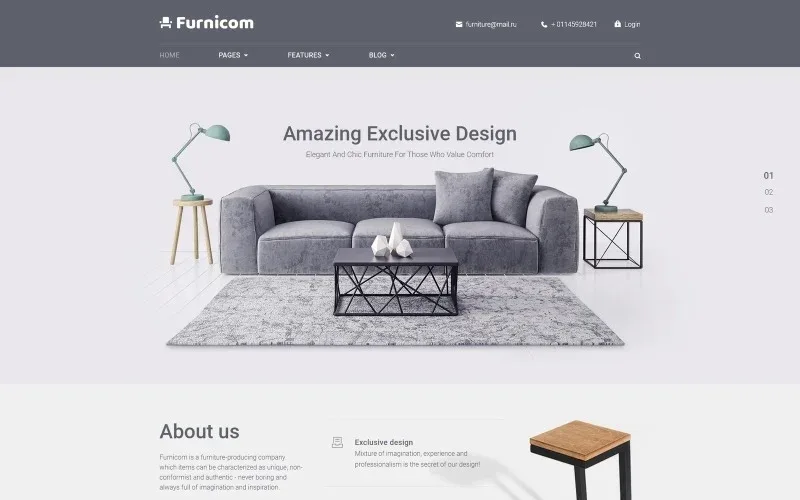
About Furnicom – Furniture Store WordPress Theme
Furnicom: a furniture website that answers questions before they are asked
Someone buying a sofa or a table does not decide in one click: they compare, measure the living room and worry about delivery and assembly. A website with pretty photos but no answers to those doubts ends up with idle visits. Furnicom is a WordPress theme for furniture makers and stores, with a demo that already organizes the catalog by type of piece and by room.
From first glance to contact: a walkthrough with Furnicom
Imagine you run a workshop that makes and sells furniture. This is how the theme would fit, step by step:
- Homepage: the demo opens with a slider of large messages, a brand introduction and three arguments (design, team, reasonable prices). Below, cards by category: chairs, tables, sofas, lighting, textiles and decor.
- Choosing a room: there are links by room (kids, office, dining, living, bedroom), which is how many people think when furnishing.
- Showing your work: the theme includes project pages with a standard layout and single pages for image, gallery, video and audio.
- Clearing doubts: testimonials, FAQs, team profiles and animated counters. In the demo, the testimonials talk about exactly what worries the buyer: deadlines, delivery and assembly.
- Taking the step: contact forms, maps, a contact page and a booked appointment template.
Watch out for two things. The demo's product cards show a "from" price and a "more" link, so they work as a showcase; if you need a cart and online payment, check in the demo whether they exist before deciding. And the appointment template is a page with its own design, so do not take it for a booking system with a calendar.
Questions people ask when building a furniture store with Furnicom
Does it work for a store with a shopping cart?
The demo is set up as a catalog and company presentation. If your sales are online from start to finish, verify in the demo that the purchase flow is there, because it cannot be taken for granted.
Can I use it if I build to order and have no fixed catalog?
Yes, it fits well: the project and service pages, plus the forms, let you show finished work and collect orders.
Does it include pages to help customers?
It includes templates for FAQs, pricing, careers, clients, team and testimonials, plus maintenance, coming soon, 404 and search results.
How many header designs does it offer?
Seven header styles and three footer styles.
Seven headers, three footers and a blog with five layouts
The header matters more than it seems in a furniture store: the search, the user login and the phone number live there.
The blog supports classic, modern, grid, masonry and justified layouts, with a left sidebar, a right sidebar or none. It supports standard, image, gallery, quote, link, video and audio posts. It is useful if you want to publish trends, decor ideas or guides to using space well, which is what people look for when they don't yet know what to buy.
Page elements include calls to action, pricing tables, tabs, toggles, maps, sliders and an audio player.
What to check in the demo before choosing Furnicom
The demo is mostly corporate and visual. See how the category grid behaves on your phone, whether the contact flow is enough to close a sale and whether the project pages show your furniture the way you want. If you need to filter hundreds of items by size or material, consider whether this theme is enough or whether it needs an additional plugin.
Topics
Version history
-
v
2.0.17 Current 13 Jun 2024
Customer reviews
Sign in to leave a review. Only people who have the product can review it.
No reviews for this product yet.
Frequently asked questions
-
GPL (General Public License) is the license under which WordPress and most premium plugins/themes are distributed. It grants you the right to use, modify and redistribute the software in as many projects as you want, with no domain restrictions.
-
Yes. With membership you get automatic updates via our GPLClub Updater plugin (installed on your WP, detects new versions and applies them). With individual purchase, you get one year of manual updates from your account.
-
Depends on the plan. Monthly: 3 domains. Semi-annual: 7. Annual and Lifetime: 15. Individual purchase: 1 domain.
-
GPLClub offers its own support for installation, configuration and compatibility. For direct support from the original author (feature requests, product-specific bugs), a license purchased from the author is required.