GD bbPress Toolbox Pro
Antivirus scan
Powered by ClamAV
✅ Verified clean
This product file has passed our security filters.
Want to run a fresh ClamAV scan right now? Takes a few seconds and shows scanner version, signature DB and live result.
This can take 5 to 30 seconds.
Clean file Threat detected
No threats detected in this file.
- File
- Size
- Scanned
- ClamAV
- Signature database
⚡ Powered by ClamAV
Scan could not be completed
Report product
If you detected an issue (broken file, malware, inappropriate content, etc.) let us know and we'll review it ASAP.
Sign in to reportNewer version out, or a problem?
About GD bbPress Toolbox Pro
A support forum fills up with code pasted halfway
Support and community forums share a problem that few people mention before setting them up: users post code without formatting, attach screenshots of any size, and repeat in new threads what was already solved two pages back. Whoever moderates ends up fixing posts by hand and hunting for lost answers. GD bbPress Toolbox Pro is a plugin for bbPress that expands forums with many new features.
Let's look at a typical case: a help forum for a product with many new users, from someone's first question to the administrator's weekly review of the forum.
Frequently asked questions about GD bbPress Toolbox Pro
Does it need bbPress to work?
Yes. It extends bbPress forums, so bbPress has to be installed and active.
How many features does it include, and can I choose which ones to use?
The current version includes 63 features on its Features page. You can enable or disable each one separately; seven are always active and cannot be turned off.
Where are the files users upload stored?
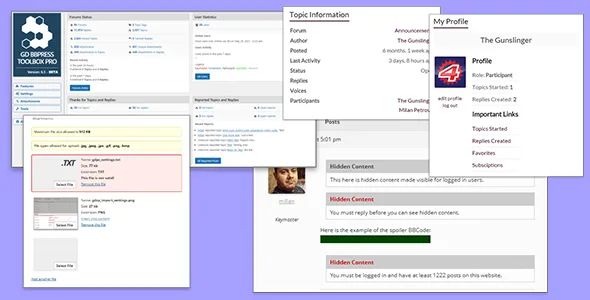
In the WordPress Media Library. The plugin panel shows the list of attachments, with filters and controls, and a second list with upload errors.
Does it have features for BuddyPress?
Yes. It includes its own settings for BuddyPress, such as signatures and notifications.
From a first message with code to a well formatted reply
The new user opens the topic editor and sees a BBCodes toolbar. They can add bold, center text or change colors from that toolbar, because the plugin includes more than 40 BBCodes, from basic formatting to images and videos. For code there is syntax highlighting, so it displays well in technical replies.
If they want to hide part of a message until a predefined condition is met, or show it only on mouse hover, there is a BBCode for that. YouTube and Vimeo videos are embedded and resized to fit the screen.
Screenshots and files that do not get out of hand
Before the forum fills up with heavy files, you decide which file types are allowed, the maximum size and how many attachments fit in each message. If you need a format that is not on the list, you can add it. Each forum also has its own settings box to override some of those rules.
- Image previews, with thumbnails of configurable size.
- File-type icons.
- Bulk download when a topic has several attachments.
As a moderator, a box in each topic and reply lets you add files or review the ones already uploaded.
When a thread gets out of control: report, close and mute
Users can report posts and other users, and the plugin panel lets you review that content. The plugin lets you close topics, lock topics or whole forums, and mute a user or a forum. For repeated replies, there are canned replies.
The main WordPress dashboard gets two widgets, one with the latest topics and replies and another with online user statistics.
Coming back to the forum and finding what is new without searching
Someone who returns after a few days wants to know what has changed. The plugin tracks each user's last activity and works out new topics, new replies in topics they already read, and topics they have not opened yet. It also counts how many users and visitors are online.
It needs bbPress active, and two features are still in beta
This plugin extends bbPress forums, so bbPress has to be installed and active.
In the feature list, two features are marked as beta: Forum Actions Bar Booster and Mark As Read. If your forum depends on them, review them carefully before using them on a forum with a lot of activity.
Topics
Version history
-
v
7.7.2 Current 13 Feb 2025
Customer reviews
Sign in to leave a review. Only people who have the product can review it.
No reviews for this product yet.
Frequently asked questions
-
GPL (General Public License) is the license under which WordPress and most premium plugins/themes are distributed. It grants you the right to use, modify and redistribute the software in as many projects as you want, with no domain restrictions.
-
Yes. With membership you get automatic updates via our GPLClub Updater plugin (installed on your WP, detects new versions and applies them). With individual purchase, you get one year of manual updates from your account.
-
Depends on the plan. Monthly: 3 domains. Semi-annual: 7. Annual and Lifetime: 15. Individual purchase: 1 domain.
-
GPLClub offers its own support for installation, configuration and compatibility. For direct support from the original author (feature requests, product-specific bugs), a license purchased from the author is required.