GeoDirectory Marker Cluster
Antivirus scan
Powered by ClamAV
✅ Verified clean
This product file has passed our security filters.
Want to run a fresh ClamAV scan right now? Takes a few seconds and shows scanner version, signature DB and live result.
This can take 5 to 30 seconds.
Clean file Threat detected
No threats detected in this file.
- File
- Size
- Scanned
- ClamAV
- Signature database
⚡ Powered by ClamAV
Scan could not be completed
Report product
If you detected an issue (broken file, malware, inappropriate content, etc.) let us know and we'll review it ASAP.
Sign in to report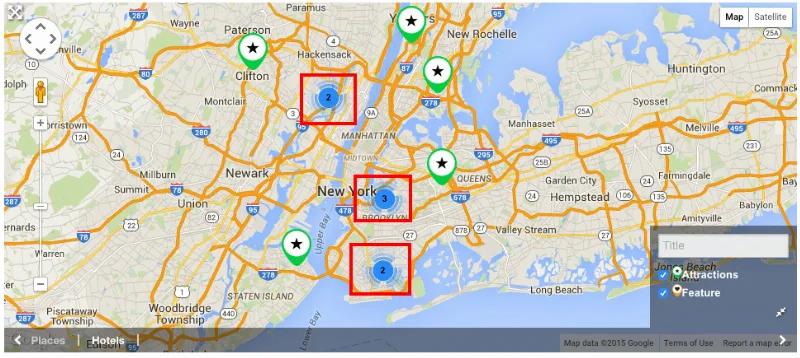
About GeoDirectory Marker Cluster
The more successful your directory gets, the worse its map looks
With few listings, a directory map looks clean. As it grows, it turns into a smear of overlapping markers where nobody can tell anything apart, and that is exactly where the piece visitors rely on most to decide where to go fails. It is an uncomfortable paradox: the directory's success degrades its own experience.
GeoDirectory Marker Cluster is a GeoDirectory add-on that groups nearby listings into a single marker showing how many there are in that area. The map becomes readable at a glance again, and the browser stops struggling with thousands of loose points.
What the visitor sees when browsing the map
With clustering active, each group marker carries the number of listings it holds. That tells users where results are concentrated before they touch anything.
- When zooming: the groups break apart and the individual listings appear.
- When clicking a group: the map zooms into that area and reclusters whatever applies there.
- Grid size and zoom levels: you adjust them to decide when and how strongly clustering happens.
- Per-map settings: if your site has several maps, you apply clustering to one, several or all of them.
It works with both Google Maps and Open Street Maps (OSM), so it does not force you to change map provider.
Browser or server rendering: how GeoDirectory Marker Cluster adapts to your size
The add-on offers two ways to calculate the clusters, and choosing well is the most important part of the setup.
Browser rendering (client-side). This is the option for small or medium directories: the map responds instantly because it already has the data loaded. The problem appears when listings number in the thousands, because the browser can slow down or fail when handling so many markers.
Server rendering (server-side). Here the server does the heavy lifting and sends the browser only the information needed for what is on screen. It is designed for very large directories, even with millions of listings, that need a responsive map.
Do you need GeoDirectory Marker Cluster or not yet?
It is an add-on, not a standalone plugin: it needs the GeoDirectory core plugin to work. It also does not change the look of each individual marker or add filters to the map; it only clusters. It is compatible with GeoDirectory's Custom Post Types and Custom Map Styles add-ons. If your directory has few listings and the map already reads well, you probably do not need it yet.
Does it work with Google Maps and OSM?
Yes, with both.
Can I enable it on only some maps?
Yes. It is configured per map, so you choose which ones get clustering.
What happens when a user clicks a cluster?
The map zooms into that location and reclusters the markers there; as you keep zooming in, the individual listings appear.
Is it useful for a small directory?
Yes, with browser rendering, which gives responsive maps. But if your markers already look separate and clear, the benefit will be small.
Topics
Version history
-
v
2.3.4 Current 28 Mar 2026
Customer reviews
Sign in to leave a review. Only people who have the product can review it.
No reviews for this product yet.
Frequently asked questions
-
GPL (General Public License) is the license under which WordPress and most premium plugins/themes are distributed. It grants you the right to use, modify and redistribute the software in as many projects as you want, with no domain restrictions.
-
Yes. With membership you get automatic updates via our GPLClub Updater plugin (installed on your WP, detects new versions and applies them). With individual purchase, you get one year of manual updates from your account.
-
Depends on the plan. Monthly: 3 domains. Semi-annual: 7. Annual and Lifetime: 15. Individual purchase: 1 domain.
-
GPLClub offers its own support for installation, configuration and compatibility. For direct support from the original author (feature requests, product-specific bugs), a license purchased from the author is required.