Google Apps Login Enterprise
Antivirus scan
Powered by ClamAV
✅ Verified clean
This product file has passed our security filters.
Want to run a fresh ClamAV scan right now? Takes a few seconds and shows scanner version, signature DB and live result.
This can take 5 to 30 seconds.
Clean file Threat detected
No threats detected in this file.
- File
- Size
- Scanned
- ClamAV
- Signature database
⚡ Powered by ClamAV
Scan could not be completed
Report product
If you detected an issue (broken file, malware, inappropriate content, etc.) let us know and we'll review it ASAP.
Sign in to reportNewer version out, or a problem?
About Google Apps Login Enterprise
Automatic WordPress sign-ups and removals that follow the Google account
In a small or mid-sized company, adding someone to the website usually means a line on a list, forgotten until someone asks for access. The riskiest part comes later: whoever leaves the team keeps a WordPress account with its password for months. Google Apps Login changes that flow, because WordPress accounts are pulled from your Google Workspace domain (formerly G Suite or Google Apps) and access depends on that account.
It fits corporate intranets especially well, as well as sites where access should be limited to people in the organization, who already have an account on that domain.
Google sign-in and profiles that fill in on their own
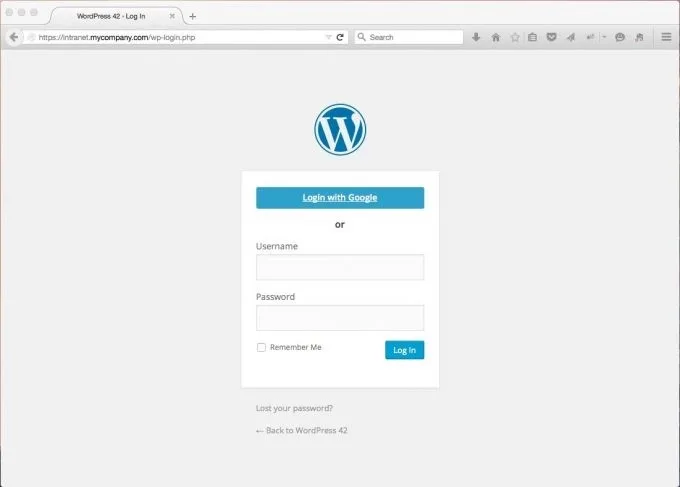
Users sign in with one click using Google as single sign-on (SSO). They don't need to remember another password for the site, and administrators stop dealing with lost accounts. Sign-in uses OAuth2, the protocol Google recommends, and if two-step verification is enabled on the account, it applies here too.
- Creates WordPress users automatically when they authenticate from the Google Workspace domain you specify.
- Fills in the profile with the person's real name, instead of a username that is hard to recognize.
- Assigns a default WordPress role to new users.
- Also logs the user out of Google when they log out of WordPress.
Only creates accounts for users on your Google Workspace domain
Automatic creation is limited to the domain you set up. Anyone who signs in with an account from another domain will not be able to create an account on the site, so if your team works with several domains, you will need to plan for that from the start.
Frequently asked questions about Google Apps Login
Can I still sign in with a WordPress username and password?
You can turn that access off. That way, anyone who leaves the company cannot sign in again with a password they already had, since only Google sign-in remains.
Does it also work for users who already had WordPress accounts?
Yes. One-click Google sign-in also works for WordPress users who already existed on the site.
Can I assign a different role by department?
Yes, as long as the department is a Google group or an organizational unit. Each group or unit is linked to a WordPress role.
Is there a record of what the plugin changes in accounts?
Yes. It includes a full report of the changes it makes to WordPress accounts.
WordPress roles by Google groups and organizational units
A corporate site rarely needs everyone to have the same permissions. With Google Apps Login you specify which Google groups or organizational units correspond to each WordPress role, so the person running administration and the person publishing content sign in with different permissions.
This also covers staff departures: when someone changes position, their role follows their Google membership, and anyone who leaves the organization no longer has unauthorized access to sensitive sites.
What you need in Google Workspace before choosing it
Google Apps Login requires a Google Workspace domain, because the accounts it creates and the roles it assigns come from there. Setup involves registering your site in Google's Developer Console, and the plugin's documentation guides you through that process.
It serves small businesses as well as large organizations, including government bodies. It makes most sense when staff or the people using the site already have an account on that domain.
Topics
Version history
-
v
3.4.3 Current 15 May 2024
Customer reviews
Sign in to leave a review. Only people who have the product can review it.
No reviews for this product yet.
Frequently asked questions
-
GPL (General Public License) is the license under which WordPress and most premium plugins/themes are distributed. It grants you the right to use, modify and redistribute the software in as many projects as you want, with no domain restrictions.
-
Yes. With membership you get automatic updates via our GPLClub Updater plugin (installed on your WP, detects new versions and applies them). With individual purchase, you get one year of manual updates from your account.
-
Depends on the plan. Monthly: 3 domains. Semi-annual: 7. Annual and Lifetime: 15. Individual purchase: 1 domain.
-
GPLClub offers its own support for installation, configuration and compatibility. For direct support from the original author (feature requests, product-specific bugs), a license purchased from the author is required.