Greet Bubble Pro Plugin
Antivirus scan
Powered by ClamAV
✅ Verified clean
This product file has passed our security filters.
Want to run a fresh ClamAV scan right now? Takes a few seconds and shows scanner version, signature DB and live result.
This can take 5 to 30 seconds.
Clean file Threat detected
No threats detected in this file.
- File
- Size
- Scanned
- ClamAV
- Signature database
⚡ Powered by ClamAV
Scan could not be completed
Report product
If you detected an issue (broken file, malware, inappropriate content, etc.) let us know and we'll review it ASAP.
Sign in to report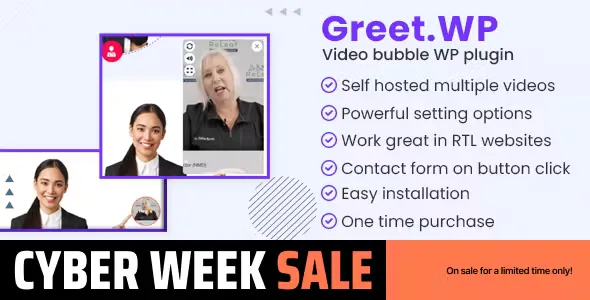
About Greet Bubble Pro Plugin
A website that doesn't speak and a visitor who doesn't write
Many people land on a website with a question and leave without asking anything, because writing to a stranger feels like effort. An empty form or a text chat waits for the visitor to take the first step, and that step is the hardest one. Greet Bubble Pro places a floating video bubble in a corner of the screen: someone greets the visitor and explains what you offer before they have to decide whether to write.
How the Greet Bubble Pro bubble works
The video is hosted on your own site and shown in a bubble at the bottom right or bottom left corner. You can adjust its position with a specific distance from the edge, change the colors of the buttons and the border, and let visitors close it so it doesn't come back during that session.
- Several videos in the same bubble.
- Buttons with external links or that play other videos.
- Loop control and time-based loading of the animation.
- Icons for the buttons and a tooltip on the buttons.
A different video for each page, post or product
Each page, post and WooCommerce product has its own options box to assign a different video. That way, a product page can show the person selling it explaining it, while the contact page shows a different greeting. You can also limit the bubble to specific pages and decide whether it shows on desktop, tablet or mobile, which is useful if the video covers content on small screens.
Buttons that open WhatsApp or your forms
This is what sets it apart from a simple video window. A bubble button can open a WhatsApp form whose data reaches your WhatsApp app, with variables to build the message (for example the current URL). It also works with Web3forms and with third-party form shortcodes such as Contact Form 7, Gravity Forms or WPForms. If you already have a working form, you hook it to the bubble instead of rebuilding it.
The video and the script are up to you
What the plugin already solves and what is up to you:
- Solves: showing the bubble, assigning videos by page, connecting buttons to WhatsApp and forms, adjusting colors, position and visibility by device, and adding your own CSS or JS from its panel.
- Up to you: recording and editing the video. The plugin neither produces nor improves it.
- Up to you: the file size. Since it is hosted on your server, a heavy video slows loading, so it is worth compressing it.
- Up to you: the form. To use Contact Form 7, Gravity Forms or WPForms, you must have that plugin installed and configured.
It is not a live chat either: the visitor doesn't talk to anyone in real time, and the video is the same for everyone. A tip: record a few seconds, look at the camera and finish with a clear invitation to click a button.
Which businesses get the most out of it
It fits where personal trust weighs before contact: medical practices, real estate agents (a general greeting and different videos per property), professionals with a personal brand, online stores that want to present a product, and businesses that want to give a welcome. If your site is about health, be careful with what you promise in the video and with the data you request in a form.
Frequently asked questions
Can I put a different video on each WooCommerce product?
Yes, each product has its own options box to choose the video.
Can it be hidden on mobile?
Yes, there are visibility settings for desktop, tablet and mobile.
Can I connect WhatsApp?
Yes, through a WhatsApp form on a bubble button. The data the visitor fills in reaches your WhatsApp.
Do I need to host the video on YouTube?
No, the video is hosted on your own site.
Does it work on multilingual or right-to-left sites?
Yes, it supports multilingual sites, RTL writing and multisite.
Topics
Version history
-
v
2.2.10 Current 5 Sep 2026
-
v
1.4.8 8 May 2024
Customer reviews
Sign in to leave a review. Only people who have the product can review it.
No reviews for this product yet.
Frequently asked questions
-
GPL (General Public License) is the license under which WordPress and most premium plugins/themes are distributed. It grants you the right to use, modify and redistribute the software in as many projects as you want, with no domain restrictions.
-
Yes. With membership you get automatic updates via our GPLClub Updater plugin (installed on your WP, detects new versions and applies them). With individual purchase, you get one year of manual updates from your account.
-
Depends on the plan. Monthly: 3 domains. Semi-annual: 7. Annual and Lifetime: 15. Individual purchase: 1 domain.
-
GPLClub offers its own support for installation, configuration and compatibility. For direct support from the original author (feature requests, product-specific bugs), a license purchased from the author is required.