GretaThemes – Yosemite
Antivirus scan
Powered by ClamAV
✅ Verified clean
This product file has passed our security filters.
Want to run a fresh ClamAV scan right now? Takes a few seconds and shows scanner version, signature DB and live result.
This can take 5 to 30 seconds.
Clean file Threat detected
No threats detected in this file.
- File
- Size
- Scanned
- ClamAV
- Signature database
⚡ Powered by ClamAV
Scan could not be completed
Report product
If you detected an issue (broken file, malware, inappropriate content, etc.) let us know and we'll review it ASAP.
Sign in to report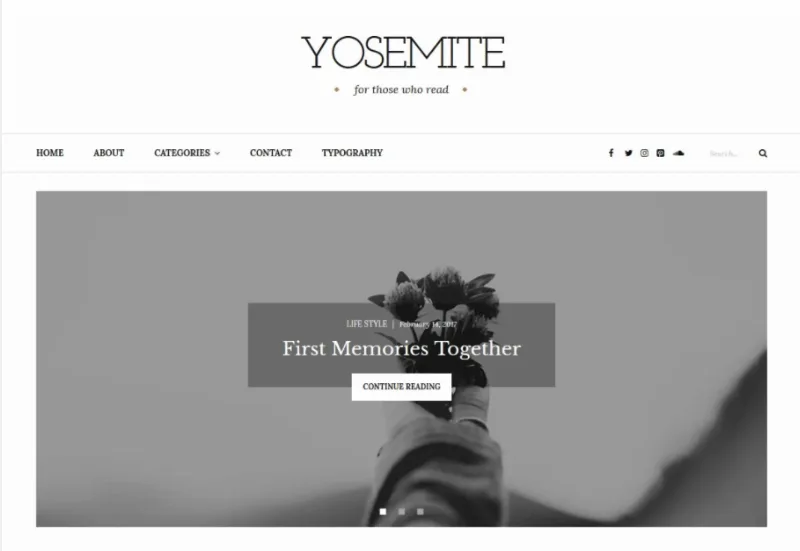
About GretaThemes – Yosemite
Yosemite: a personal blog where your best posts don't get buried
Running a personal blog has a problem hardly anyone mentions at the start: the best thing you published last month ends up buried under this week's posts, and people arriving from Google read one post and leave. GretaThemes Yosemite is a blog theme for personal, lifestyle, fashion or travel sites, with a classic layout and careful typography, designed to keep readers browsing instead of leaving.
It works in Chrome, Firefox, Safari and Edge, adapts to mobile, tablet and desktop, supports widgets and is ready to be translated into your language.
Slider, related posts and sticky menu: three ways to keep readers around
This is what really works in favor of your archive:
- Featured content slider: you put the posts you most want read in a carousel on the homepage, not just the newest ones.
- Related posts: after finishing an entry, readers see recommendations from your own blog, a natural way to bring old articles back.
- Sticky header: the main navigation stays at the top while scrolling, so nobody has to go back to the top to move around.
- Custom logo: uploaded from the WordPress options, without touching code.
Fonts, colors and Instagram in the footer: PRO version only
Yosemite comes in a free version and a PRO version, and the difference matters if your blog lives on its visual identity. Before deciding, look at this split:
- What it already solves: responsive design, featured slider, sticky menu, related posts and your own logo.
- PRO only: one-click demo import, infinite scroll, your Instagram images in the footer or sidebar, custom fonts and custom colors.
- What you'll do by hand in the free one: build the site from scratch, with no demo importer, and stay with the starting typography and colors.
- What you'll cover with another tool: anything outside a blog (shop, bookings, complex forms), because Yosemite is designed for publishing and reading posts.
How Yosemite feels as your blog grows
Infinite scroll loads more posts when you reach the bottom of the page and supports automatic and manual mode. If you have a large archive, check it in the demo before choosing.
The Instagram integration shows your images in an attractive format in the footer or sidebar. It makes sense if your content is visual (fashion, travel, daily life), and less so if you write long texts with hardly any photos.
Frequently asked questions about Yosemite
Can I try it without paying?
Yes, there is a free version. However, it does not include demo import, infinite scroll, Instagram in the footer, or custom fonts and colors.
Is it useful for anything other than a blog?
It is designed for personal, lifestyle, fashion and travel blogs. If you need a shop or a portfolio, check in the demo whether it fits what you are looking for.
Can I change the colors to match my brand?
With custom colors and fonts, yes, but that option belongs to the PRO version.
Is it translatable and mobile-friendly?
Yes: it is translation ready, responsive on any screen and optimized to load fast.
Topics
Version history
-
v
1.5.4 Current 17 Jun 2024
Customer reviews
Sign in to leave a review. Only people who have the product can review it.
No reviews for this product yet.
Frequently asked questions
-
GPL (General Public License) is the license under which WordPress and most premium plugins/themes are distributed. It grants you the right to use, modify and redistribute the software in as many projects as you want, with no domain restrictions.
-
Yes. With membership you get automatic updates via our GPLClub Updater plugin (installed on your WP, detects new versions and applies them). With individual purchase, you get one year of manual updates from your account.
-
Depends on the plan. Monthly: 3 domains. Semi-annual: 7. Annual and Lifetime: 15. Individual purchase: 1 domain.
-
GPLClub offers its own support for installation, configuration and compatibility. For direct support from the original author (feature requests, product-specific bugs), a license purchased from the author is required.