Growsass – Software Landing Page WordPress Theme
Antivirus scan
Powered by ClamAV
✅ Verified clean
This product file has passed our security filters.
Want to run a fresh ClamAV scan right now? Takes a few seconds and shows scanner version, signature DB and live result.
This can take 5 to 30 seconds.
Clean file Threat detected
No threats detected in this file.
- File
- Size
- Scanned
- ClamAV
- Signature database
⚡ Powered by ClamAV
Scan could not be completed
Report product
If you detected an issue (broken file, malware, inappropriate content, etc.) let us know and we'll review it ASAP.
Sign in to report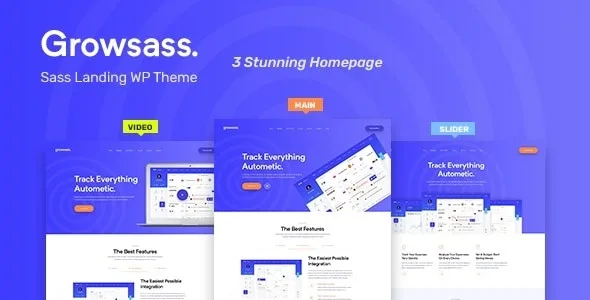
About Growsass – Software Landing Page WordPress Theme
If changing a headline means touching the app, your sales site will age
Your software already works and you need to fix a price on the home page, add a plan or publish an article. If the sales site lives inside the product's code, that change waits its turn behind bugs and new features. The home page stays as it was on launch day.
Separating the commercial site from the application lets the people who sell edit without disturbing the people who code. Your product stays on its own system, and the page that explains it moves to a WordPress anyone on the team can touch.
Growsass, by Theme_Pure, is a landing page theme for software, SaaS, web applications and startups. It can also serve to showcase an app. With it you build that commercial layer: the product presentation, the plans and the blog, on a visual builder.
Three home pages and more than 35 WPBakery elements
Growsass is built with Visual Composer, now called WPBakery, and on Bootstrap. It includes 3 demo home pages, one-click import and a blog, with a fully responsive design.
It adds more than 35 custom elements for the builder. These include:
- Growsass Slider, to present messages in a carousel.
- Features Content, to explain the features.
- Growsass Work, to show your work.
- Growsass Pricing, for the plans table.
- Growsass Blog, to bring the latest articles to the home page.
Colors, typography and lead capture
Growsass settings live in the WordPress Customizer. From there you control the header and footer, the colors and the typography, and there is a switch for the side info panel.
It has an option for right-to-left writing, useful if your market needs it. It also comes with MailChimp integration, to gather people who want launch news, and Contact Form 7, for demo requests or sales inquiries. What you do with those contacts afterwards depends on your own process.
Showing plans and charging for them are separate jobs
Growsass is the part seen before signing up. The plans element shows the prices. Its features include no user registration, no login to your application, no billing and no subscriptions.
Signup happens in your software, which lives on its own system, so you will need to link the site to that page and check the step from one to the other.
Setting up Growsass and getting the home page ready
It needs WPBakery, which comes in the theme package as js_composer.zip, and the One Click Demo Import plugin for the quick import.
- Upload the theme in Appearance, Themes, Add New. If that fails, copy the folder to /wp-content/themes/ by FTP.
- Install WPBakery and then the essential plugins from Appearance, Install Plugins.
- Import the demo in Appearance, Import Demo Data.
- In Settings, Permalinks, choose Post name.
- Assign a menu to the Primary Menu location, which is mandatory.
- In Settings, Reading, set a static page as the front page and select Home.
If the site already has content, it is recommended to reset the database before importing. Do that only on an installation you can afford to lose.
More themes for presenting software
If you prefer another base, look at Saasland. There are also Pollock and Framer on the same ground.
If what you are presenting is a mobile app, look at Naxos. And for the builder, WPBakery Page Builder is in the catalog separately.
Growsass through a product team's eyes
Does it work with Elementor?
Its custom elements are for WPBakery, the builder it is made with. If your team works with another one, bear in mind you would lose those elements.
Can I sell subscriptions directly?
The theme presents the plans, but its features include no payments or subscriptions. Signup and payment stay on your own system.
Does it work to showcase a mobile app?
Yes, it is also meant as an app showcase site.
Does it adapt to right-to-left languages?
It has a specific setting for that writing direction.
Is importing the demo mandatory?
No, although it is the most direct way to start. You can also import the XML file by hand with the WordPress tool.
Topics
Version history
-
v
1.0.6 Current 18 Jun 2024
Customer reviews
Sign in to leave a review. Only people who have the product can review it.
No reviews for this product yet.
Frequently asked questions
-
GPL (General Public License) is the license under which WordPress and most premium plugins/themes are distributed. It grants you the right to use, modify and redistribute the software in as many projects as you want, with no domain restrictions.
-
Yes. With membership you get automatic updates via our GPLClub Updater plugin (installed on your WP, detects new versions and applies them). With individual purchase, you get one year of manual updates from your account.
-
Depends on the plan. Monthly: 3 domains. Semi-annual: 7. Annual and Lifetime: 15. Individual purchase: 1 domain.
-
GPLClub offers its own support for installation, configuration and compatibility. For direct support from the original author (feature requests, product-specific bugs), a license purchased from the author is required.