GUST PRO BUILD WEBSITES WITH WORDPRESS & TAILWIND CSS
Antivirus scan
Powered by ClamAV
✅ Verified clean
This product file has passed our security filters.
Want to run a fresh ClamAV scan right now? Takes a few seconds and shows scanner version, signature DB and live result.
This can take 5 to 30 seconds.
Clean file Threat detected
No threats detected in this file.
- File
- Size
- Scanned
- ClamAV
- Signature database
⚡ Powered by ClamAV
Scan could not be completed
Report product
If you detected an issue (broken file, malware, inappropriate content, etc.) let us know and we'll review it ASAP.
Sign in to report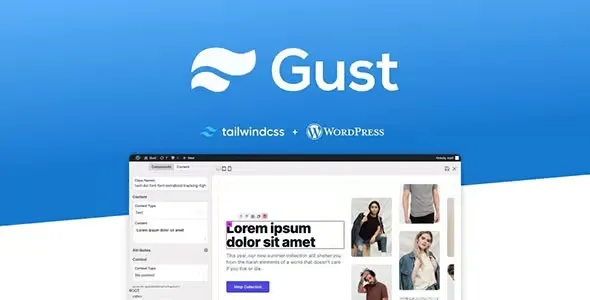
About GUST PRO BUILD WEBSITES WITH WORDPRESS & TAILWIND CSS
Building a site with Tailwind CSS usually means setting up a build environment, writing templates by hand and going back into code every time the client wants a section changed. And if you pick a theme with a visual builder, you usually load a pile of CSS you never use and speed suffers. Gust tries to combine both: visual editing and minimal CSS.
Gust and the temptation of paying for CSS nobody uses
Anyone building sites for clients knows speed is almost always lost through accumulation: extra styles, components loaded even when they are not visible. Gust starts from under 7 kb of CSS out of the box and removes unused CSS. With that base, sites running it often score between 95 and 99 on PageSpeed Insights without extra tweaks. These are starting figures: the final result depends on your images, your hosting and the plugins you add.
A job from start to finish: an agency site with Gust
Step 1: start from templates and components
Instead of starting from a blank page, you choose from more than 50 ready-made templates and components: responsive pages and sections that serve as a base to assemble your own layouts.
Step 2: build pages by dragging
The builder is drag and drop and requires no coding knowledge, so a designer or content manager can make progress without depending on a developer for every change.
Step 3: connect dynamic content
If the project needs a list of posts, a product grid or any content that changes, Gust has built-in support for dynamic data:
- WP Query from the visual editor: you retrieve content without writing the query.
- Loops: you repeat the same template for each item.
- Your own data with filters: if WP Query falls short, you return exactly what you need through code.
Step 4: adapt the design to the brand
The Tailwind configuration is fully editable, so colors, typography and spacing adapt to each client. You can also create your own components and share them as JSON between projects, useful if you repeat blocks across several sites.
What developers appreciate, and the limit worth knowing
Gust offers a large number of WordPress hooks to decide what is displayed at each point. That makes it comfortable for technical profiles. An important point: it is a site-building theme, not a store or a booking system on its own. If you are going to sell, you will need an e-commerce plugin and should check in the demo how its products are displayed.
Another warning: the original Gust project is listed as retired and not taking new subscriptions. If you choose it, plan it for sites where you are comfortable maintaining the theme yourself, with your own Tailwind configuration.
Frequently asked questions about Gust
Do I need to know Tailwind CSS to use it?
Not to build pages: the visual builder does not ask for code. It will help if you want to customize the configuration or create advanced components.
Is it suitable for several clients?
It is designed for agencies, with a visual builder, templates and reusable components.
Does it guarantee a score of 95 to 99?
No. That is what freshly built sites often see; heavy images or added plugins can lower it.
Can I share my components between sites?
Yes, they can be created and shared as JSON or with the visual builder.
Version history
-
v
1.8.2 Current 12 Jun 2024
Customer reviews
Sign in to leave a review. Only people who have the product can review it.
No reviews for this product yet.
Frequently asked questions
-
GPL (General Public License) is the license under which WordPress and most premium plugins/themes are distributed. It grants you the right to use, modify and redistribute the software in as many projects as you want, with no domain restrictions.
-
Yes. With membership you get automatic updates via our GPLClub Updater plugin (installed on your WP, detects new versions and applies them). With individual purchase, you get one year of manual updates from your account.
-
Depends on the plan. Monthly: 3 domains. Semi-annual: 7. Annual and Lifetime: 15. Individual purchase: 1 domain.
-
GPLClub offers its own support for installation, configuration and compatibility. For direct support from the original author (feature requests, product-specific bugs), a license purchased from the author is required.