Hongo Modern WooCommerce Theme
Antivirus scan
Powered by ClamAV
✅ Verified clean
This product file has passed our security filters.
Want to run a fresh ClamAV scan right now? Takes a few seconds and shows scanner version, signature DB and live result.
This can take 5 to 30 seconds.
Clean file Threat detected
No threats detected in this file.
- File
- Size
- Scanned
- ClamAV
- Signature database
⚡ Powered by ClamAV
Scan could not be completed
Report product
If you detected an issue (broken file, malware, inappropriate content, etc.) let us know and we'll review it ASAP.
Sign in to report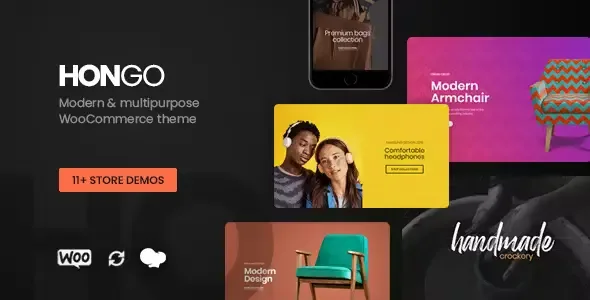
About Hongo Modern WooCommerce Theme
A gorgeous homepage won't sell on its own: the sale is decided in the listing and on the product page
Building a WooCommerce store often ends with an eye-catching home page, a flat product listing that is hard to filter and product pages that all look the same. And it is right there, between the listing and the product page, that the visitor decides whether to buy or leave.
Hongo Modern WooCommerce Theme puts the weight on that part: it brings different shop and product page styles, not just an attractive front page. It also works for corporate websites and blogs, but its home turf is the store.
Hongo depending on who installs it
If you are launching a store with a varied catalog
You start from one of the store demos and from more than 250 ready-made templates. You get 10 listing styles (classic, minimalist, metro, modern, clean, masonry and others). A clothing catalog and a furniture catalog are not displayed the same way, and here you change the grid without rebuilding the site.
If you already have a store and want a new look
You keep WooCommerce and renew the visual layer: header, footer, listing and product page. Before deciding, load your real products (with photos in different formats and long names) and see how they look, because a demo with perfect photos is misleading.
If you are an NGO or an organization that sells and tells stories
The merchandise store and the blog live in the same theme. The blog offers grid or masonry listings and posts with video or audio, useful for telling the story of your projects. If you need to collect donations, check in the demo whether something is planned or whether you will need a separate plugin.
If you want a marketplace with several vendors
It is compatible with Dokan, the marketplace plugin. Dokan is installed separately: the theme provides the design, not the management of vendors or commissions.
Filters, tailor-made product pages and mega menus in Hongo
What matters most in the day-to-day of a store:
- Filters by price, attributes and category in the listing, so customers narrow down results without leaving the page.
- Quick product information in the listing itself, to save clicks.
- Product page styles integrated with WooCommerce, where you rearrange images and blocks for each product or collection.
- Mega menus with their own content, created with the theme's section builder.
For the rest of the site there are more than 200 customizable elements and you edit by dragging and dropping, without writing code.
Questions before choosing Hongo
Does it work without WooCommerce? You can use it for a corporate website or a blog, but it is designed for stores. If you sell, you need WooCommerce.
Do I need to know how to code? No. You start from demos and templates and adjust with elements you drag into place.
Can I give each product a different page? There are several product page styles and you can rearrange images and blocks, so yes, you can differentiate a product or a collection.
Does it work for a marketplace? It is compatible with Dokan, which you install separately.
Header and footer depend on WPBakery
Hongo's header and footer builder relies on WPBakery shortcodes, so that page builder is part of the workflow. If you already master another builder, you will have to learn this one.
Also, the demos are not your store: payments, shipping and taxes are configured in WooCommerce, not in the theme.
Topics
Version history
-
v
3.8 Current 10 Jun 2025
Customer reviews
Sign in to leave a review. Only people who have the product can review it.
No reviews for this product yet.
Frequently asked questions
-
GPL (General Public License) is the license under which WordPress and most premium plugins/themes are distributed. It grants you the right to use, modify and redistribute the software in as many projects as you want, with no domain restrictions.
-
Yes. With membership you get automatic updates via our GPLClub Updater plugin (installed on your WP, detects new versions and applies them). With individual purchase, you get one year of manual updates from your account.
-
Depends on the plan. Monthly: 3 domains. Semi-annual: 7. Annual and Lifetime: 15. Individual purchase: 1 domain.
-
GPLClub offers its own support for installation, configuration and compatibility. For direct support from the original author (feature requests, product-specific bugs), a license purchased from the author is required.