Hoskia | Multipurpose Hosting with WHMCS Theme
Antivirus scan
Powered by ClamAV
✅ Verified clean
This product file has passed our security filters.
Want to run a fresh ClamAV scan right now? Takes a few seconds and shows scanner version, signature DB and live result.
This can take 5 to 30 seconds.
Clean file Threat detected
No threats detected in this file.
- File
- Size
- Scanned
- ClamAV
- Signature database
⚡ Powered by ClamAV
Scan could not be completed
Report product
If you detected an issue (broken file, malware, inappropriate content, etc.) let us know and we'll review it ASAP.
Sign in to report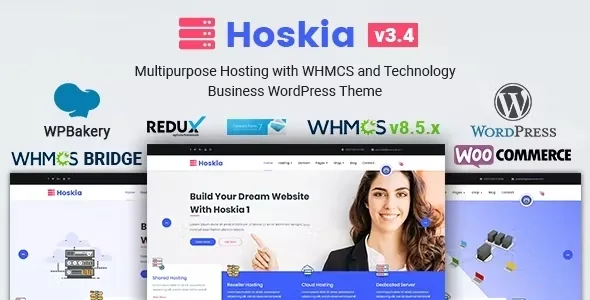
About Hoskia | Multipurpose Hosting with WHMCS Theme
For the hosting company that sells with WHMCS and wants its website and client area to look like one business
A hosting customer goes from a polished website to a billing panel with a different design, menu and logo right when they are about to pay. That jump raises doubts at the worst moment, especially when what they are handing over is their domain and their data.
Hoskia is made for hosting companies, domain registrars, VOIP providers, cloud service providers and technology businesses that work with WHMCS or plan to. It also fits a technology blog or a software review blog.
It may not be your theme if:
- You will not use WHMCS: the bridge and the template are its most valuable parts, and WHMCS is a separate system you must have set up. The theme does not bill or provision on its own.
- You work with another page builder: Hoskia is built on WPBakery Page Builder and you will have to lay out pages with it.
- You want an online store: it includes WooCommerce styling, but what defines it is hosting and technology.
Hoskia with WHMCS Bridge: from domain search to order
WHMCS is the platform many hosting companies use to manage billing, support and provisioning. Hoskia is compatible with WHMCS Bridge and includes domain search and registration with WHMCS, so visitors can find their domain and sign up for a plan from your own website.
It also comes with its own WHMCS template, which you can use separately, so the client area inherits the look of your website. That template is made for a specific version of WHMCS: before installing it, check that it matches the one you run.
Pricing tables so customers can compare plans without writing to you
The pricing tables show shared, VPS or dedicated hosting, with different server configurations. In hosting, comparison is the decision: someone who hesitates between two plans and cannot see the difference goes to another provider. The theme gives you the format, but the content is up to you: each plan should say what changes compared to the next one.
It includes three custom post types, Slider, Gallery and Service, to organize services, images and related content without mixing everything into loose pages.
Building with Hoskia using WPBakery, Redux and an imported demo
This is what you get to build the site:
- One-click demo import, so you start from an already laid-out site instead of a blank page.
- WPBakery Page Builder included, with drag-and-drop editing.
- A Redux options panel and CMB2 fields on each page: loader, breadcrumbs, menu, header and layout selectors, and header logo.
- Blog and page layouts in full width or with a left or right sidebar, with unlimited colors and Google Fonts.
- An example child theme, .pot files for translation, ready-styled Contact Form 7 forms and Mailchimp with Ajax.
Questions to ask before choosing Hoskia
Do I need WHMCS to use it?
To sell hosting and domains, yes: it is what gives the domain search and the client area their purpose. For a technology blog or a corporate website you can use it as a normal theme, but you will miss its main strength.
Can I use the WHMCS template without the theme?
Yes, it is included so you can use it separately.
Does it work with Elementor?
It is built on WPBakery Page Builder. If you already work with another builder, you will have to adapt to this one.
Can I translate it into my language?
It comes with .pot files for translation, so you can offer the site in your customers' language.
Topics
Version history
-
v
3.4 Current 15 Jun 2024
Customer reviews
Sign in to leave a review. Only people who have the product can review it.
No reviews for this product yet.
Frequently asked questions
-
GPL (General Public License) is the license under which WordPress and most premium plugins/themes are distributed. It grants you the right to use, modify and redistribute the software in as many projects as you want, with no domain restrictions.
-
Yes. With membership you get automatic updates via our GPLClub Updater plugin (installed on your WP, detects new versions and applies them). With individual purchase, you get one year of manual updates from your account.
-
Depends on the plan. Monthly: 3 domains. Semi-annual: 7. Annual and Lifetime: 15. Individual purchase: 1 domain.
-
GPLClub offers its own support for installation, configuration and compatibility. For direct support from the original author (feature requests, product-specific bugs), a license purchased from the author is required.