Ibuki – Creative Multi-Purpose & Shop Theme
Antivirus scan
Powered by ClamAV
✅ Verified clean
This product file has passed our security filters.
Want to run a fresh ClamAV scan right now? Takes a few seconds and shows scanner version, signature DB and live result.
This can take 5 to 30 seconds.
Clean file Threat detected
No threats detected in this file.
- File
- Size
- Scanned
- ClamAV
- Signature database
⚡ Powered by ClamAV
Scan could not be completed
Report product
If you detected an issue (broken file, malware, inappropriate content, etc.) let us know and we'll review it ASAP.
Sign in to report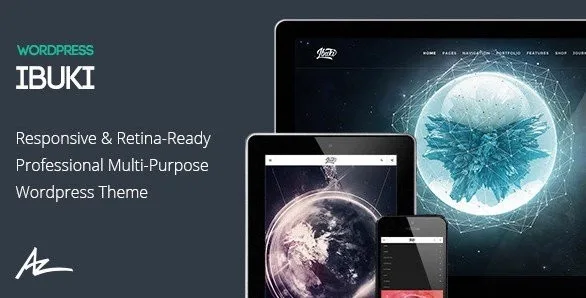
About Ibuki – Creative Multi-Purpose & Shop Theme
In a creative studio, people reach the shop from a piece of work
Someone comes to your site to look at a photo series or a design project. They did not come to buy. But one image catches their eye and they wonder whether they can have it, and at that moment the shop sits at another point in the menu, with another look, as if it were a different site.
That is the mistake made by anyone who sells their own work and shows it on the same site. Portfolio and shop get treated as two sections, when for the visitor they are one journey: first you look, then you want.
Ibuki, by Alessio Atzeni, suits agencies, portfolios, photographers and blogs, and brings together in one flat design the work, the news and a WooCommerce store. It has more options on the showing side than on the selling side, which is worth knowing when deciding how to join the two parts.
Nine ways to present work
The portfolio holds many of its options:
- Grid and Masonry, standard or full width.
- Wall Effect, in Grid and Masonry versions.
- Listed, Metro and Carousel, for series or selections.
- Filters, pagination and selection by category, for long project catalogs.
- Customization per page and per post for portfolio, team and blog.
The blog has two layouts, Listed and Center, meant for presenting work, news and updates.
How each Ibuki page is put together
- Sections at full screen, full width or standard, with color, image or video backgrounds, and opacity control for the overlay on the video.
- Headers normal, fixed, sticky, transparent sticky and left or right side headers, open or not, at full or normal width.
- Visual Composer in a slightly modified version, for building pages with many shortcodes.
- Revolution Slider for responsive sliders at full width or full screen.
- Visibility classes to show or hide content by device, on the Bootstrap grid, with a mobile and tablet version and tuning for Retina screens.
The shop: custom styles on top of WooCommerce
Ibuki adds its own styles for the main shop grid and for product pages, in three formats: full width, or with a left or right sidebar. The store itself, with cart, payments and shipping, is WooCommerce.
Among its shop features there is no wishlist, compare tool or quick view. And among its layouts there is no automatic link between a portfolio piece and its product: you create that step.
The direct way is to add a button to the product in each portfolio post with the builder, and a section of related work on the product page. This is our own combination, so try it with a single piece before repeating it on all of them.
Importing Ibuki and building your first page
Selling requires WooCommerce; several languages require a plugin such as WPML. The theme includes .po and .mo files for translating it. The steps to start:
- Install Ibuki and activate the base child theme it includes if you will touch code.
- Import the XML file with the demo content.
- Fill the image gaps: copyrighted photos do not come in that import.
- Create your home page with the builder and choose a header in the options panel.
- Activate WooCommerce and decide whether the shop runs full width or with a sidebar.
There is documentation and a YouTube playlist of video tutorials to follow each part.
If your project leans toward design or toward selling
Uncode is aimed at designers, studios and agencies, with more than fifty concepts, an adapted version of WPBakery and a WooCommerce store. Salient is also creative and multipurpose, with seven portfolio styles and a store with an instant cart and a zoom gallery.
If selling comes first and the portfolio takes second place, WoodMart is built as a shop theme.
Ibuki for people selling their work
Does it work for a photographer selling prints?
It works for showing the work and selling it with WooCommerce. The link between each photo and its product is built by hand.
Are the demo images included?
Not the copyrighted ones. You will need to fill those spaces with your own material.
Which builder does it use?
A slightly modified version of Visual Composer. If you ever change themes, check how those pages look before migrating.
Can it be translated?
Yes. It includes .po and .mo files and works with multilanguage plugins such as WPML.
Topics
Version history
-
v
3.3.8.4 Current 19 Jun 2024
Customer reviews
Sign in to leave a review. Only people who have the product can review it.
No reviews for this product yet.
Frequently asked questions
-
GPL (General Public License) is the license under which WordPress and most premium plugins/themes are distributed. It grants you the right to use, modify and redistribute the software in as many projects as you want, with no domain restrictions.
-
Yes. With membership you get automatic updates via our GPLClub Updater plugin (installed on your WP, detects new versions and applies them). With individual purchase, you get one year of manual updates from your account.
-
Depends on the plan. Monthly: 3 domains. Semi-annual: 7. Annual and Lifetime: 15. Individual purchase: 1 domain.
-
GPLClub offers its own support for installation, configuration and compatibility. For direct support from the original author (feature requests, product-specific bugs), a license purchased from the author is required.