Inigo – Night Club Responsive WordPress Theme
Antivirus scan
Powered by ClamAV
✅ Verified clean
This product file has passed our security filters.
Want to run a fresh ClamAV scan right now? Takes a few seconds and shows scanner version, signature DB and live result.
This can take 5 to 30 seconds.
Clean file Threat detected
No threats detected in this file.
- File
- Size
- Scanned
- ClamAV
- Signature database
⚡ Powered by ClamAV
Scan could not be completed
Report product
If you detected an issue (broken file, malware, inappropriate content, etc.) let us know and we'll review it ASAP.
Sign in to report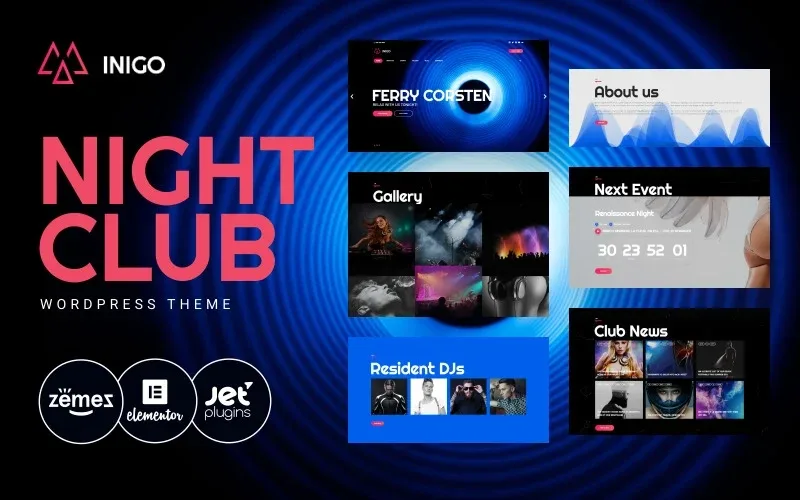
About Inigo – Night Club Responsive WordPress Theme
A club lives on people knowing what's on Thursday, not on having a website
Building a nightclub website often ends with a flyer PDF stuck on a page, an Instagram nobody finds on Google, or a page where you can't tell what time the doors open or who is playing tonight.
A club website goes stale every week. A poster from a month ago puts people off more than having no website at all. Before choosing a theme, think about who will update the events and how often.
Events, DJs and galleries: Inigo's home page is built for the night
The demo organizes the home page into clear blocks, each with its own job:
- Upcoming events: cards with the night's name, day, date and guest MCs or DJs, each with a more info link.
- Next event: a highlighted block with the date, the time and the lineup, along with a countdown.
- Resident DJs: a space to introduce the people who play regularly.
- Gallery: albums by themed night (in the demo, from a minimal techno night to a carnival night), so people who missed it can see the atmosphere.
- Club news: a blog with tags such as artist, DJ, event or party.
Booking a table and buying tickets: the buttons are there, the management isn't
The demo includes «book a table» and «Buy tickets» buttons in the header and on the posters. They are links or calls to action, not a booking system or a box office.
- Already solved: visual presence of the buttons, event list, gallery, blog, phone and address in the footer, opening hours by day, social links (Facebook, Twitter, Pinterest, YouTube and SoundCloud) and a sign-up block to announce the next party.
- You cover it: real table booking management, online ticket sales with payment, and sending emails to subscribers. That calls for a separate plugin, an external ticketing platform or, in the simplest case, a phone number or an email to link to.
Bookings and tickets need a separate plugin
If your business depends on selling tables or tickets online, don't expect Inigo to do it on its own. The usual approach is to link the buttons to your sales platform or to a form. Try in the demo where each button leads and decide which tool you will connect before launching.
The countdown works similarly: in the demo it shows zero, so check that it updates with your event's date before publishing.
Inigo in practice: a dark club look with content you have to fill in
The demo is set up as the website of an electronic music club: a header with phone and social links, a menu with Home, About us, Events, Gallery, Blog and Contacts, and a footer with hours and address.
If you need a music store, a label with a catalog or a DJ school, another theme will fit better.
Frequently asked questions
Can I sell tickets directly with Inigo?
It doesn't come as a sales system. The ticket buttons are meant to direct people to your platform or ticketing plugin.
Can I show my hours and my location?
Yes, the demo shows them in the footer along with the phone and contact email.
Does it look good on mobile?
Check it in the demo with your own photos before launching.
Topics
Version history
-
v
1.0.1 Current 13 Jun 2024
Customer reviews
Sign in to leave a review. Only people who have the product can review it.
No reviews for this product yet.
Frequently asked questions
-
GPL (General Public License) is the license under which WordPress and most premium plugins/themes are distributed. It grants you the right to use, modify and redistribute the software in as many projects as you want, with no domain restrictions.
-
Yes. With membership you get automatic updates via our GPLClub Updater plugin (installed on your WP, detects new versions and applies them). With individual purchase, you get one year of manual updates from your account.
-
Depends on the plan. Monthly: 3 domains. Semi-annual: 7. Annual and Lifetime: 15. Individual purchase: 1 domain.
-
GPLClub offers its own support for installation, configuration and compatibility. For direct support from the original author (feature requests, product-specific bugs), a license purchased from the author is required.