Instagram Theatre
Antivirus scan
Powered by ClamAV
✅ Verified clean
This product file has passed our security filters.
Want to run a fresh ClamAV scan right now? Takes a few seconds and shows scanner version, signature DB and live result.
This can take 5 to 30 seconds.
Clean file Threat detected
No threats detected in this file.
- File
- Size
- Scanned
- ClamAV
- Signature database
⚡ Powered by ClamAV
Scan could not be completed
Report product
If you detected an issue (broken file, malware, inappropriate content, etc.) let us know and we'll review it ASAP.
Sign in to report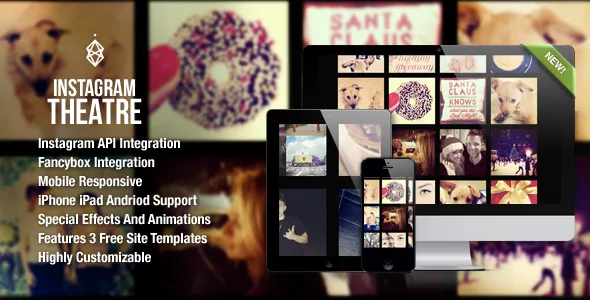
About Instagram Theatre
For anyone who uses Instagram as a portfolio, not for those who just want a feed
Showing Instagram photos on a website often ends up as a tiny sidebar widget nobody looks at, or a gallery that looks nothing like your work. Instagram Theatre is built for the opposite: to make the photos the stars of the page.
It suits photographers, athletes, brands with very visual products or anyone whose account already works as a showcase. Before choosing it, keep its limits in mind:
- It is a gallery for showing photos, not a shop or booking plugin.
- The multi-user mode does not allow loading more photos.
- The popular feed is listed as deprecated, so do not count on it.
- It depends on the Instagram API: check in the demo that the type of account you plan to connect displays properly.
Fullscreen, thumbnails or list: three ways to show the same photos
The same collection can look very different depending on the mode you pick, so decide based on what you want visitors to do.
- Fullscreen: turns the site into a fullscreen gallery, with Instagram photos or your own.
- Thumbnails: a grid where clicking a photo opens a larger version in a pop-up window (fancybox).
- List: hovering over each photo reveals an effect with the author, date, caption and number of likes.
You can also adjust effect speed, the interval between photos and alternative layouts. The gallery adapts to phones and tablets.
Your own account, a tag or a place: where the photos come from
The usual choice is to show your own account, but Instagram Theatre allows other sources, useful if you want a gallery livelier than your profile alone:
- A specific user, by entering their ID.
- Several users at once, for example team members (without a load more button).
- A tag, to gather photos on a topic or campaign.
- A location, to show what was posted at a specific place, such as a venue or an event.
If you show photos from other accounts, think about who took them and whether you have the right to display them on your site.
Three site templates and a jQuery version for use outside WordPress
Alongside the plugin come three responsive site templates, one for each layout type, so your site can look like the demo without starting from scratch. Anyone who knows CSS can reuse the styles in their own installation. A stand-alone jQuery plugin is also included, in case you want the same gallery on a site that does not use WordPress.
Questions before building the gallery
Can I mix Instagram photos with my own?
In fullscreen mode, yes: it can use Instagram photos or your own photos.
Can it show several accounts?
Yes, with the multi-user mode, but without the option to load more photos.
Does it look good on mobile?
It is designed to adapt to phones and tablets. Try it in the demo from your own phone.
Do I need to know how to code?
Not to use it: it has a simple admin panel. Custom CSS is optional for anyone who wants to fine-tune the design.
Topics
Version history
-
v
1.7 Current 27 Aug 2024
Customer reviews
Sign in to leave a review. Only people who have the product can review it.
No reviews for this product yet.
Frequently asked questions
-
GPL (General Public License) is the license under which WordPress and most premium plugins/themes are distributed. It grants you the right to use, modify and redistribute the software in as many projects as you want, with no domain restrictions.
-
Yes. With membership you get automatic updates via our GPLClub Updater plugin (installed on your WP, detects new versions and applies them). With individual purchase, you get one year of manual updates from your account.
-
Depends on the plan. Monthly: 3 domains. Semi-annual: 7. Annual and Lifetime: 15. Individual purchase: 1 domain.
-
GPLClub offers its own support for installation, configuration and compatibility. For direct support from the original author (feature requests, product-specific bugs), a license purchased from the author is required.