Instantio Pro
Antivirus scan
Powered by ClamAV
✅ Verified clean
This product file has passed our security filters.
Want to run a fresh ClamAV scan right now? Takes a few seconds and shows scanner version, signature DB and live result.
This can take 5 to 30 seconds.
Clean file Threat detected
No threats detected in this file.
- File
- Size
- Scanned
- ClamAV
- Signature database
⚡ Powered by ClamAV
Scan could not be completed
Report product
If you detected an issue (broken file, malware, inappropriate content, etc.) let us know and we'll review it ASAP.
Sign in to report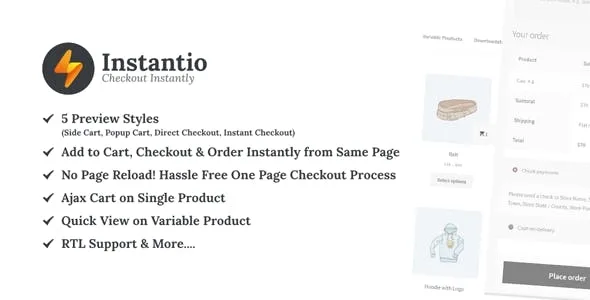
About Instantio Pro
Shoppers in a WooCommerce store often get lost between the product page, the cart page and the checkout, and every page reload is a chance to close the tab. Instantio Pro shortens that path: when a product is added, a panel appears with the cart and a direct button to pay.
One order with Instantio Pro, step by step
Picture a cosmetics store with cheap products and impulse buying. This is how the flow behaves:
- Step 1, add to cart: the customer clicks the button from any page, including the product page. The action uses Ajax, so the page does not reload. You can turn on an animation in which the icon or the product's featured image flies to the cart.
- Step 2, review: a popup or side panel opens with the cart summary, a field to apply a coupon, and the cart and checkout buttons. From there quantities go up or down and the cart can be emptied, all without reloading. Variable products can also be chosen and added from any page.
- Step 3, pay: with the checkout button the customer goes to the checkout. In direct checkout mode, a floating side button is enough to get there without going through the cart.
Keep one thing in mind: in the free version's options, the popup and side panel buttons lead to WooCommerce's own cart and checkout pages. Paying inside the panel itself, in one or several steps, belongs to the Pro modes.
Eight ways to check out and four visual looks
Instantio Pro offers eight systems: popup cart, side cart, floating direct checkout button, side checkout in several steps or in a single one, popup checkout in several steps or in a single one, and a right-to-left variant for Arabic. Each one supports four styles: light, dark, glassmorphism and gradient.
If your catalog is small and your customers already know what they want, a single-step panel is usually enough. If you sell products that raise questions (sizes, variants, coupons), the multi-step flow leaves more room to review before paying.
Design without touching code
- Your own cart icon or one from the included library, with six positions (top, middle or bottom, left or right).
- A design panel and tidy settings, with custom CSS for anything that is missing.
- Four progress bars and two entrance animations: the default one and a fade.
- Responsive layout, RTL support and compatibility with more than fifteen popular themes.
Extra sales from the panel itself
Instantio Pro includes upsell and cross sell features, so the panel can also suggest one more product before payment. It is useful in low-ticket stores, where a small add-on moves the average order.
What to know before buying
It is a WooCommerce add-on: without WooCommerce it does nothing. It cuts steps, but it does not replace the setup of your payment methods, shipping and taxes, which remain those of your store. It does not promise that abandonment will drop on its own: if the problem is shipping costs or lack of trust, a faster cart will not fix it. Check in the demo how it looks with your theme.
Frequently asked questions about Instantio Pro
Can customers pay without leaving the page?
Yes, with the side checkout or popup checkout modes, which belong to the Pro version. The basic modes send customers to the checkout page.
Does it work with any theme?
It is compatible with more than fifteen popular themes. If you use an uncommon one, test it first and adjust with the custom CSS.
Can I change the look of the floating cart?
Yes: icon, position, light, dark, glassmorphism or gradient style, and animations.
Does it support Arabic stores?
Yes, it includes a right-to-left checkout system and RTL support.
Topics
Version history
-
v
3.2.8 Current 8 Feb 2025
Customer reviews
Sign in to leave a review. Only people who have the product can review it.
No reviews for this product yet.
Frequently asked questions
-
GPL (General Public License) is the license under which WordPress and most premium plugins/themes are distributed. It grants you the right to use, modify and redistribute the software in as many projects as you want, with no domain restrictions.
-
Yes. With membership you get automatic updates via our GPLClub Updater plugin (installed on your WP, detects new versions and applies them). With individual purchase, you get one year of manual updates from your account.
-
Depends on the plan. Monthly: 3 domains. Semi-annual: 7. Annual and Lifetime: 15. Individual purchase: 1 domain.
-
GPLClub offers its own support for installation, configuration and compatibility. For direct support from the original author (feature requests, product-specific bugs), a license purchased from the author is required.