Jane Watson – Advanced And Reliable CV WordPress Theme
Antivirus scan
Powered by ClamAV
✅ Verified clean
This product file has passed our security filters.
Want to run a fresh ClamAV scan right now? Takes a few seconds and shows scanner version, signature DB and live result.
This can take 5 to 30 seconds.
Clean file Threat detected
No threats detected in this file.
- File
- Size
- Scanned
- ClamAV
- Signature database
⚡ Powered by ClamAV
Scan could not be completed
Report product
If you detected an issue (broken file, malware, inappropriate content, etc.) let us know and we'll review it ASAP.
Sign in to report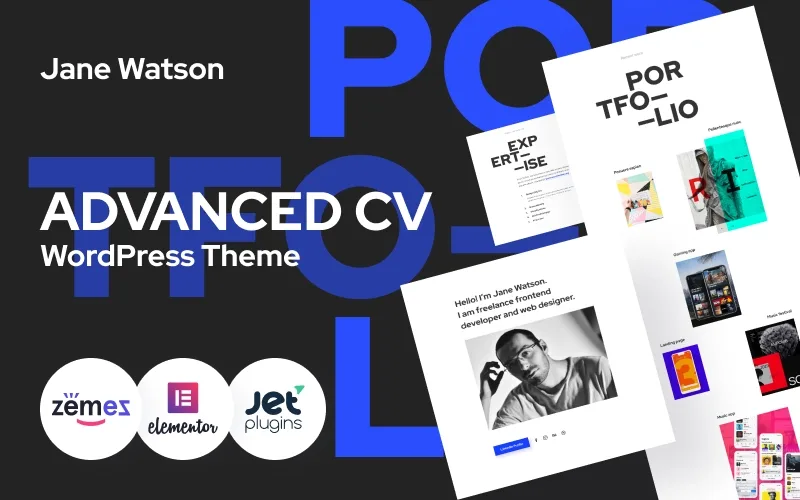
About Jane Watson – Advanced And Reliable CV WordPress Theme
A client arrives from LinkedIn and doesn't know what to hire you for
Someone recommends you, opens your profile and finds a list of skills, but still doesn't know whether you are the right person for their problem. A PDF résumé or a social network doesn't show work or explain what you can be hired for. Jane Watson is a one-page theme for freelance designers and developers who want to gather in a single URL who they are, what they do, what they have done and how to contact them.
The underlying idea: whoever visits you isn't looking for a profile, they are looking for someone to solve something specific. This template's order assumes it: first you introduce yourself, then you say how you can help, and then you prove it.
Jane Watson step by step: from introduction to email
Imagine you are a UX/UI designer and frontend developer setting up your page. This is the path the demo suggests:
- Introduction. At the top go your name, a line about your profile, your phone number and the icons for LinkedIn, Facebook, Instagram, Behance and Dribbble. It lets visitors know in one screen who you are and where to see more of you.
- Services. A numbered list of the ways you can help (in the demo: UX/UI design, brand identity, Shopify stores, iOS/Android apps and front-end). It answers the question "does this person do what I need?".
- Recent work. A portfolio block with projects such as a clothing shop, a gaming app or a landing page. This is where visitors check your level. Check in the demo whether each project opens its own page or is only shown as a piece; if you need long case studies, another structure may suit you better.
- Recognitions. A list of awards and mentions. It is useful if you have them; if not, this block is surplus and is better used for something else.
- Contact. Email, phone, address and social networks. If you prefer a form, check whether the demo provides one or whether you will have to add it with another plugin.
One single page: what you gain and what is left out
What you gain is linear reading: visitors scroll down and find everything without hunting through menus. What you lose is depth. It is a structure designed for one person presenting themselves in the first person, not for a studio with several teams, an active blog, a shop or a long page for each service. If your business needs that, this template will fall short.
Demo texts you must change before publishing
In the demo, every service repeats the same sentence and the rest of the content is filler. That is the first thing to rewrite, because a client looking for a Shopify store doesn't want to read the same thing as one who needs a brand identity. Describe each service with the problem you solve and for whom. Also replace the awards, the Amsterdam address, the phone number and the email with your own.
Questions before building your CV with Jane Watson
Does it work if I'm not a developer?
The services and portfolio blocks suit creative and tech profiles. Another professional who wants to show their work can use it, but will have to rewrite the texts, which are written for design and development.
Is it suitable for an agency?
It is written in the first person ("I am...", "contact me"). For a studio you would have to change the tone, and showing several profiles on a single page is hard.
Does the portfolio have categories or filters?
The demo presents the projects as a block of recent work, with no filters visible. If you need them, check before you commit.
Which social networks does it include?
The demo shows LinkedIn, Facebook, Instagram, Behance and Dribbble, useful for design and development.
Topics
Version history
-
v
1.0.0 Current 14 Jun 2024
Customer reviews
Sign in to leave a review. Only people who have the product can review it.
No reviews for this product yet.
Frequently asked questions
-
GPL (General Public License) is the license under which WordPress and most premium plugins/themes are distributed. It grants you the right to use, modify and redistribute the software in as many projects as you want, with no domain restrictions.
-
Yes. With membership you get automatic updates via our GPLClub Updater plugin (installed on your WP, detects new versions and applies them). With individual purchase, you get one year of manual updates from your account.
-
Depends on the plan. Monthly: 3 domains. Semi-annual: 7. Annual and Lifetime: 15. Individual purchase: 1 domain.
-
GPLClub offers its own support for installation, configuration and compatibility. For direct support from the original author (feature requests, product-specific bugs), a license purchased from the author is required.