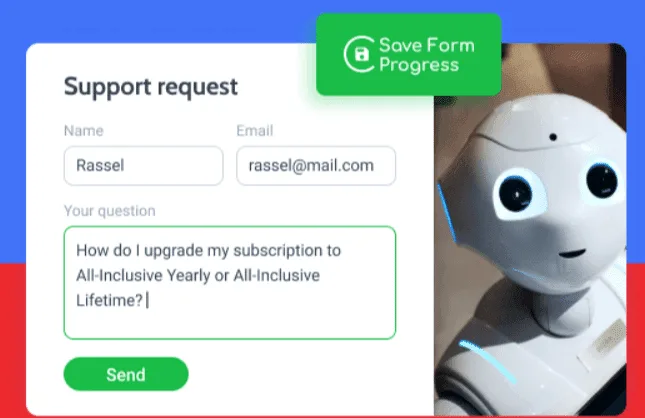
JetFormBuilder Save Form Progress
Antivirus scan
Powered by ClamAV
✅ Verified clean
This product file has passed our security filters.
Want to run a fresh ClamAV scan right now? Takes a few seconds and shows scanner version, signature DB and live result.
This can take 5 to 30 seconds.
Clean file Threat detected
No threats detected in this file.
- File
- Size
- Scanned
- ClamAV
- Signature database
⚡ Powered by ClamAV
Scan could not be completed
Report product
If you detected an issue (broken file, malware, inappropriate content, etc.) let us know and we'll review it ASAP.
Sign in to report
Official activation available
With membership we activate it with the official Crocoblock Suite license.
Newer version out, or a problem?
Activate it with the official license
Crocoblock Suite, with the author's license
| What it includes | GPL download | Official license |
|---|---|---|
| Works with all its features | ||
| Direct updates | Yes, via GPLClub Updater | Direct |
| Author's official support | Basic installation support | Advanced technical support from Crocoblock |
Included with memberships.
Or buy it on its own: $7.00
About JetFormBuilder Save Form Progress
Candidates, customers and attendees who quit halfway through a form
A job application, a custom order or an event registration with many fields can take a while. If the page closes, the connection drops or a missing detail has to be looked up, everything typed is lost and it is easy for nobody to start again. This JetFormBuilder addon saves progress automatically so whoever fills in the form can pick up where they left off.
What the addon saves while the person fills in the form
Once enabled, the addon keeps the values the user has already entered, linked to that form's ID. It is not limited to text: it also keeps what the form calculates and what it decides to show.
- Calculations: results are kept and updated with the data entered later.
- Triggered conditions: if an answer showed extra fields, when the user returns the form shows them again according to what was filled in.
- Steps in multi-step forms: completed steps stay visible on the progress bar even if the form was abandoned.
- Uploaded files: attachments sent before the interruption are kept, so nobody has to upload a CV or a receipt again.
Autocomplete fields with their own addon
Select and address fields only save their data if you add the matching addon: Select Autocomplete for the select field and Address Autocomplete for addresses. Without it, those fields are not part of the saved progress.
Frequently asked questions about JetFormBuilder Save Form Progress
Do I need JetFormBuilder to use it?
Yes. It is an addon for JetFormBuilder, so the main plugin must be installed and active for the feature to work.
Does it work if the user is not logged in?
Yes. It works for both registered users and visitors, because progress is saved in the browser.
Can I turn it on for only some forms?
Yes. The option is set on each form, so you can enable it on long surveys or orders and leave it off in short forms.
What happens to files the user has already uploaded?
They are kept. The addon saves attachments sent before the interruption, so the user does not have to upload them again when returning.
What data does it save exactly?
Field values, calculations, triggered conditions, completed steps and attached files. Select and address fields need their matching addons.
Where the progress is stored and when it makes sense
Values are stored in the browser's local storage and linked to the form ID. That makes the addon browser-specific: the progress stays in the browser where the form was filled in. It suits job applications, orders, support requests, event registrations, surveys and quote requests, whether they are completed by registered customers or by visitors.
If your form is very long, pairing it with a multi-step layout makes it even easier to finish.
With JetFormBuilder, JetAppointment and JetBooking: what you need for it to fit
This addon extends JetFormBuilder and is indispensable if you build forms with JetAppointment and JetBooking. It works with any WordPress theme, so your site design does not affect the feature.
- JetFormBuilder installed and active.
- The Select Autocomplete or Address Autocomplete addon, only if you use those fields.
- A long or multi-step form, the case it is designed for.
Topics
Version history
-
v
1.0.12 Current 10 Nov 2026
-
v
1.0.11 23 Sep 2025
Customer reviews
Sign in to leave a review. Only people who have the product can review it.
No reviews for this product yet.
Frequently asked questions
-
GPL (General Public License) is the license under which WordPress and most premium plugins/themes are distributed. It grants you the right to use, modify and redistribute the software in as many projects as you want, with no domain restrictions.
-
Yes. With membership you get automatic updates via our GPLClub Updater plugin (installed on your WP, detects new versions and applies them). With individual purchase, you get one year of manual updates from your account.
-
Depends on the plan. Monthly: 3 domains. Semi-annual: 7. Annual and Lifetime: 15. Individual purchase: 1 domain.
-
GPLClub offers its own support for installation, configuration and compatibility. For direct support from the original author (feature requests, product-specific bugs), a license purchased from the author is required.