JobSearch WP Job Board WordPress Plugin
Antivirus scan
Powered by ClamAV
✅ Verified clean
This product file has passed our security filters.
Want to run a fresh ClamAV scan right now? Takes a few seconds and shows scanner version, signature DB and live result.
This can take 5 to 30 seconds.
Clean file Threat detected
No threats detected in this file.
- File
- Size
- Scanned
- ClamAV
- Signature database
⚡ Powered by ClamAV
Scan could not be completed
Report product
If you detected an issue (broken file, malware, inappropriate content, etc.) let us know and we'll review it ASAP.
Sign in to report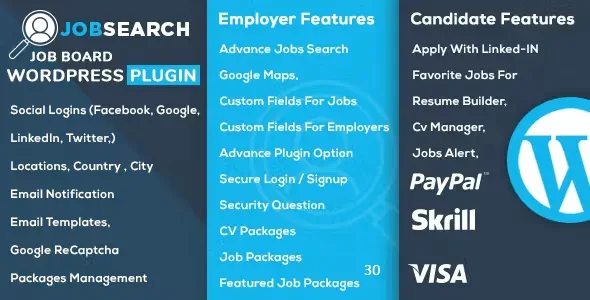
About JobSearch WP Job Board WordPress Plugin
The empty portal: the problem every new job board faces
Building a job board in WordPress usually hits the same wall: companies won't post jobs if there are no candidates, and candidates won't sign up if there are no jobs. JobSearch WP Job Board displays jobs on any type of website, and it is designed so you don't start from scratch: some big job portals let you use their database to extend your site with job offers, and the plugin can handle that automatically.
There is also a source of income that doesn't depend on a company paying you to post: some job providers pay a commission when one of your visitors clicks on their job links.
Full walkthrough: from an empty site to a candidate who finds the right job
Picture a local job board with companies posting and people looking for work. This is how each piece fits.
Step 1: build the site without coding
You import the demo and adjust the result: grid size, boxed layout, typography options and page templates, with a good collection of inner pages already prepared. No code is needed. The first limit: if you build with WPBakery, there is a JobSearch addon for that page builder, sold separately. The plugin also supports Elementor.
Step 2: sign-up and login for companies and candidates
Each visitor can register and log in, even with a Facebook or Google account. Registration includes activation by a six-digit code that expires after 15 minutes, and if someone tries to log in without activating their account, the system opens the activation window with their email already filled in.
Step 3: the company posts and reviews applications
Each user has a dashboard page template from which to manage their activity. For whoever receives applications, the plugin can export a candidate report to Excel, useful when someone outside WordPress does the selection.
Step 4: the candidate searches and compares
This is the core of the plugin: shortcodes for job listings, simple search and advanced search, plus resume listing and advanced resume search. Lists support sorting options and several ways of being displayed. There are also archive pages by sector, skill and location, and location searches accept multi-word names. If your portal is small, a simple search is enough; the advanced one makes sense once you have volume.
Step 5: notify candidates so they don't have to keep checking
The plugin sends job alerts by email with job cards that are easy to scan, and the other notifications show your site logo. The plugin is translation ready and compatible with WPML, so the portal can run in several languages.
Common questions before choosing JobSearch WP Job Board
Do I need to know how to code? No. Setup is done from its admin interface, with the imported demo as a starting point.
Can I try both sides before deciding? Yes: the official demo includes an employer account and a candidate account so you can see the portal from each perspective.
Does it work with WPML and WooCommerce? It is compatible with both. Check in the demo how WooCommerce fits the way you want to charge before planning paid plans.
Does it work with any theme? It is a plugin, so it works on any website, although it is designed to be used with its companion theme. For WPBakery you need the separate addon.
Pricing tables: charging companies is a separate decision
The plugin includes shortcodes for pricing tables and comparison pricing tables, to present plans clearly. Having these tables doesn't mean your whole commercial policy comes solved: first decide whether you will charge for posting, for featuring jobs, or live off click commissions, and then check in the demo how it shows up in the portal.
Topics
Version history
-
v
3.4.1 Current 28 Oct 2026
-
v
3.4.0 24 Oct 2026
-
v
3.3.9 14 Oct 2026
-
v
3.3.0 4 Jun 2026
-
v
3.2.7 23 Apr 2026
Customer reviews
Sign in to leave a review. Only people who have the product can review it.
No reviews for this product yet.
Frequently asked questions
-
GPL (General Public License) is the license under which WordPress and most premium plugins/themes are distributed. It grants you the right to use, modify and redistribute the software in as many projects as you want, with no domain restrictions.
-
Yes. With membership you get automatic updates via our GPLClub Updater plugin (installed on your WP, detects new versions and applies them). With individual purchase, you get one year of manual updates from your account.
-
Depends on the plan. Monthly: 3 domains. Semi-annual: 7. Annual and Lifetime: 15. Individual purchase: 1 domain.
-
GPLClub offers its own support for installation, configuration and compatibility. For direct support from the original author (feature requests, product-specific bugs), a license purchased from the author is required.