KAMI – Creative Magazine and Blog WordPress Theme
Antivirus scan
Powered by ClamAV
✅ Verified clean
This product file has passed our security filters.
Want to run a fresh ClamAV scan right now? Takes a few seconds and shows scanner version, signature DB and live result.
This can take 5 to 30 seconds.
Clean file Threat detected
No threats detected in this file.
- File
- Size
- Scanned
- ClamAV
- Signature database
⚡ Powered by ClamAV
Scan could not be completed
Report product
If you detected an issue (broken file, malware, inappropriate content, etc.) let us know and we'll review it ASAP.
Sign in to reportNewer version out, or a problem?
About KAMI – Creative Magazine and Blog WordPress Theme
Publishers, news outlets and review blogs that change their homepage every day
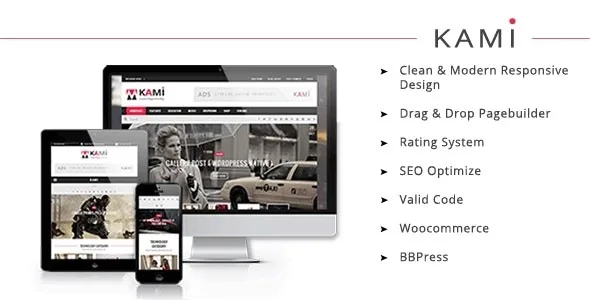
On a magazine or digital news site, the homepage is what gets touched most: new stories come in, articles get highlighted and sections change almost daily. The problem is that each change usually depends on a developer or on editing code, and the publishing rhythm suffers. KAMI is built so that whoever edits can rearrange the homepage from WordPress.
It fits magazine, news, editorial, blog, photography or review sites. If your project is a shop, the theme supports WooCommerce.
What you need: like any theme, it is installed on top of WordPress. To sell products you need the WooCommerce plugin, and for forums the bbPress plugin, both installed separately.
KAMI's homepage is assembled from modules you drag into place
The built-in page builder lets you choose modules and place them in homepage sections by dragging and dropping. This way whoever edits can add an ad block or change the order of the modules.
The menu supports a mega menu that shows the posts of a category inside the menu itself.
- Loading posts without reloading: the next and previous posts appear without refreshing the page, and the reader keeps reading.
- Customizable header: you can set your own background and fix the menu while scrolling.
- Adaptive design: it looks good on any screen size and you can hide the sidebar in mobile view.
Six blog layouts and a look of its own for each category
For post listings you have six layouts: small thumbnails, two or three columns in a window style, rows of two or three columns and a two-column full-width version. They are different ways of showing the same content, so it helps to pick the one that fits how many images you publish.
The layout is not limited to the homepage. You can choose a layout for category, tag, author, index and search pages, and assign each category its own color or a background for its page.
Sidebars and site width
You can create as many sidebars as you need, place them on the left or right and assign one to each template. The site can also switch between boxed and wide layout with one click.
Review boxes with ratings, pros and cons
If you publish reviews, the theme includes a system to add a rating to each post, with a summary and a list of pros and cons. The rating box can sit in four different positions, and readers can rate with one click if you enable that option.
Reviews also carry structured data markup so search engines can display their content more richly.
Colors, fonts and languages you adjust from the theme options
From the theme options you choose the site colors, upload your logo and favicon, and use Google Web Fonts. You also set the header background.
For advertising, there are ad modules and widgets in specific spots: header, between modules, sidebar and footer.
If the site runs in another language, the theme includes .po and .mo translation files and a right-to-left layout that you switch on with one click. It is also compatible with WPML.
Post formats: video, gallery and image inside KAMI
KAMI supports WordPress's standard post formats: standard, video, gallery and image. In video posts you can use the video iframe or the featured image as the thumbnail. Galleries open in an enlargeable viewer.
There are also shortcodes for YouTube and Vimeo videos, columns and buttons, and the documentation includes many images and video tutorials.
Common questions about using KAMI for a magazine or blog
Can I run a shop with KAMI?
Yes, the theme is compatible with the WooCommerce plugin.
Can it work in several languages?
Yes. It includes .po and .mo translation files to translate it into any language, and it is compatible with WPML.
Can I use a right-to-left layout?
Yes, you switch to the RTL layout with one click.
Can I set different sidebars in each section?
Yes. You create the sidebars you need with the included generator and assign one to each WordPress template, placed on the left or right.
Topics
Version history
-
v
2.1 Current 18 Jun 2024
Customer reviews
Sign in to leave a review. Only people who have the product can review it.
No reviews for this product yet.
Frequently asked questions
-
GPL (General Public License) is the license under which WordPress and most premium plugins/themes are distributed. It grants you the right to use, modify and redistribute the software in as many projects as you want, with no domain restrictions.
-
Yes. With membership you get automatic updates via our GPLClub Updater plugin (installed on your WP, detects new versions and applies them). With individual purchase, you get one year of manual updates from your account.
-
Depends on the plan. Monthly: 3 domains. Semi-annual: 7. Annual and Lifetime: 15. Individual purchase: 1 domain.
-
GPLClub offers its own support for installation, configuration and compatibility. For direct support from the original author (feature requests, product-specific bugs), a license purchased from the author is required.