Kapee – Fashion Store WooCommerce Theme
Antivirus scan
Powered by ClamAV
✅ Verified clean
This product file has passed our security filters.
Want to run a fresh ClamAV scan right now? Takes a few seconds and shows scanner version, signature DB and live result.
This can take 5 to 30 seconds.
Clean file Threat detected
No threats detected in this file.
- File
- Size
- Scanned
- ClamAV
- Signature database
⚡ Powered by ClamAV
Scan could not be completed
Report product
If you detected an issue (broken file, malware, inappropriate content, etc.) let us know and we'll review it ASAP.
Sign in to report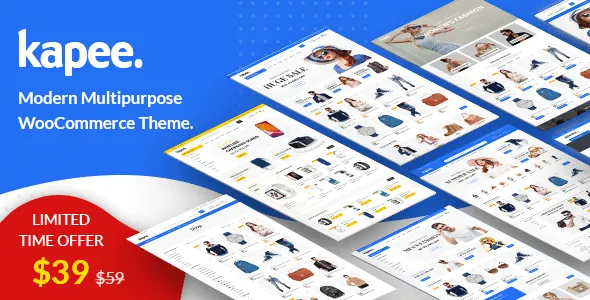
About Kapee – Fashion Store WooCommerce Theme
A fashion store is won on the product page, not on the homepage
Building a clothing store usually ends the same way: an eye-catching homepage and a weak product page, with no size guide, no visible offers and a cart that forces shoppers to leave the page. People buying fashion online hesitate over size, fit and whether it is worth adding another item.
The theme is built for WooCommerce and has a clean, minimalist design. Although it was created for fashion, it also works for electronics, furniture or accessories.
Kapee features that shorten the path to the cart
These are the ones that matter most in a fashion store:
- Size guide: it can be enabled on each product, to settle the doubt before the customer leaves.
- Offer and service texts: let you highlight a specific promotion or service on the product page.
- Frequently bought together: suggests complementary products to raise the order value.
- Quick view and quick buy button: the quick view opens in a popup.
- Off-canvas cart and AJAX add to cart: the cart sits off canvas to save space and products are added with AJAX.
- Instant search and comparison: AJAX instant search finds items and the comparison puts them together in a detailed full-screen view.
- Product video, review styles and custom tabs: you can add several custom tabs to the product page.
It also includes list or grid view, five different hover effects on a product and a catalog mode.
How it is built: WPBakery, more than a dozen homepages and plenty of shortcodes
Layout
Kapee works with WPBakery Page Builder, with drag and drop, and comes with Revolution Slider. It includes more than 12 different homepages and a one-click demo importer that loads posts, pages, widgets, sliders and theme options. There are full-width and boxed layouts, and RTL support.
Building blocks for pages
There are shortcodes for product grids or carousels, products with a banner, product tabs, hot deal products, categories, brands, testimonials, team, counter, countdown timer and more. The mega menu is also designed with WPBakery, so you can use shortcodes in it. The custom widgets cover attribute and price filters, brands, recently viewed products and sorting.
Style and performance
You can change the overall color with a picker, control typography, use Google Fonts, Typekit or your own fonts, and it works with Yoast or All in One SEO. It is ready for translation with po and mo files, is compatible with WPML and supports a child theme.
Choosing Kapee: marketplace, wishlist and what to confirm first
Kapee supports multivendor marketplaces with Dokan, WC Vendors, WC Marketplace and WCFM. The wishlist relies on YITH Wishlist, and contact forms are compatible with Contact Form 7. That means some features depend on external plugins that you need to install.
Do I need to know how to code?
No. It is built with the demo importer, WPBakery and the theme options panel.
Does it work if I don't sell fashion?
Yes, it is designed for any WooCommerce store. That said, the demos have a fashion style, so check that their look fits your catalog.
Can I build a marketplace with several vendors?
Yes, but you need to install one of the compatible multivendor plugins. The theme only provides the visual integration.
Is it designed for Elementor?
No: Kapee uses WPBakery. If your team works with Elementor, this is not the theme, and it is worth considering another option.
Are the demo images included?
No. The images in the screenshots are for preview only and are not part of the theme files, so you will need to add your own photos.
Topics
Version history
-
v
1.7.6 Current 21 Oct 2026
-
v
1.7.5 14 Oct 2026
-
v
1.7.4 8 Aug 2026
-
v
1.7.1 22 Apr 2026
Customer reviews
Sign in to leave a review. Only people who have the product can review it.
No reviews for this product yet.
Frequently asked questions
-
GPL (General Public License) is the license under which WordPress and most premium plugins/themes are distributed. It grants you the right to use, modify and redistribute the software in as many projects as you want, with no domain restrictions.
-
Yes. With membership you get automatic updates via our GPLClub Updater plugin (installed on your WP, detects new versions and applies them). With individual purchase, you get one year of manual updates from your account.
-
Depends on the plan. Monthly: 3 domains. Semi-annual: 7. Annual and Lifetime: 15. Individual purchase: 1 domain.
-
GPLClub offers its own support for installation, configuration and compatibility. For direct support from the original author (feature requests, product-specific bugs), a license purchased from the author is required.