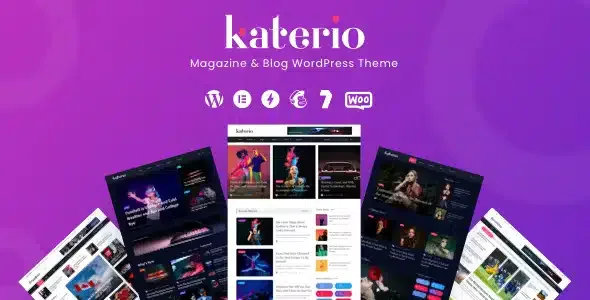
Katerio Magazine and Blog WordPress Theme
Antivirus scan
Powered by ClamAV
✅ Verified clean
This product file has passed our security filters.
Want to run a fresh ClamAV scan right now? Takes a few seconds and shows scanner version, signature DB and live result.
This can take 5 to 30 seconds.
Clean file Threat detected
No threats detected in this file.
- File
- Size
- Scanned
- ClamAV
- Signature database
⚡ Powered by ClamAV
Scan could not be completed
Report product
If you detected an issue (broken file, malware, inappropriate content, etc.) let us know and we'll review it ASAP.
Sign in to reportNewer version out, or a problem?
About Katerio Magazine and Blog WordPress Theme
A blog that grows without order ends up driving readers away
At first you publish four articles and any design will do. Months later you have hundreds, mixed categories, a homepage that doesn't know what to highlight and a reader who arrives from Google, reads one post and leaves because they can't find what to read next. Katerio is a theme for magazines, blogs and news sites built for that moment: when the problem is no longer publishing, but keeping people reading.
From day one to the homepage: how to build a magazine with Katerio
This is the typical path, with what the theme solves at each step and where it pays to look closely.
- Import a demo. It includes one-click demo installation, so you start from a homepage that is already built instead of an empty page. Before choosing, check in the demo whether its structure resembles that of your publication.
- Build the header and footer. They are built with Elementor, with unlimited header and footer layouts. There is a sticky header, a sticky navigation menu, an off-canvas menu and a megamenu also built with Elementor.
- Organize the homepage. You can show posts in a grid or masonry layout, and the site layout can be stretched, boxed or framed.
- Choose the look. There are light and dark skins with custom colors, a noise-texture background, adjustable typography and SVG logo and icons.
- Take care of the single post. It offers 10 article layouts, a reading progress indicator, share buttons and related posts built with Elementor.
What Katerio does so readers don't leave after the first post
That is where a magazine's value lies: a reader who lands on a single page rarely comes back. Katerio tackles that drop-off with specific tools:
- Infinite loading of the next posts, so another article appears when one ends.
- Related posts that you design with Elementor.
- A sticky sidebar that follows the reader as they scroll.
- A search popup and a newsletter popup, to capture those who want more.
That said, the newsletter popup is only the visual part: you will need a separate email service to manage the list. And since almost all the design relies on Elementor, expect to work with that page builder; custom blocks and layouts are built there, not with a separate panel of its own.
Frequently asked questions about Katerio
Do I need Elementor?
Yes, in practice. Header, footer, megamenu and related posts are built with it. If you don't like working with page builders, this theme will fall short for you.
Is it suitable for sites in Arabic or Hebrew?
Yes, it includes full RTL support, and it is also translation ready.
What about contact forms?
It is compatible with Contact Form 7. If you prefer another forms plugin, check first that it fits your design.
What about speed?
It includes lazy loading of images and lightweight theme options, and it is compatible with the AMP plugin for mobile. Final speed also depends on your hosting and the weight of your images.
What else Katerio includes and what to expect
It includes its own custom widgets, retina-ready display and readiness for rich snippets and Open Graph, useful so your posts look good when shared. It is a clean, minimalist theme: if you are looking for an online store or a booking site, it is not what it is designed to do. Its territory is editorial content: personal blogs, magazines and digital newspapers.
Topics
Version history
-
v
1.5.1 Current 21 Feb 2025
Customer reviews
Sign in to leave a review. Only people who have the product can review it.
No reviews for this product yet.
Frequently asked questions
-
GPL (General Public License) is the license under which WordPress and most premium plugins/themes are distributed. It grants you the right to use, modify and redistribute the software in as many projects as you want, with no domain restrictions.
-
Yes. With membership you get automatic updates via our GPLClub Updater plugin (installed on your WP, detects new versions and applies them). With individual purchase, you get one year of manual updates from your account.
-
Depends on the plan. Monthly: 3 domains. Semi-annual: 7. Annual and Lifetime: 15. Individual purchase: 1 domain.
-
GPLClub offers its own support for installation, configuration and compatibility. For direct support from the original author (feature requests, product-specific bugs), a license purchased from the author is required.