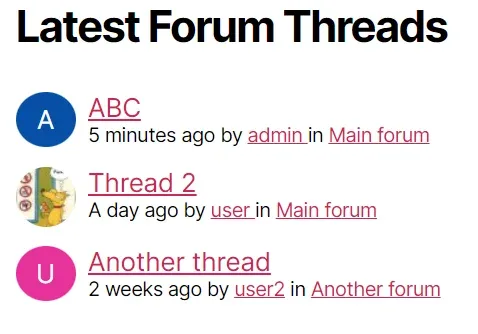
Latest XenForo Threads Widget for WordPress
Antivirus scan
Powered by ClamAV
✅ Verified clean
This product file has passed our security filters.
Want to run a fresh ClamAV scan right now? Takes a few seconds and shows scanner version, signature DB and live result.
This can take 5 to 30 seconds.
Clean file Threat detected
No threats detected in this file.
- File
- Size
- Scanned
- ClamAV
- Signature database
⚡ Powered by ClamAV
Scan could not be completed
Report product
If you detected an issue (broken file, malware, inappropriate content, etc.) let us know and we'll review it ASAP.
Sign in to reportNewer version out, or a problem?
About Latest XenForo Threads Widget for WordPress
Latest XenForo Threads Widget: your forum's recent threads on your site
If you run a XenForo forum and a WordPress site, community conversations usually stay inside the forum, and your site visitors never see what is being discussed. This plugin creates a widget that shows the latest threads from your forum on your WordPress installation.
You can add several widgets in different positions and configure each one separately.
Latest XenForo Threads Widget settings for each goal
Newly created threads or recent activity
You can choose between 'latest created' and 'latest updated'. Keep this in mind with 'latest updated': the user shown next to the thread is whoever wrote the last post, and the link goes to that latest reply, not to the start of the thread.
If you want to decide what visitors see
The widget options let you control exactly what information is shown for each thread.
If your forum is on another server
The plugin uses the XenForo API, so it can also pull the latest threads from a forum that is not on the same server as your WordPress installation. Requests are loaded with AJAX, so they do not slow down your page load.
If the widget has to match your design
Each element has CSS classes, so you can override its look. The plugin's stylesheet is the starting point for doing so.
How WordPress connects to your forum: the API key
The connection relies on an API key that you create in the XenForo admin panel, under the API keys menu. For this plugin, the key needs read permissions for threads, nodes and users (thread:read, node:read and user:read).
A 'Guest' key is recommended, so the widget cannot access restricted forums, such as your moderators forum. The API URL is normally your forum's base address followed by /api, and the plugin tests the connection when you save your settings.
Frequently asked questions about Latest XenForo Threads Widget
Does the forum have to be on the same server as WordPress?
No. The plugin queries the XenForo API, so the forum can be on another server.
What about restricted forums?
It depends on the key you configure. With a Guest key, the widget does not access restricted forums, such as the moderators forum.
Can I have more than one widget?
Yes. You can add several widgets in different positions and set the options for each one.
How long does the plugin wait on a slow server?
Content loads with AJAX, and on slow servers the plugin waits up to 30 seconds before giving up on the request.
Cloudflare can block calls to your forum's API
If your XenForo forum sits behind Cloudflare, calls from WordPress may end up on the browser check screen or be blocked altogether. This is a general problem, not one specific to this widget. If you cannot whitelist the API in Cloudflare, one fix is to edit your server's hosts file so that requests from its own IP bypass Cloudflare. Ask whoever manages your server before changing that file.
Topics
Version history
-
v
1.0.4.1 Current 8 Apr 2024
Customer reviews
Sign in to leave a review. Only people who have the product can review it.
No reviews for this product yet.
Frequently asked questions
-
GPL (General Public License) is the license under which WordPress and most premium plugins/themes are distributed. It grants you the right to use, modify and redistribute the software in as many projects as you want, with no domain restrictions.
-
Yes. With membership you get automatic updates via our GPLClub Updater plugin (installed on your WP, detects new versions and applies them). With individual purchase, you get one year of manual updates from your account.
-
Depends on the plan. Monthly: 3 domains. Semi-annual: 7. Annual and Lifetime: 15. Individual purchase: 1 domain.
-
GPLClub offers its own support for installation, configuration and compatibility. For direct support from the original author (feature requests, product-specific bugs), a license purchased from the author is required.