LivePreview (PRO)
Antivirus scan
Powered by ClamAV
✅ Verified clean
This product file has passed our security filters.
Want to run a fresh ClamAV scan right now? Takes a few seconds and shows scanner version, signature DB and live result.
This can take 5 to 30 seconds.
Clean file Threat detected
No threats detected in this file.
- File
- Size
- Scanned
- ClamAV
- Signature database
⚡ Powered by ClamAV
Scan could not be completed
Report product
If you detected an issue (broken file, malware, inappropriate content, etc.) let us know and we'll review it ASAP.
Sign in to report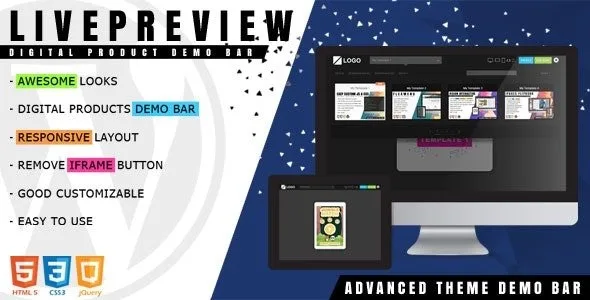
About LivePreview (PRO)
If you sell themes or templates with your own demos, this is for you; if you want a store, it is not
Sending a customer to a demo often means losing them for a while: they open another site, browse around and, to buy, have to find their own way back to the sales page. LivePreview (PRO) puts a bar over each demo from which the visitor switches products, tests screen sizes and clicks buy.
It suits anyone selling WordPress themes, HTML templates, HTML5 games or other digital products who already has each demo published at its own address. It does not suit anyone expecting the plugin to build the demos or handle payments. These are the limits:
- It does not create demos: each one must already exist and is added by its URL.
- It does not take payments: the buy button leads to the link you set.
- Check in the demo that your sites load properly inside the bar's frame before going live.
The demo is the last step before buying, and that is where the sale slips away
Someone who reaches a demo is already interested. What they lack is a way to see another product without going back to the catalog and to have the buy button at hand when they decide. If that depends on them remembering where the link was, part of that interest is lost. With the bar, buying and switching products are always on the same screen.
Each product can have its own identifier and, with it, a unique URL, and the plugin works with the browser history. So you can share the link to a specific demo.
LivePreview (PRO) inside: list, search and responsive testing
- Thumbnail panel: the visitor picks a product and loads it. You can show or hide it, and it can be browsed with the up and down arrow keys.
- Search and filters: search is based on each product's title and tag.
- Responsive devices: changes the demo size to see how it adapts. You can set a default device or hide the option.
- Buy button: with customizable text, it can be shown or hidden.
- Close frame: closes the bar and leaves the visitor on the demo site.
- Preload screen: can be turned on or off.
The bar's design is independent of your theme and other plugins.
What to fill in for each demo so the list is findable and sells
Each item takes a title, a thumbnail, a demo URL and a buy URL. It also has a badge to highlight something over the thumbnail and a tag for filtering. Use consistent tags, for example one per product type, because the search uses them along with the title. You can also move a product to the start or end of the list, handy for putting what you most want to sell first.
Adjusting the bar's look without touching your theme
There are two built-in styles and you can create your own by editing the style file (CSS or less). You can also set your logo with a link and decide whether it opens in the same window or a new one. It works on modern browsers and on iOS, Android and Windows mobile devices.
Questions before putting the bar on your demos
Is it only for WordPress themes?
No. It is designed for digital products in general: HTML templates, HTML5 games and similar, as long as they have a demo URL.
Can I remove the buy button?
Yes, it is shown or hidden from the settings, just like the frame close button, the list and the devices.
How does a visitor reach a specific demo?
Through the search, through the tags or with that product's own link.
Can I change the colors and design?
Yes, with one of the two styles or by editing the CSS or less file.
Version history
-
v
1.2.3 Current 30 May 2024
Customer reviews
Sign in to leave a review. Only people who have the product can review it.
No reviews for this product yet.
Frequently asked questions
-
GPL (General Public License) is the license under which WordPress and most premium plugins/themes are distributed. It grants you the right to use, modify and redistribute the software in as many projects as you want, with no domain restrictions.
-
Yes. With membership you get automatic updates via our GPLClub Updater plugin (installed on your WP, detects new versions and applies them). With individual purchase, you get one year of manual updates from your account.
-
Depends on the plan. Monthly: 3 domains. Semi-annual: 7. Annual and Lifetime: 15. Individual purchase: 1 domain.
-
GPLClub offers its own support for installation, configuration and compatibility. For direct support from the original author (feature requests, product-specific bugs), a license purchased from the author is required.