Livesay – Event & Conference WordPress Theme
Antivirus scan
Powered by ClamAV
✅ Verified clean
This product file has passed our security filters.
Want to run a fresh ClamAV scan right now? Takes a few seconds and shows scanner version, signature DB and live result.
This can take 5 to 30 seconds.
Clean file Threat detected
No threats detected in this file.
- File
- Size
- Scanned
- ClamAV
- Signature database
⚡ Powered by ClamAV
Scan could not be completed
Report product
If you detected an issue (broken file, malware, inappropriate content, etc.) let us know and we'll review it ASAP.
Sign in to reportNewer version out, or a problem?
About Livesay – Event & Conference WordPress Theme
From event announcement to registration, step by step with Livesay
Running an event on the web usually ends the same way: the schedule changes the week before, speakers arrive through another channel, and the attendee ends up emailing to ask where the room is.
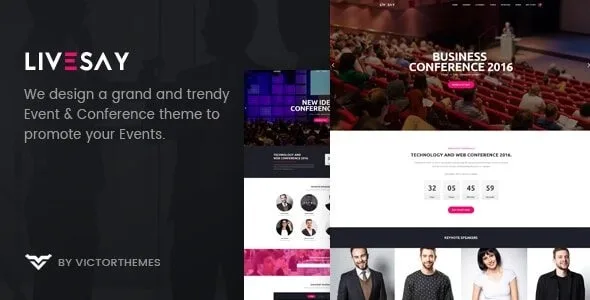
The journey starts on the front page. Livesay comes with three home page variations designed to present event information in an attractive way, so you pick the one you like and adapt it to your event.
Then comes the schedule. There are two schedule layouts to present your event schedule in a creative way.
Frequently asked questions about the Livesay theme
Is it only for large conferences?
No, it is designed for conferences and other events. It has pages for the schedule, speakers, venue and registration.
Can I change colors and typography without touching code?
Yes. Colors can be changed part by part from the Customizer with a live preview, and you can choose from more than 790 Google fonts or upload your own fonts.
What if I want to modify the theme?
Livesay includes a child theme. If you edit code, your changes are preserved, which is the recommended way to modify an existing theme.
Does it look good on mobile?
Yes, the theme is 100% responsive and designed so content reads clearly on any device.
Speakers, venue and schedule: the pages attendees check before going
Before deciding to attend, people look for who is speaking, where it is and how to get there. Livesay has a speakers page to present keynote speakers and their details in an attractive way.
The venue page gives you creative freedom to add travel information. Once an event is over, the past events page shows information about completed sessions, and the calendar presents your events in a professional and efficient layout.
Registration and tickets: what the visitor completes on the site
The event registration form lets visitors register their presence for the event. The tickets page offers a simple way for visitors to access your event.
The shop is powered by WooCommerce, so that plugin must be installed and active for the purchase pages to work.
WPBakery Page Builder for building pages without code
Livesay integrates with WPBakery Page Builder, a drag and drop visual builder that works on the front end and back end. With it you assemble each page's sections without writing code, and every shortcode has well organized and easy to fill fields.
Forms, languages and maps: how Livesay adapts to your audience
Livesay is compatible with Contact Form 7 and follows its native way of working, so you keep its simplicity with powerful options. It is also ready for WPML, the translation plugin, to translate your event into several languages.
For the venue, the theme extends Google Maps with multiple styling options within the same map area. FontAwesome and Line Icons are picked from a selector, and the theme is built to support search engines.
Topics
Version history
-
v
1.8 Current 19 Jun 2024
Customer reviews
Sign in to leave a review. Only people who have the product can review it.
No reviews for this product yet.
Frequently asked questions
-
GPL (General Public License) is the license under which WordPress and most premium plugins/themes are distributed. It grants you the right to use, modify and redistribute the software in as many projects as you want, with no domain restrictions.
-
Yes. With membership you get automatic updates via our GPLClub Updater plugin (installed on your WP, detects new versions and applies them). With individual purchase, you get one year of manual updates from your account.
-
Depends on the plan. Monthly: 3 domains. Semi-annual: 7. Annual and Lifetime: 15. Individual purchase: 1 domain.
-
GPLClub offers its own support for installation, configuration and compatibility. For direct support from the original author (feature requests, product-specific bugs), a license purchased from the author is required.
Related products

Avantage – Business Consulting WordPress Theme
Pictalter – Photo Editing App Landing Page Template WordPress Theme
Minimy – Responsive Clean Personal & Fashion Blog