Magic Content Box
Antivirus scan
Powered by ClamAV
✅ Verified clean
This product file has passed our security filters.
Want to run a fresh ClamAV scan right now? Takes a few seconds and shows scanner version, signature DB and live result.
This can take 5 to 30 seconds.
Clean file Threat detected
No threats detected in this file.
- File
- Size
- Scanned
- ClamAV
- Signature database
⚡ Powered by ClamAV
Scan could not be completed
Report product
If you detected an issue (broken file, malware, inappropriate content, etc.) let us know and we'll review it ASAP.
Sign in to report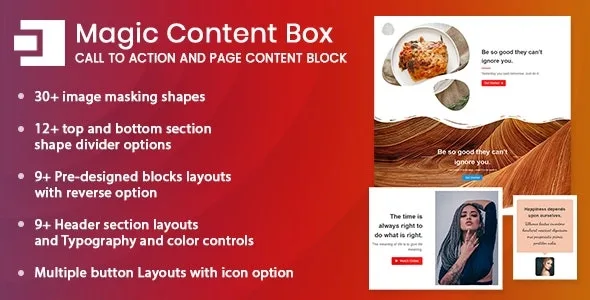
About Magic Content Box
A Gutenberg page built only with basic blocks reads like a document, not like a website
Paragraph, image, another paragraph, another image. The block editor lets you publish fast, but pages end up looking alike, and someone landing on your services or company page decides early whether to keep scrolling. People who install something like this usually run their own site or their clients' sites and want sections with some design without stacking a whole page builder on top.
Magic Content Box is a set of section blocks for the block editor: header, image box, button, inner container and shape dividers. You work in the same editor as always, with blocks that already come with the layout worked out.
The five components of Magic Content Box and what you control in each
- Header section: title and subtitle with 9+ layouts, each with an option to reverse the arrangement.
- Image box: 9+ ready-made block layouts, also with an option to flip the side of the image, and 30+ masking shapes so the photo can break out of the usual rectangle.
- Button: several layouts with fill or border, a hover effect and an optional Font Awesome 5 icon.
- Inner container: an area inside the box where you can place other WordPress blocks, useful when text and image are not enough.
- Top and bottom dividers: 12+ layered shapes to separate sections, with colors of your choice.
On top of all that you get typography and color controls, gradients, shadows, borders and spacing, so the same design can serve several pages without making them look like clones.
It is a block add-on, not a site builder
It will not give you forms, galleries, sliders or header and footer templates: if you need them, you will have to cover them with other plugins. It is also no use if you work with the classic editor, because the blocks only exist inside the block editor. And since each section carries its shapes and layers, check in the demo how it looks on mobile before you accept a layout as final.
Common questions before installing Magic Content Box
Can I put my own blocks inside a box?
Yes, that is what the inner container is for: inside it you add other WordPress blocks.
Can I change the colors and fonts of each design?
Yes. You have typography, color and gradient controls, plus shadows, borders and spacing, so the starting designs adapt to your brand.
Is it suitable for a shop or a blog?
It does not replace the functions of a shop or a blog, it only improves how the content you already publish looks.
30+ patterns ready to import: start from one, not from a blank page
Building a section from scratch with five blocks and their settings takes longer than starting from a pattern that is already composed. Pick the pattern closest to what you want, change the texts and images, then adjust colors, shapes and dividers until it matches the rest of your site.
If you will repeat the same style across several pages, decide the colors and typography first and keep them in every section. If each box uses a different image shape and divider, the page loses the order you wanted to give it.
Version history
-
v
1.2.0 Current 17 May 2024
Customer reviews
Sign in to leave a review. Only people who have the product can review it.
No reviews for this product yet.
Frequently asked questions
-
GPL (General Public License) is the license under which WordPress and most premium plugins/themes are distributed. It grants you the right to use, modify and redistribute the software in as many projects as you want, with no domain restrictions.
-
Yes. With membership you get automatic updates via our GPLClub Updater plugin (installed on your WP, detects new versions and applies them). With individual purchase, you get one year of manual updates from your account.
-
Depends on the plan. Monthly: 3 domains. Semi-annual: 7. Annual and Lifetime: 15. Individual purchase: 1 domain.
-
GPLClub offers its own support for installation, configuration and compatibility. For direct support from the original author (feature requests, product-specific bugs), a license purchased from the author is required.